Prompt de What Stop Sign para Veo
Atualizado em:
Resposta rápida
Cole o prompt abaixo no Veo com a foto do seu pet como imagem inicial, em 9:16. O Veo pode adicionar som próprio, então baixe sem som ou deixe mudo antes de adicionar o áudio.
Copie este prompt
Image-to-video, 9:16, about 11 seconds.
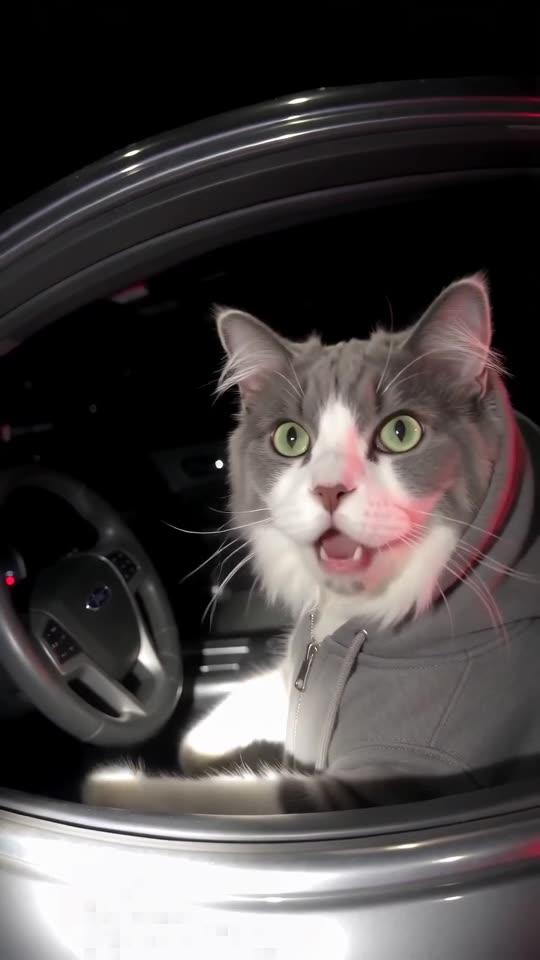
Reference image 1 is the DRIVER, a pet. Keep its species, face, fur colours and markings exactly as in the image.
The DRIVER sits upright in the driver's seat of an ordinary dark sedan at night, wearing a plain grey hoodie with the hood up, its own ears and face visible. Red and blue emergency lights flash somewhere behind, washing the car in colour.
Camera: a police body-camera point of view, slightly fisheye, chest height, grainy night video, handheld walking motion. No person is visible.
Beat 1 (0 to 2 seconds): the camera walks up to the open driver's window; the DRIVER slowly turns to look into the lens.
Beat 2 (2 to 5 seconds): close view through the window, the DRIVER stares with huge, innocent, clueless eyes and tilts its head.
Beat 3 (5 to 9 seconds): it leans toward the window, blinks, looks away as if thinking, then looks back with the same innocent face.
Beat 4 (9 to 11 seconds): a flashlight lights it up and it holds a small blank white card out toward the camera with one paw.
Audio: night ambience only, an idling engine and distant traffic. No dialogue, no speech, no voices.
Photorealistic, no text, no plates, no badges, no logos, no watermark.
Dicas
- Use uma foto clara e nítida.
- Mantenha o clipe com cerca de 11 segundos.
Perguntas frequentes
O Veo mantém as manchas do meu pet?
Muitas vezes, se a foto for nítida e clara.
Crie seu próprio vídeo do What Stop Sign
Envie uma foto do seu pet e teste uma prévia grátis de 5 segundos. Sem assinatura, e o vídeo completo não tem marca d’água.
Criar meu vídeo