Prompt de Window Peeper para Veo
Atualizado em:
Resposta rápida
Cole o prompt abaixo no Veo com a sua foto como imagem inicial, em 9:16. O Veo pode adicionar o próprio som, então baixe sem som ou silencie antes de adicionar o som da trend.
Copie este prompt
Image-to-video, 9:16, about 14 seconds.
Reference image 1 is the CHARACTER. Keep their face, hair, skin tone and clothes exactly as in the image. Adult only.
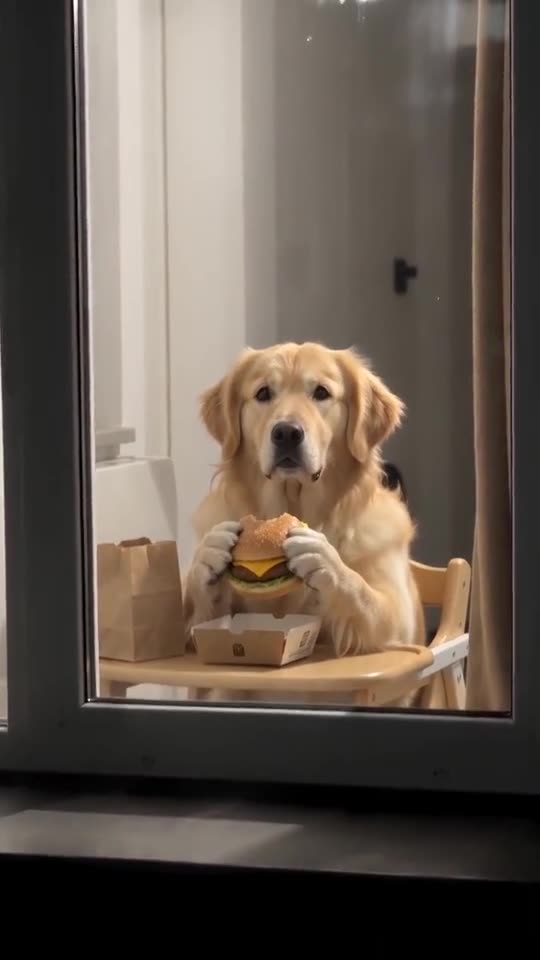
Setting: a plain apartment block at night seen from the building across the street; rows of dark windows, only one window lit warm yellow. Inside: a small kitchen table right behind the glass and a long brown curtain on the right side of the window.
Camera: a neighbour's phone zoom, steady, slightly grainy night footage, no cuts.
Beat 1 (0 to 2 seconds): wide shot of the dark facade, then a fast smooth zoom into the lit window until it fills the frame.
Beat 2 (2 to 6 seconds): the CHARACTER sits at the table holding a plain unbranded cheeseburger with both hands, takes a big bite, then freezes mid-chew and stares straight into the lens.
Beat 3 (6 to 10 seconds): keeps staring without blinking, chewing very slowly, deadpan and suspicious.
Beat 4 (10 to 14 seconds): puts the burger down, stands up, walks to the right side of the window and pulls the curtain shut; the window goes dark.
Audio: a light playful suspense instrumental and faint city night ambience. No voices, no speech.
Photorealistic, no brand names, no logos, no text, no watermark.
Dicas
- Use uma foto clara e nítida de cabeça e ombros.
- Mantenha o clipe em cerca de 14 segundos.
Perguntas frequentes
O Veo mantém o meu rosto?
Muitas vezes, se a foto for nítida e clara. No começo o rosto aparece pequeno, então avalie depois do zoom.
Faça o seu vídeo de Window Peeper
Envie uma foto e teste uma prévia grátis de 5 segundos. Sem assinatura, e o vídeo completo não tem marca d'água.
Criar meu vídeo