CCTV Tiger Fight Video Generator: Wrestle a Tiger on Security Footage
Also called: Security Camera Tiger Fight, Man vs Tiger CCTV, CCTV Tiger Trend, Fighting a Tiger CCTV AI
Add one photo of an adult. You get a 5-second video in the look of black-and-white security footage: you walk down a quiet forest road, a tiger springs out of the bushes, you wrestle it across the ground and end up on top. The video has no music: add your own sound in TikTok. Pick the ending, the place and the animal. It recreates the look of the trend people post.
No free preview right now: the full 5s HD video starts at $6.99. · Vertical 9:16 · Full video, no watermark · No subscription
TikTok
@fahsai5350
Original trend on TikTok
The post ends with a how-to. We make the first 11 seconds from your photo.
This is the original trend on TikTok. Your video uses your own photo.
You
Required. One adult looking at the camera with the face clearly visible: you, or an adult friend (with their OK). A whole-body photo works best. No one under 18
For the best result
- One adult, alone, looking at the camera
- Whole body or from the thighs up, in good light
- A clear face and plain clothes, with a plain background behind
More photo tips
Before you upload
- One adult in the photo, facing the camera (no one under 18)
- Whole body or from the thighs up, with the face clearly visible
- Good light, no heavy filters or sunglasses
The video is held first and comes back to your balance if it fails
- This video
- 1 video
- Your balance
- —
- Buy videos
Full video: 5s at 720p, downloadable. Uses 1 video from your balance. Unused videos never expire.
Any problem with your video? Email support@mimiczip.com first — a real person will sort it out for you.
The trend, explained
What is the CCTV Tiger Fight trend?
Quick answer
CCTV Tiger Fight, also called Security Camera Tiger Fight, Man vs Tiger CCTV, CCTV Tiger Trend or Fighting a Tiger CCTV AI, is a short TikTok format: grainy black-and-white security footage in which an ordinary person fights off a tiger. Upload 1 photo for an HD (720p) video of 5 seconds from $6.99, paid once with no subscription. Add the original sound in TikTok when you post.
By MimicZip Team · Updated
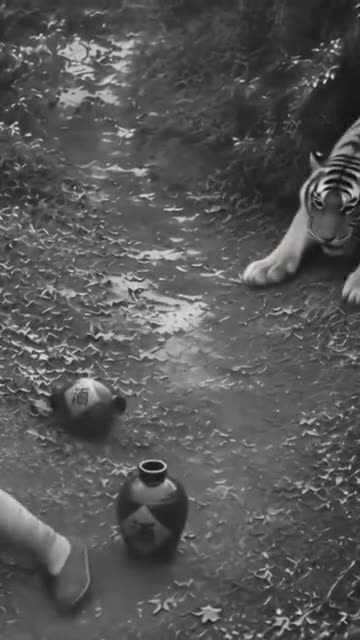
CCTV Tiger Fight, also called Security Camera Tiger Fight, Man vs Tiger CCTV, CCTV Tiger Trend or Fighting a Tiger CCTV AI, is a short TikTok format: grainy black-and-white security footage in which an ordinary person fights off a tiger. The post we follow is a Burmese-language tutorial from 9 November 2026, with about 580,000 views when we checked. Its first 11 seconds are the finished video: a person on a forest road, a tiger springing out of the bushes and a wrestle that ends with the person on top. After that the post shows how to make one on a phone, which is not part of our clip.
The charm is the mismatch: dull surveillance footage and a fight that cannot be real. Ours comes without music. We rebuild the road and the wrestle around your photo, in your own clothes, and the clip shows only you and the animal. Add the sound yourself when you post.
MimicZip makes your own version from one photo of an adult, in a 5-second video. The road, the animal and the fight are generated. Only the person in your photo is yours. MimicZip is an independent template tool: your video is generated from your own photo and is not made, endorsed or licensed by the author of the original post. Your video is AI-generated, so keep the platform’s AI label on when you post.
Where this trend comes from
Use this sound — your video is timed to it, from 0s
@fahsai5350 · TikTok · Nov 9, 2026 — The clip we follow: a black-and-white security-camera picture of a forest dirt road where a tiger springs out of the bushes at a passer-by, the two wrestle and the person ends up pinning the tiger to the ground (the post is a Burmese-language tutorial: about 580,000 views; the first 11 seconds are the finished video, the rest is a screen recording; we follow a clean clip of the same trend)
Links open the original posts. MimicZip is not affiliated with these creators.
What happens in a CCTV Tiger Fight video
A 5-second video in four beats: the walk, the pounce, the wrestle and the win. Timings are approximate, and the 5-second preview shows the same scene at lower quality.
01 · 0–1s
The walk
You stroll down the road toward the camera, glancing around, while something rustles in the bushes at the roadside.
02 · 1–2s
The pounce
The animal springs out of the bushes and leaps at you; you turn, catch it and stagger back a step.
03 · 2–4s
The wrestle
You and the animal grapple and roll over once on the ground, arms and body twisting, until you end up on top.
04 · 4–5s
The win
The ending you picked: pinning it down, riding it for a moment or lifting it up high, with a look up at the camera.
Your photo decides who fights. The camera and the four parts are set, and every result comes out a little different. The ending, the place and the animal are yours to pick.
How to add the original sound in TikTok
Open the clip marked above, tap Use this sound, upload your video and keep the sound at 0s.Show the full how-to
Our videos come with an AI-made original soundtrack. To use the trending sound instead, add it inside TikTok when you post: that also puts your video on the sound's page, where people following the trend look. You can also download a silent version from My videos and put the original sound on that.
- Open this clip in TikTok: our video follows it. Tap the sound name at the bottom, then tap Use this sound.
- Tap Upload and pick the video you downloaded from us.
- Open Volume and turn the video's own sound down to 0, or download the silent version from My videos.
- To line up the beat, use the scissors (trim) to start the sound from 0 seconds, then post.

Need to move where the sound starts? This short video shows how to trim it.

Video: How To Trim Sound On TikTok 2026 (Very Easy) by Software Solutions on YouTube
How to make a CCTV Tiger Fight video in 3 steps
No filming, no prompts and no editing app.
Add your photo
Upload one clear photo of an adult facing the camera, whole body or from the thighs up. JPG, PNG or WebP, up to 10 MB.
Choose your options
Pick the ending, the place and the animal, tick the photo-consent box and log in. Every pack includes bonus 5-second previews, so you can check your photo before spending a credit.
Make the full video
Spend 1 credit on a 5-second 720p video. Download it and add your sound in TikTok.
Which photo works?
One photo is required: a single adult, looking at the camera, whole body or from the thighs up. The scene uses the arms and the legs, so a clear, front-facing photo with open eyes works best.
Works well
- One adult, alone, looking at the camera
- Whole body or from the thighs up, in good light
- A clear face and plain clothes, with a plain background behind
- JPG, PNG or WebP, up to 10 MB, 300 to 6000 pixels per side
Avoid
- Anyone under 18, celebrities or famous characters
- Photos with no clear main subject: scenery, text, a screenshot or a crowd
- More than one person in the photo, pets, or heavy filters
- Sunglasses, masks or anything hiding the face
Limits: width-to-height ratio between 0.4 and 2.5. Upload only subjects you own or have permission to use.
Ways to play it
On the forest road, the default
A quiet dirt road between tall trees, with a few rocks and bushes at the edge, filmed from high above.
Another animal or another place
Swap the tiger for a big bear or a lion, or move the fight to a country lane or an empty car park at the edge of a wood.
A different last move
Instead of pinning the animal down, ride it for a moment with your arms in the air or heave it up off the ground.
Why people use it
Bonus previews in every pack
See yourself wrestle a tiger on camera before you spend a credit.
A security-camera fight, generated
The grainy picture, the road and the wrestle are made around your photo, so nobody has to meet a tiger.
Just you
One adult: you, or a friend with their OK. No children, no celebrities, no pets.
No subscription
Buy credits once. They never expire.
Pick the ending, the place and the animal
three endings (Pin it down by default), three places (Forest road by default) and three animals (Tiger by default).
One fixed camera, nothing to edit
One fixed camera, nothing to edit. You add the sound in TikTok.
One-time credit packs
Pay only for the videos you make. One full 5-second video costs 1 credit.
1 HD video
$6.99
≈ $6.99 / video
+ 1 extra preview
One-time payment, no subscription
- Most popular
3 HD videos
$10.99
≈ $3.66 / video
+ 3 extra previews
One-time payment, no subscription
5 HD videos
$15.99
≈ $3.20 / video
+ 5 extra previews
One-time payment, no subscription
- Secure checkout by Waffo or Dodo Payments
- Instant credits
- 7-day refund on unused packs
- Failed videos refunded
CCTV Tiger Fight: frequently asked questions
What is the CCTV Tiger Fight trend?
It is a short TikTok format: black-and-white security footage in which a person fights off a tiger on a forest road. The post we follow is from 9 November 2026. The explainer guide has the background.
How do I make the CCTV Tiger Fight video from my photo?
Upload one photo of an adult, choose the options and start. A few minutes later you get a 5-second 720p MP4. The how-to guide lists each step.
Is it free to try?
Not at the moment. MimicZip has no free tier or free preview; one full 5-second 720p video costs 1 credit, and packs start at $6.99. Every pack includes bonus watch-only previews so you can check your photo before spending a credit. There is no subscription, and the full video has no watermark.
Which sound goes with it?
The post we follow plays a music track whose licence we cannot confirm, so our video has no music, only faint wind and a few thuds. Open the original post in TikTok, tap its sound and use it, or pick any song that is trending right now. The sound guide shows how.
Can I use a photo of someone else?
Only an adult who agreed. Photos of children, celebrities, pets, toys and drawn characters are not supported.
Is the original AI-made?
Our version is AI-generated from your own photo, so keep the platform’s AI label on when you post.
How popular is this trend?
The post we follow had about 580,000 views when we checked on 12 November 2026, and it was posted on 9 November.
How many photos do I need?
One, showing one adult, as a JPG, PNG or WebP file up to 10 MB.
More questions (8)
Is there a similar action video?
Yes. For one person against a whole crowd, try One Man Army AI.
Is this connected to the TikTok author?
MimicZip is an independent template tool: your video is generated from your own photo and is not made, endorsed or licensed by the author of the original post or anyone in the original posts.
Is there a watermark, and can I post it on TikTok or Reels?
A bonus preview wears a PREVIEW badge and can’t be saved, while the full video has no watermark. Yes, you can post it: pick 9:16 for TikTok and Reels and add the sound you like in the app. Keep the platform’s AI-generated label on.
Can I change the ending, the place and the animal?
Yes, from presets: three endings (Pin it down by default), three places (Forest road by default) and three animals (Tiger by default). The camera and the timing stay the same, and the options do not change the price.
Do I have to write a prompt?
No. This is a fixed template, so there is no prompt box: you add a photo and pick the options and the video shape. Prefer your own tool? Copy the ready-made prompt from the Kling prompt page.
What if a video fails, and how long is my photo kept?
A failed generation returns its credit automatically, and unused packs can be refunded within 7 days; see the refund policy. Photos are stored privately and deleted automatically 14 days after upload.
Is the tiger fight real?
No. The person, the animal and the footage are AI pictures made from your photo. Nothing in the video was filmed, and nobody met a tiger.
Who appears in the video?
Only the person from your photo, plus the animal. Nobody from the original post appears, and nobody’s clothes are copied.
Updated:
CCTV Tiger Fight not working? Fixes for common problems and a free redo
Is there a free retry for a CCTV Tiger Fight video?
If a CCTV Tiger Fight run fails, the credit comes back automatically. A clip that finished is not redone for free, even when it looks different from your photo. Each pack includes bonus previews, so test your photo in one before you use a credit on the full clip.
Returned and not returned
- Returned automatically: any run that errors out before a video exists.
- Kept: a finished clip where the face does not match your photo, the animal looks odd or an extra person appears. We treat that as a result of your photo and options, not a fault in the run.
- Another attempt: it costs 1 credit, whichever photo or option you change, for a 5-second clip.
- Packs nobody has touched: can be refunded inside 7 days; the refund policy has the details.
Before you run it again
Make sure the person is recognisable, there is exactly one and the clip ends on the win you picked. The fix guides cover the common misses: a face looks different (guide), the animal or the moves look wrong (guide), and an extra person or some text appears (guide). Previews per pack: 1 ($6.99), 3 ($10.99) and 5 ($15.99).
A refund request for an unused pack, inside 7 days, goes to support@mimiczip.com.
CCTV Tiger Fight video: my face looks different in the footage, and how do I fix it?
A face drifts when the photo is dark, small or turned away, and grainy footage makes it harder. Use a sharp, well-lit, front-facing photo with the eyes visible, run a 5-second bonus preview, then make the full video.
Quick fixes
- Pick a photo where the eyes are open and the face is fully visible.
- Use soft, even light, with no strong shadow across the face.
- Start with the default forest road and the tiger.
- Leave caps, hoods and glasses off the face in the photo.
Why it happens
The model has to keep one face recognisable while the picture is grainy and the person is turning. A sharp photo with open eyes gives it a clean face to copy.
Grain hides some of the face
Black and white with film grain softens a face on purpose. If the eyes and jaw still match your photo, the face is right, even when the skin looks flatter than the original.
CCTV Tiger Fight video: the animal or the moves look wrong, what can I do?
A pounce, a roll and a pin are hard for a video model, so a paw can flicker or an arm can bend the wrong way. Start with the default road and the tiger, keep the photo plain, and check a 5-second bonus preview before the full clip.
Quick fixes
- Use a photo that shows the arms and the legs as well as the face.
- Start with the default place and the default ending.
- Try the lion next: a plain animal shape is easier to keep clean.
- Run again rather than changing several options at once.
Why it happens
The model has to redraw a person and a large animal in every frame while they grapple. A second run often draws them cleaner.
Why the animal looks soft
A large animal in grainy footage always looks a little soft. If it looks more like a blur than an animal, try the lion, which has a simpler outline.
CCTV Tiger Fight video: an extra person or text appears, how do I stop it?
There should be only you and the animal, and no writing anywhere, not even a timestamp. A second person or a stray word usually comes from someone behind you in the photo or a top with printed words. Use one adult, a plain top and a 5-second bonus preview, then add any caption yourself in TikTok.
Quick fixes
- Crop out other people and pets.
- Avoid tops with printed words or logos.
- Avoid photos with a sign, a poster or a screen behind you.
- Use a plain background.
Why it happens
The model sometimes turns a second face in a photo into another person on the road, and words on a top can be redrawn as lettering. A clean photo of one adult avoids both.
Questions people ask
Does an error cost me a credit?
No. A credit is set aside at the start and handed back when a run errors out.
How can I avoid paying twice?
Check a bonus preview first and tidy the photo: one adult, open eyes, nothing on the face. Then use the credit for the full clip.
Is cash back possible?
Yes, but only for a pack with no used credits, within 7 days of the purchase. Credits that produced a clip are final.
Is a failed video charged?
No. Failed runs return their credit automatically. A finished clip that just looks off is a result, not a failure, so it is not refunded.
Will the same photo give the same result?
Not exactly. Every run differs a little, even with the same photo.
CCTV Tiger Fight: CapCut vs AI, other tools and prompts
CCTV Tiger Fight vs CapCut: a template swap or a generated scene?
A CapCut template drops a face into a clip somebody else filmed, whereas an AI tool draws the road, the animal and the fight around your photo. MimicZip is the short route: you upload one photo of an adult and get a 5-second clip, and every pack carries bonus previews.
Editing it yourself or generating it
- What editing software handles: trimming, captioning and rearranging clips you already have, or dropping a face into a template. It cannot put you in a tiger fight you were never in.
- What MimicZip does: it creates the walk, the pounce, the wrestle and the win, and makes your photo the star.
- You upload: one photo of an adult.
- What comes back: a 5-second 720p clip that follows the fight of the TikTok from 9 November 2026, with no text on screen.
- Cost: CapCut has both free and paid features. Here 1 credit gets one full video without a watermark (you wrestling a tiger), and each pack includes watch-only previews.
Choosing between them
Cut by hand when you need one exact clip. Generate with MimicZip when you want the fight built around your photo. Nothing stops you generating here and adding text in CapCut afterwards.
One more difference is the animal. In an editor you would need real footage of a tiger and a convincing way to match your own face to it. Here the road, the grain and the finish come out of your photo, and your part is picking the options and checking a preview.
What you keep when you add text later
You can add a caption or a fake timestamp in an editor after the clip is made. The grain, the road and the wrestle are already in the file.
CCTV Tiger Fight vs general AI video tools: which one should I use?
General tools give full control, but keeping one face recognisable through a wrestle falls to the text prompt. MimicZip does one job: your photo becomes the CCTV Tiger Fight clip, with no prompt.
Where a prompt struggles with this scene
- What you type: a general tool asks for a prompt and settings. MimicZip has no prompt box: you add your photo and pick the options.
- Your face: a general tool often blurs a face once a large animal crosses it; our scene is built to keep it clear.
- The beats: the walk, the pounce, the wrestle and the win need the right order, and we fix the order for you.
- Nothing borrowed: the prompt never names a song or an account, and many tools would filter those anyway.
- Cost: general tools charge on their own plans. MimicZip sells packs from $6.99, with 1 credit per clip and previews in every pack.
When a general tool is better
Use a general tool for your own story or full camera control. Use MimicZip when you want exactly this clip from your photo, fast: the security-camera fight with you in it. To write the prompt yourself, see Kling, Veo and Seedance.
Wrestling is the catch
General tools usually draw a good animal and a good person, and fail where the two touch. A fixed scene keeps the order of the pounce, the roll and the finish.
CCTV Tiger Fight prompt for Kling: a copyable prompt without names
Copy this prompt into Kling with one adult photo attached: the person wrestles a tiger on grainy black-and-white footage. It names no person, sound or account. Expect a few tries, or use MimicZip.
Copy this prompt
Image-to-video, 9:16, about 5 seconds.
Reference image 1 is YOU, an adult: keep their face, hair, skin tone and body shape exactly in every second, in the clothes shown in the image, plain and without print or logos. YOU walk alone along a quiet dirt road through a dense forest when a big tiger springs out of the bushes and the two wrestle in a silly, harmless way. No readable text, full-frame picture.
One continuous shot, no cuts: a fixed security camera mounted high up, looking down along the road, black and white with fine film grain and a slightly soft focus, like old security footage; no timestamp and no writing.
0-1 s: YOU walk calmly along the road toward the camera, glancing around; something rustles in the bushes.
1-2 s: the tiger springs out and pounces; YOU turn, catch it and stagger back a step.
2-4 s: YOU and the tiger wrestle and roll over once; YOU keep a firm grip and end up on top.
4-5 s: YOU pin the tiger flat to the ground with both hands and look up at the camera.
Nothing and nobody gets hurt, there is no blood and nobody speaks. No text anywhere. Audio: faint wind in the trees and a few soft thuds, no music, no vocals. Photorealistic, no subtitles, no logos, no watermark.
How to use it
- Attach one photo of an adult as the reference image.
- Pick your sound in TikTok after you export. Text prompts cannot land every beat on the second, so you may need to nudge the sound.
- Keep names, song titles and brands out of it; many tools filter them, which is why this prompt describes what happens.
- Models update all the time, so confirm the clip length and shape your tool allows and edit the first line to match.
CCTV Tiger Fight prompt for Veo: a copyable prompt without names
Copy this prompt into Veo with one adult photo attached: the person wrestles a tiger on grainy black-and-white footage. It names no person, sound or account. Expect a few tries, or use MimicZip.
Copy this prompt
Create a 5-second cinematic video from the reference image, 9:16.
Reference image 1 is YOU, an adult: keep their face, hair, skin tone and body shape exactly in every second, in the clothes shown in the image, plain and without print or logos. YOU walk alone along a quiet dirt road through a dense forest when a big tiger springs out of the bushes and the two wrestle in a silly, harmless way. No readable text, full-frame picture.
One continuous shot, no cuts: a fixed security camera mounted high up, looking down along the road, black and white with fine film grain and a slightly soft focus, like old security footage; no timestamp and no writing.
0-1 s: YOU walk calmly along the road toward the camera, glancing around; something rustles in the bushes.
1-2 s: the tiger springs out and pounces; YOU turn, catch it and stagger back a step.
2-4 s: YOU and the tiger wrestle and roll over once; YOU keep a firm grip and end up on top.
4-5 s: YOU pin the tiger flat to the ground with both hands and look up at the camera.
Nothing and nobody gets hurt, there is no blood and nobody speaks. No text anywhere. Audio: faint wind in the trees and a few soft thuds, no music, no vocals. Photorealistic, no subtitles, no logos, no watermark.
How to use it
- Attach one photo of an adult as the reference image.
- Pick your sound in TikTok after you export. Text prompts cannot land every beat on the second, so you may need to nudge the sound.
- Keep names, song titles and brands out of it; many tools filter them, which is why this prompt describes what happens.
- Models update all the time, so confirm the clip length and shape your tool allows and edit the first line to match.
CCTV Tiger Fight prompt for Seedance: a copyable prompt without names
Copy this prompt into Seedance with one adult photo attached: the person wrestles a tiger on grainy black-and-white footage. It names no person, sound or account. Expect a few tries, or use MimicZip.
Copy this prompt
Generate a 5-second 9:16 video using the reference image as the subject.
Reference image 1 is YOU, an adult: keep their face, hair, skin tone and body shape exactly in every second, in the clothes shown in the image, plain and without print or logos. YOU walk alone along a quiet dirt road through a dense forest when a big tiger springs out of the bushes and the two wrestle in a silly, harmless way. No readable text, full-frame picture.
One continuous shot, no cuts: a fixed security camera mounted high up, looking down along the road, black and white with fine film grain and a slightly soft focus, like old security footage; no timestamp and no writing.
0-1 s: YOU walk calmly along the road toward the camera, glancing around; something rustles in the bushes.
1-2 s: the tiger springs out and pounces; YOU turn, catch it and stagger back a step.
2-4 s: YOU and the tiger wrestle and roll over once; YOU keep a firm grip and end up on top.
4-5 s: YOU pin the tiger flat to the ground with both hands and look up at the camera.
Nothing and nobody gets hurt, there is no blood and nobody speaks. No text anywhere. Audio: faint wind in the trees and a few soft thuds, no music, no vocals. Photorealistic, no subtitles, no logos, no watermark.
How to use it
- Attach one photo of an adult as the reference image.
- Pick your sound in TikTok after you export. Text prompts cannot land every beat on the second, so you may need to nudge the sound.
- Keep names, song titles and brands out of it; many tools filter them, which is why this prompt describes what happens.
- Models update all the time, so confirm the clip length and shape your tool allows and edit the first line to match.
Questions people ask
Did CapCut or TikTok create CCTV Tiger Fight?
No. MimicZip is an independent tool, not made, endorsed or licensed by CapCut, TikTok or the people who posted the trend.
Can I combine them?
Yes. Save the MP4, open it in CapCut to trim it, add text or lay your sound over it.
Which one is cheaper?
It depends on what you have to start with. With one photo only and a wish for the tiger fight, MimicZip starts at $6.99, and every pack has bonus previews.
Does CCTV Tiger Fight use a general AI model?
Yes. A general video model generates the frames, steered by our fixed scene (the security-camera fight) and your photo; the Terms of Service name it.
Can I type my own prompt here?
No. The scene is fixed and there is no prompt box, which keeps the beats in order and the result generic.
Why not just use a general tool?
A general tool wins when you want to direct every shot. This site is for the CCTV Tiger Fight clip finished from your photo (the ending, the place and the animal).
Why are there no names in the prompt?
Video tools filter names and lyrics, so the prompt describes the reference photo and the scene. This page is independent and not affiliated with the people who posted the trend.
Will I get the same clip as the original?
Not exactly. Faces, motion and timing shift with the tool, the model version and your photo, so treat the prompt as a starting point.
Do I need to write a prompt here?
No. MimicZip runs a fixed scene: you add your photo, pick an option and press the make button.
Ready to wrestle a tiger?
One photo of an adult, a bonus preview with every pack, then your own CCTV Tiger Fight video.
Make my videoOne photo. One camera. One tiger.
5-second HD video from $6.99. No subscription, no watermark.
Questions? Email support@mimiczip.com.
MimicZip is an independent AI tool. “CCTV Tiger Fight” is the name of an internet trend: MimicZip is not affiliated with or endorsed by the author of the original post, the app the trend spread on or anyone in it. Videos are AI-generated scenes of a trend, with no music and no real footage.