Winter Wonderland Dance Video Generator: Matching Pajamas, Two Photos
Also called: Winter Wonderland Dance Trend, Winter Wonderland Pajama Dance, Matching Christmas PJs Dance, Winter Wonderland AI Trend
Add one photo of each of the two. You get a 5-second video of a living room in front of a Christmas tree: both of you wear matching pajamas, the first one dances with loose arm swings, a hip twist and a point at the camera, and the other sways from side to side with a small pet held in both arms, lifting it up on the beat and trying not to laugh. Pick the outfit and the pet. It works for a couple, two flatmates or two friends.
No free preview right now: the full 5s HD video starts at $6.99. · Vertical 9:16 · Full video, no watermark · No subscription
Failed or refused videos: credit back automatically. Unused packs: refund within 7 days. Refund Policy
TikTok
@aly.fett
Original trend on TikTok
This is the original trend on TikTok. Your video uses your own photos.
Dancer
Required. One adult looking at the camera with the face clearly visible: you or an adult friend (with their OK). This person does the dance. A chest-up or further-down photo works best. No pets, no one under 18
Partner
Required. One more adult looking at the camera with the face clearly visible (with their OK). This person sways beside the dancer, holding the pet. A different photo from the first one. No pets, no one under 18
For the best result
- One adult in each photo, looking at the lens
- From the chest up or further down, in good light
- Two different photos with clear faces
More photo tips
Before you upload
- One adult in each photo, face in view (no one under 18)
- From the chest up or further down, in good light
- A plain background, no heavy filters
The video is held first and comes back to your balance if it fails
- This video
- 1 video
- Your balance
- —
- Buy videos
Full video: 5s at 720p, downloadable. Uses 1 video from your balance. Unused videos never expire.
Any problem with your video? Email support@mimiczip.com first — a real person will sort it out for you.
The trend, explained
What is the Winter Wonderland Dance trend?
Quick answer
Winter Wonderland Dance, also called Winter Wonderland Dance Trend, Winter Wonderland Pajama Dance, Matching Christmas PJs Dance or Winter Wonderland AI Trend, is a Christmas trend on TikTok in which two people in matching pajamas dance the same short routine in front of the tree. Upload 2 photos for an HD (720p) video of 5 seconds from $6.99, paid once with no subscription. Add the original sound in TikTok when you post.
By MimicZip Team · Updated
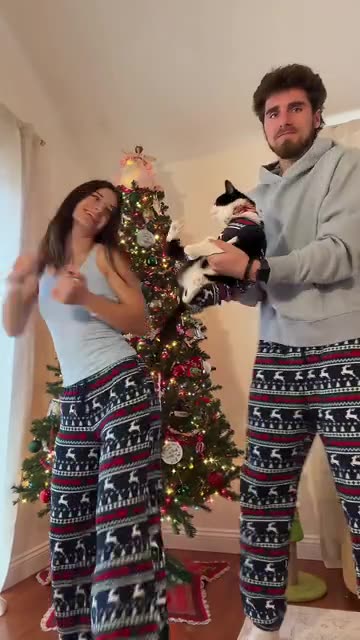
Winter Wonderland Dance, also called Winter Wonderland Dance Trend, Winter Wonderland Pajama Dance, Matching Christmas PJs Dance or Winter Wonderland AI Trend, is a Christmas trend on TikTok in which two people in matching pajamas dance the same short routine in front of the tree. In the post we follow, two adults in red-and-blue reindeer pajamas stand in a living room by a decorated tree; one dances with arm swings, hip twists, a point at the camera and a hair flick, while the other sways from side to side with a black-and-white cat in a tiny Christmas outfit, lifts it up and tries not to laugh. The post is a single 16-second shot that went up on 13 November 2026 and had about 1,700,000 views when we checked. The whole post is the finished clip.
The joke is the contrast: one person dancing all out and one person gently swaying, with a pet as the audience. Our video keeps the living room, the tree, the matching pajamas and the two roles, and the camera stays fixed on both of you. The post is set to a remix of “Walking in a Winter Wonderland” and “Here Comes Santa Claus”, two songs under copyright, made by another TikTok user; ours comes without music, and you add a song in TikTok if you like.
MimicZip makes your own version from two photos of adults, in a 5-second video. The room, the tree and the pet are generated, and the two people are you. MimicZip is an independent template tool: your video is generated from your own photos and is not made, endorsed or licensed by the author of the original post or anyone in it. The people and the cat from the original are not shown or copied. Your video is AI-generated, so keep the platform’s AI label on when you post.
Where this trend comes from
Use this sound — your video is timed to it, from 0s
@aly.fett · TikTok · Nov 13, 2026 · 1.7M views — The post we follow is a finished 16-second clip with no how-to part, in one continuous shot: in a living room in front of a decorated Christmas tree, two adults in matching red-and-blue reindeer-pattern pajamas dance to a Christmas remix; one does a light dance with arm swings, hip twists, pointing at the camera and a hair flick, while the other sways from side to side holding a black-and-white cat in a tiny Christmas outfit, lifts the cat up now and then and tries not to laugh
Links open the original posts. MimicZip is not affiliated with these creators.
What happens in a Winter Wonderland Dance video
A 5-second video in three beats: the first steps, the point at the camera and the big flick. Timings are approximate, and the 5-second preview shows the same scene at lower quality.
01 · 0–1.5s
The first steps
Both of you stand in front of the tree facing the camera. The dancer begins with a loose arm swing. The other one starts to sway on the beat.
02 · 1.5–3.5s
The point at the camera
The dancer shakes the hands out, twists the hips and points at the lens with a grin, while the other one sways with the pet you picked and lifts it up.
03 · 3.5–5s
The big flick
The dancer tosses head and shoulders in one big flick, and the other one keeps swaying with a wide grin, trying hard not to laugh.
Your two photos decide who dances and who sways, and each face stays yours. The camera and the three beats are set, and every result comes out a little different. The outfit and the pet are yours to pick.
How to add the original sound in TikTok
Open the clip marked above, tap Use this sound, upload your video and keep the sound at 0s.Show the full how-to
Our videos come with an AI-made original soundtrack. To use the trending sound instead, add it inside TikTok when you post: that also puts your video on the sound's page, where people following the trend look. You can also download a silent version from My videos and put the original sound on that.
- Open this clip in TikTok: our video follows it. Tap the sound name at the bottom, then tap Use this sound.
- Tap Upload and pick the video you downloaded from us.
- Open Volume and turn the video's own sound down to 0, or download the silent version from My videos.
- To line up the beat, use the scissors (trim) to start the sound from 0 seconds, then post.
Need to move where the sound starts? This short video shows how to trim it.

Video: How To Trim Sound On TikTok 2026 (Very Easy) by Software Solutions on YouTube
How to make a Winter Wonderland Dance video in 3 steps
No filming, no prompts and no editing app.
Add your photos
Upload one clear photo of each of the two: the first for the dancer and the second for the one who sways and holds the pet. Each photo shows one adult facing the camera, from the chest up or further down. JPG, PNG or WebP, up to 10 MB each.
Choose your options
Pick the outfit and the pet, tick the photo-consent box and log in. Every pack includes bonus 5-second previews, so you can check your photos before spending a credit.
Make the full video
Spend 1 credit on a 5-second 720p video. Download it and add your sound in TikTok.
Which photo works?
Two photos are required, one of each person: the dancer and the one who sways. Each is a single adult looking at the camera, from the chest up or further down, with the face clearly visible. The pet is generated, so you never upload one.
Works well
- One adult in each photo, looking at the lens
- From the chest up or further down, in good light
- Two different photos with clear faces
- JPG, PNG or WebP, up to 10 MB, 300 to 6000 pixels per side
Avoid
- Photos of children or celebrities
- Photos with no clear main subject: scenery, text, a screenshot or a crowd
- Two people in the same photo, or heavy filters and sunglasses
- Pets, toys or drawings instead of adults
Limits: width-to-height ratio between 0.4 and 2.5. Upload only subjects you own or have permission to use.
Ways to play it
Reindeer pajamas, the default
A red-and-blue set with a plain reindeer and snowflake pattern, the same for both, like the post.
Other pets
Keep the dance and swap the cat for a small dog, or let the second person dance along with no pet.
Plaid or your own clothes
Switch to matching red plaid pajamas, or keep what you wear in your photos.
Why people use it
Bonus previews in every pack
Watch the matching pajamas and the Christmas-tree dance play out with your own two people before you spend a credit.
Matching pajamas, ready for the tree
Both of you get the same pajamas in front of a decorated tree, or keep the clothes from your own photos.
A pet that needs no photo
The small animal in the arms is generated for you, a cat by default, or a dog, or nothing at all. You upload only the two people.
No subscription
Buy credits once. They never expire.
Pick the outfit and the pet
Three outfits (matching reindeer pajamas by default) and three ways to hold the pet (a cat by default).
One take, nothing to edit
A single fixed shot with the beats already in order, with no cuts, no text and nobody hurt.
One-time credit packs
Pay only for the videos you make. One full 5-second video costs 1 credit.
- Most popular
1 HD video
$6.99
≈ $6.99 / video
+ 1 extra preview
Bonus preview: see your video first without using up a video. Not downloadable.
One-time payment, no subscription
Card · Apple Pay · Google Pay · secure checkout by

3 HD videos
$10.99
≈ $3.66 / video
+ 3 extra previews
Bonus preview: see your video first without using up a video. Not downloadable.
One-time payment, no subscription
Card · Apple Pay · Google Pay · secure checkout by
5 HD videos
$15.99
≈ $3.20 / video
+ 5 extra previews
Bonus preview: see your video first without using up a video. Not downloadable.
One-time payment, no subscription
Card · Apple Pay · Google Pay · secure checkout by
- Secure checkout by Waffo or Dodo Payments
- Instant credits
- 7-day refund on unused packs
- Failed videos refunded
Winter Wonderland Dance: frequently asked questions
What is the Winter Wonderland Dance trend?
It is a Christmas dance trend on TikTok: two people in matching pajamas dance in front of a Christmas tree, one with big moves and one swaying with a pet. The post we follow went up on 13 November 2026. The explainer guide has the background.
How do I make the Winter Wonderland Dance video from my photos?
Upload one photo for the dancer and one for the one who sways, choose the outfit and the pet and start. A few minutes later you get a 5-second 720p MP4. The how-to guide lists each step.
Is it free to try?
Not at the moment. MimicZip has no free tier or free preview; one full 5-second 720p video costs 1 credit, and packs start at $6.99. Every pack includes bonus watch-only previews so you can check your photos before spending a credit. There is no subscription, and the full video has no watermark.
Which sound goes with it?
The post we follow is set to a remix of “Walking in a Winter Wonderland” and “Here Comes Santa Claus”, songs under copyright, so our video has no music or voices, only the quiet of a living room. Pick a Christmas song in TikTok and start it at 0 seconds. The sound guide shows how.
Does it have to be a couple?
No. Any two adults work: a couple, flatmates, two friends or two photos of the same person, and either one can be the dancer. Photos of children, pets, toys and drawn characters are not supported.
Is the original AI-made?
Our version is AI-generated from your own photos, so keep the platform’s AI label on when you post.
How popular is this trend?
The post we follow had about 1,700,000 views when we checked on 20 November 2026, and it was posted on 13 November.
How many photos do I need?
Two, one adult in each, as JPG, PNG or WebP files up to 10 MB each. Both are required and they must be different photos. The pet needs no photo.
More questions (8)
Is there a similar Christmas dance?
Yes. For a Christmas dance for two with a different routine, try Last Christmas Dance. It is a different trend: there both of you dance a set routine, while here one dances and one sways with a pet.
Is this connected to the TikTok author?
MimicZip is an independent template tool: your video is generated from your own photos and is not made, endorsed or licensed by the author of the original post or anyone in the original posts.
Is there a watermark, and can I post it on TikTok or Reels?
A bonus preview wears a PREVIEW badge and can’t be saved, while the full video has no watermark. Yes, you can post it: pick 9:16 for TikTok and Reels and add the sound you like in the app. Keep the platform’s AI-generated label on.
Can I change the outfit and the pet?
Yes, from presets: three outfits (matching reindeer pajamas by default) and three ways to hold the pet (a cat by default). The camera and the timing stay the same, and the options do not change the price.
Do I have to write a prompt?
No. This is a fixed template, so there is no prompt box: you add your photos and pick the options and the video shape. Prefer your own tool? Copy the ready-made prompt from the Kling prompt page.
What if a video fails, and how long are my photos kept?
A failed generation returns its credit automatically, and unused packs can be refunded within 7 days; see the refund policy. Photos are stored privately and deleted automatically 14 days after upload.
Is the video real?
No. The room, the tree and the pet are AI pictures made around your photos. Nothing in the video was filmed in real life, and nobody danced.
Who appears in the video?
Only the two adults from your photos, plus a generated pet if you pick one. Nobody from the original post appears, and the cat from it is not copied.
Updated:
Winter Wonderland Dance not working? Fixes for common problems and a free redo
Is there a free retry for a Winter Wonderland Dance video?
If a Winter Wonderland Dance run fails, you get the credit back automatically. A finished clip is not repeated for free, even when it differs from your photos. Each pack has bonus previews, so try your photos in one before spending a credit on the full clip.
Returned and not returned
- Handed back by itself: any run that errors out before a video exists.
- Kept: a finished clip where a face does not match its photo, the pet bends oddly or the pattern shimmers. We treat that as a result of your photos and options, not a fault in the run.
- Trying again: it takes 1 credit, whichever photo or option you change, for a 5-second clip.
- Untouched packs: can be refunded within 7 days; the refund policy has the details.
Before you run it again
Make sure both faces are recognisable, the pet is held calmly and the clip ends on the big flick. The fix guides cover the common misses: a face looks different (guide), the pet or the pajamas look wrong (guide), and an extra person or some text appears (guide). Previews per pack: 1 ($6.99), 3 ($10.99) and 5 ($15.99).
Refund requests for an unused pack, within 7 days, go to support@mimiczip.com.
A redo and the two of you
Two faces in one frame is the hardest part of this clip: when one face drifts the other often follows, and a swinging arm can cover half a face for a moment. A finished clip with a drifting face is still a finished clip, so it stays with you; a clip that failed to render is refunded in full.
Before you spend a credit, use the bonus preview to check both faces and the pet in the arms. If the second person’s arms look wrong, swap the pet to No pet and compare the two.
Winter Wonderland Dance video: a face looks different, and how do I fix it?
A face drifts when a photo is dark, small or turned away, and quick arm swings make it harder. Use two sharp, well-lit, front-facing photos with the whole face visible, run a 5-second bonus preview, then make the full video.
Quick fixes
- Pick photos where the face and both eyes are clearly visible.
- Use soft, even light, with no strong shadow across the face.
- Start with the reindeer pajamas and the cat.
- Leave hats, masks and sunglasses off in the photos.
Why it happens
The model has to keep two faces recognisable while one person flicks their hair and swings their arms. A sharp photo with a clear face gives it a clean subject to copy.
Winter Wonderland Dance video: the pet or the pajamas look wrong, what can I do?
A small animal in someone’s arms and a busy pajama pattern are hard for a video model, so the pet can bend oddly or the pattern can shimmer. Start with the default options, keep the photos plain, and check a 5-second bonus preview before the full clip.
Quick fixes
- Use photos where both people look clearly at the camera.
- Start with the cat, the simplest pet.
- Try the plaid set if the reindeer pattern shimmers.
- Run again rather than changing the photos and the options at once.
Why it happens
The model has to redraw a patterned outfit and a small animal in every frame while they overlap with the arms. A second run often draws them cleaner.
Winter Wonderland Dance video: an extra person or text appears, how do I stop it?
Only the two of you should be in front of the tree, with no writing anywhere. A stray person or a word usually comes from someone else in a photo or a printed shirt. Use one person per photo, plain clothes and a 5-second bonus preview, then add any caption in TikTok.
Quick fixes
- Crop each photo so it shows only one person.
- Avoid clothes with printed words or logos.
- Avoid photos with a sign, a poster or a screen behind you.
- Choose a plain background.
Why it happens
The model sometimes turns a second face in a photo into a third person by the tree, and words on a shirt can be redrawn as lettering on the wall. A clean photo of one person avoids both.
Questions people ask
Is a credit spent when a run errors?
No. A credit is held when the run starts and returned if it errors out.
How do I avoid paying a second time?
Check a bonus preview first and tidy the photos: one person each, a clear face, nothing printed on the clothes. Then use the credit for the full clip.
Do I get money back?
Yes, for a pack where no credit was spent, within 7 days of purchase. A credit that made a clip is final.
Is a failed video charged?
No. Failed runs return their credit automatically. A finished clip that just looks off is a result, not a failure, so it is not refunded.
Will the same photo give the same result?
Not exactly. Every run differs a little, even with the same photo.
Do I pay for a failed video?
No. A failed run returns its credit automatically. A clip that finished but looks off counts as a result, not a failure, so it is not refunded.
Is the result the same with the same photo?
Not exactly. Each run differs a little, even from the same photo.
Winter Wonderland Dance: CapCut vs AI, other tools and prompts
Winter Wonderland Dance vs CapCut: a Santa hat on your clip or a pajama dance we make?
A CapCut template can add a sparkle or a shake to footage you already have, but it cannot put two people from photos in matching pajamas and make them dance. MimicZip builds the whole scene from two photos: a 5-second clip with the room, the tree and the pet built in, plus bonus previews in every pack.
Footage you edit, or a scene you generate
- What editing software handles: cutting, captioning and adding snow or sparkles to footage you already have. It cannot make a pajama dance you never filmed.
- What MimicZip does: it creates the room, the tree and the pet, and puts the two of you in matching pajamas to dance.
- You upload: two photos, one of each person.
- What comes back: a 5-second 720p clip that follows part of the TikTok from 13 November 2026, with no text on screen.
- Cost: here 1 credit gets one full video without a watermark, and each pack includes watch-only previews.
Which route suits you
Edit by hand when you already have a clip of two people dancing by a tree. Generate with MimicZip when you have only photos. Nothing stops you generating here and adding falling snow in CapCut afterwards.
One more difference is the cast. An editor can put a Santa hat on a clip, but the people stay whoever you filmed. Here the whole scene is made around your photos, and your part is picking the outfit and the pet and checking a preview.
Winter Wonderland Dance vs general AI video tools: which fits?
General tools give full control, but keeping two faces and a small animal apart falls to the text prompt. MimicZip does one job: your two photos become the Winter Wonderland Dance clip, with no prompt.
Where a text prompt struggles here
- Input: a general tool wants a written prompt and a settings panel, while MimicZip has no prompt box, only your two photos and two presets.
- Your two faces: a general tool often redraws one subject as someone else; our scene is built to copy both of yours.
- The beats: the first steps, the point at the camera and the big flick need the right order, and we fix the order for you.
- Names: the prompt never mentions a person, an account or a song title, so a tool’s name filter has nothing to catch.
- Cost: a general tool bills on its own plans, while MimicZip sells packs from $6.99, 1 credit per clip, with previews in every pack.
When a general tool is the better pick
Use a general tool for your own story or full camera control. Use MimicZip when you want exactly this clip from your photos, fast: a pajama dance by the tree. To write the prompt yourself, see Kling, Veo and Seedance.
Winter Wonderland Dance Kling prompt: a pajama dance by the Christmas tree
Copy this prompt into Kling with two photos attached: one person dances in front of the tree while the other sways with a small pet. It names no person, account or song. Expect a few tries, or use MimicZip.
Copy this prompt
Image-to-video, 9:16, about 5 seconds.
Reference image 1 is the DANCER and reference image 2 is the PARTNER, two adults and the only people: keep the face, hair, skin tone, age and build of each one exactly as in their own image in every second. Both wear matching red-and-blue pajamas with a plain reindeer and snowflake pattern, and they stand side by side, the DANCER on the left and the PARTNER on the right, in front of a tall decorated Christmas tree with warm white lights in a cosy living room. No readable text, no logos, full-frame vertical picture.
One continuous take from a fixed vertical phone camera at chest height, about three metres away, both framed from head to knees, only a very slight handheld drift, no cuts.
0-1.5 s: the DANCER starts an easy dance with a loose swing of both arms while the PARTNER sways from side to side on the beat. 1.5-3.5 s: the DANCER shakes the hands out, twists the hips and points at the lens with a grin, while the PARTNER sways with a small black-and-white cat in a tiny Christmas outfit held gently in both arms and lifts it up for a moment. 3.5-5 s: the DANCER tosses the head and shoulders in a big flick, while the PARTNER keeps swaying and tries hard not to laugh.
Cheerful comedy: nobody is hurt, adults only, no children. Audio: the quiet of a living room and soft footsteps, no music, no voices. Photorealistic, no text, no subtitles, no logos, no watermark.
Using the prompt
- Attach one photo of each of the two as the reference images.
- Add any song in TikTok after the export; a written prompt cannot land every arm swing to the second.
- Keep names and brands out, because many tools filter them; the prompt only describes the room, the two people and the movement.
- Tools change often, so check the clip length and shape yours allows and adjust the first line.
Winter Wonderland Dance Veo prompt: a pajama dance by the Christmas tree
Copy this prompt into Veo with two photos attached: one person dances in front of the tree while the other sways with a small pet. It names no person, account or song. Expect a few tries, or use MimicZip.
Copy this prompt
Create a 5-second cinematic video from the reference image, 9:16.
Reference image 1 is the DANCER and reference image 2 is the PARTNER, two adults and the only people: keep the face, hair, skin tone, age and build of each one exactly as in their own image in every second. Both wear matching red-and-blue pajamas with a plain reindeer and snowflake pattern, and they stand side by side, the DANCER on the left and the PARTNER on the right, in front of a tall decorated Christmas tree with warm white lights in a cosy living room. No readable text, no logos, full-frame vertical picture.
One continuous take from a fixed vertical phone camera at chest height, about three metres away, both framed from head to knees, only a very slight handheld drift, no cuts.
0-1.5 s: the DANCER starts an easy dance with a loose swing of both arms while the PARTNER sways from side to side on the beat. 1.5-3.5 s: the DANCER shakes the hands out, twists the hips and points at the lens with a grin, while the PARTNER sways with a small black-and-white cat in a tiny Christmas outfit held gently in both arms and lifts it up for a moment. 3.5-5 s: the DANCER tosses the head and shoulders in a big flick, while the PARTNER keeps swaying and tries hard not to laugh.
Cheerful comedy: nobody is hurt, adults only, no children. Audio: the quiet of a living room and soft footsteps, no music, no voices. Photorealistic, no text, no subtitles, no logos, no watermark.
Using the prompt
- Attach one photo of each of the two as the reference images.
- Add any song in TikTok after the export; a written prompt cannot land every arm swing to the second.
- Keep names and brands out, because many tools filter them; the prompt only describes the room, the two people and the movement.
- Tools change often, so check the clip length and shape yours allows and adjust the first line.
Winter Wonderland Dance Seedance prompt: a pajama dance by the Christmas tree
Copy this prompt into Seedance with two photos attached: one person dances in front of the tree while the other sways with a small pet. It names no person, account or song. Expect a few tries, or use MimicZip.
Copy this prompt
Generate a 5-second 9:16 video using the reference image as the subject.
Reference image 1 is the DANCER and reference image 2 is the PARTNER, two adults and the only people: keep the face, hair, skin tone, age and build of each one exactly as in their own image in every second. Both wear matching red-and-blue pajamas with a plain reindeer and snowflake pattern, and they stand side by side, the DANCER on the left and the PARTNER on the right, in front of a tall decorated Christmas tree with warm white lights in a cosy living room. No readable text, no logos, full-frame vertical picture.
One continuous take from a fixed vertical phone camera at chest height, about three metres away, both framed from head to knees, only a very slight handheld drift, no cuts.
0-1.5 s: the DANCER starts an easy dance with a loose swing of both arms while the PARTNER sways from side to side on the beat. 1.5-3.5 s: the DANCER shakes the hands out, twists the hips and points at the lens with a grin, while the PARTNER sways with a small black-and-white cat in a tiny Christmas outfit held gently in both arms and lifts it up for a moment. 3.5-5 s: the DANCER tosses the head and shoulders in a big flick, while the PARTNER keeps swaying and tries hard not to laugh.
Cheerful comedy: nobody is hurt, adults only, no children. Audio: the quiet of a living room and soft footsteps, no music, no voices. Photorealistic, no text, no subtitles, no logos, no watermark.
Using the prompt
- Attach one photo of each of the two as the reference images.
- Add any song in TikTok after the export; a written prompt cannot land every arm swing to the second.
- Keep names and brands out, because many tools filter them; the prompt only describes the room, the two people and the movement.
- Tools change often, so check the clip length and shape yours allows and adjust the first line.
Questions people ask
Is Winter Wonderland Dance a CapCut or TikTok feature?
No. MimicZip stands alone, and CapCut, TikTok and the author of the original post had no part in building, backing or licensing it.
Can I use both?
Yes. Save the MP4 and polish it in CapCut: trim a frame, lay text on top or put a Christmas song underneath.
Which costs less?
If all you have is two photos, MimicZip starts at $6.99 and every pack adds bonus previews; an editor costs nothing until you need a pajama dance you never filmed.
Is a general AI model behind Winter Wonderland Dance?
Yes. A general video model generates the frames, steered by our fixed scene (the room, the tree and the pet) and your photos; the Terms of Service name it.
Can I type my own prompt here?
No. The scene is locked, so there is nothing to type: the three beats stay in order and the room stays plain.
Why not simply use a general tool?
A general tool wins when you want to direct every shot. This site is for the Winter Wonderland Dance clip finished from your photos (the outfit and the pet).
Why are no names used?
Many tools filter names and brands, so the prompt describes the room, the pajamas and the dance instead. This page is independent of the people who posted the trend.
Will it match the original exactly?
Not exactly: a prompt can fix the order of the first steps, the point at the camera and the big flick, but the faces and the way the pet is held drift with the tool, the model version and your photos.
Must I write a prompt on this site?
No. MimicZip already holds the room and the three beats: add your two photos, pick the outfit and the pet and press the make button.
Ready to dance by the tree?
Two photos of two adults, a bonus preview with every pack, then your own Winter Wonderland Dance video.
Make my videoYour photos. One tree. One matching dance.
5-second HD video from $6.99. No subscription, no watermark.
Questions? Email support@mimiczip.com.
MimicZip is an independent AI tool. “Winter Wonderland Dance” is the name of an internet trend: MimicZip is not affiliated with or endorsed by the author of the original post, the app the trend spread on or anyone in it. Videos are AI-generated scenes of a trend, with no music and no real footage.