How do I make a My Ride Is Here video with AI?
Updated:
Short answer
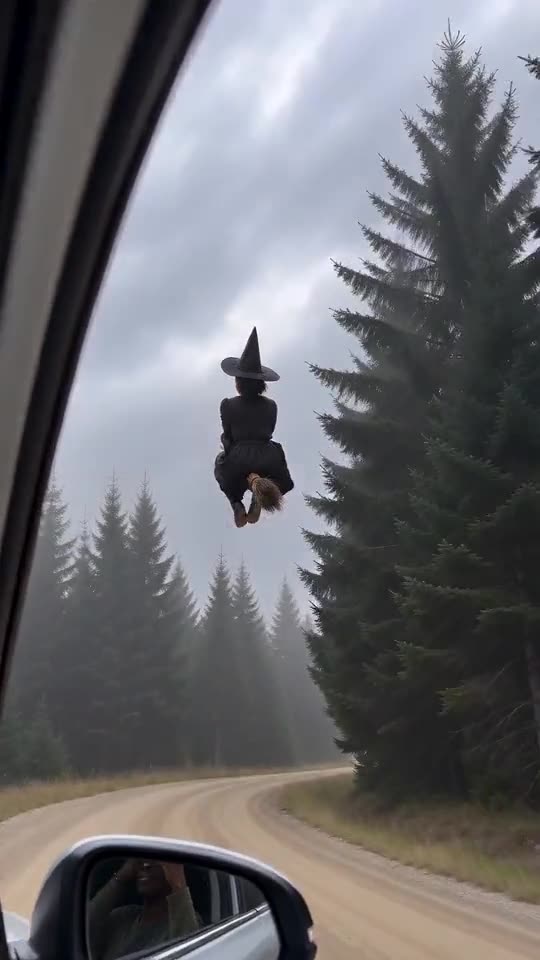
Upload one photo of yourself, a friend or a pet, and MimicZip builds the broom scene for you. Pick the place, the outfit and the ending, run the free 5-second preview, then spend 35 credits on a 10-second 720p video. There is no prompt to write.
Step by step
- Open the [generator](/my-ride-is-here#generator) on this template page and add one photo.
- Choose a format. 9:16 fits TikTok, Reels and Shorts, and 16:9 suits YouTube and desktop screens.
- Pick the options. Choose the place, the outfit and the ending, or keep the defaults. They are presets, not a prompt box.
- Tick the photo-consent box and log in with Google.
- Run the free preview (5 seconds, 480p) to check the face and the motion.
- Render the full video for 35 credits, then download the MP4.
What the fixed scene does for you
The phone camera in the car, the broom beside the window, the look back and the ending are built into one scene. You never write or paste a prompt, and your photo only decides who rides.
The beats come in a set order, so results feel like the trend and not like a random clip. Faces and motion still change from run to run.
After it finishes
Your video appears in My videos, where you can download it or copy its share link. The sound is generated with the picture, and the silent version is there if you want to add your own.
MimicZip is an independent tool and is not affiliated with the people who posted the original clips.
Questions people ask
Do I need to write a prompt?
No. The scene and the camera come from the fixed setup. You choose the photo, the format and, if you like, the place, the outfit and the ending.
Do I need a photo on a broom?
No. The broom is generated for you. A plain photo of your face and upper body works better than one with props in your hands.
Can I close the page while it renders?
Yes. Rendering continues on our servers, and the finished video is saved in My videos under your account.
Which format should I pick?
Pick 9:16 for TikTok, Reels and Shorts, or 16:9 for YouTube and desktop. You can run the free preview in either one.
Make your own My Ride Is Here video
Upload one photo and try a free 5-second preview. No subscription, no watermark.
Make my video