My Ride Is Here AI Video Generator
Turn one photo into the flying broom clip: you sit side-saddle on a broom right beside a moving car, glance at the camera, then fly off or crash into a sign. Pick the place, the outfit and the ending, and get a 10-second video made for TikTok and Reels. Preview it free first.
- Free 5s preview · 10s HD from $4.90
- 9:16 or 16:9
- No watermark
- No subscription
See the broom ride, then make yours
These clips were made with MimicZip from AI-generated photos of fictional people and a dog, each with a different place, outfit or ending. Your result follows your own photo, so it will look different.
- Generated
Forest road, witch outfit, fly away
A rider in a pointed black witch hat and a long black dress floats beside the car over a forest dirt road under grey skies, looks back at the camera, then flies up toward the treetops. Options used: forest road, witch outfit, fly away. She is fictional and the input photo is AI-generated.
Place: Forest road · Outfit: Witch hat and dress · Ending: Fly away
Inputs
10s · 720p · AI-generated audio · Made 2026-10-21
Generated with MimicZip
AI-generated wind, engine and a light spooky tune. No singing and no lyrics.
Example people are fictional.
- Generated
Suburb, own outfit, fly away
A young woman with curly hair and a red top sits side-saddle on a broom at window height beside the car on a sunny suburban street, then flies off over the rooftops. Options used: suburban street, my own outfit, fly away. She is fictional and the input photo is AI-generated.
Place: Suburban street · Outfit: My outfit · Ending: Fly away
Inputs
10s · 720p · AI-generated audio · Made 2026-10-21
Generated with MimicZip
AI-generated wind, engine and a light spooky tune. No singing and no lyrics.
Example people are fictional.
- Generated
City at night, own outfit, crash
A young man with blond hair and a green jacket ends up sitting dazed on a grass strip after hitting a signpost on a lit city street at night, shop windows glowing behind him. Options used: city at night, my own outfit, crash. He is fictional and the input photo is AI-generated.
Place: City at night · Outfit: My outfit · Ending: Crash into a sign
Inputs
10s · 720p · AI-generated audio · Made 2026-10-21
Generated with MimicZip
AI-generated wind, engine and a light spooky tune. No singing and no lyrics.
Example people are fictional.
- Generated
Suburb, witch outfit, crash
A dog rides a broom beside the car on a suburban street, then bumps into a STOP sign and ends up on the grass with the broom beside it. Options used: suburban street, witch outfit, crash. The dog is fictional and the input photo is AI-generated.
Place: Suburban street · Outfit: Witch hat and dress · Ending: Crash into a sign
Inputs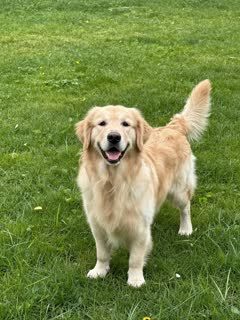
10s · 720p · AI-generated audio · Made 2026-10-21
Generated with MimicZip
AI-generated wind, engine and a light spooky tune. No singing and no lyrics.
Example people are fictional.
Examples are shown for illustration, not as a promise of identical output. Faces, motion and sound change with your photo.
The trend, explained
What is the My Ride Is Here trend?
My Ride Is Here is a Halloween-season AI trend. Filmed from a moving car, a person or a pet sits side-saddle on a broom flying alongside, looks back at the camera as if the broom were the ride they called, then flies off. It began in September 2026 as a CapCut template, and AI versions use your photo.
The earliest broom template came on 22 September 2026 from @brandytuan3245, with a Vietnamese street scene and a CapCut tutorial. On 27 September @rora_dd posted a version captioned “¡Ya llegó mi transporte!” (“my ride has arrived”), which named the trend, at about 550,000 views. A Portuguese tutorial from @shaseighthenesl114 on 28 September, at roughly 1.6 million views, is the most-watched real-person version we found. Around 18 October a comic ending appeared in which the rider hits a road sign. We read these counts on 21 October 2026 and did not audit them.
MimicZip makes your own version from one photo. The side-saddle ride beside the car, the look back at the camera and the ending are built in, and you pick the place, the outfit and the ending from short lists, so you never write a prompt. The site is an independent tool. It is not affiliated with the people who posted the trend, TikTok, Instagram or CapCut.
Read more: First broom template on TikTok (@brandytuan3245) · The post that named the trend (@rora_dd) · Portuguese tutorial version (@shaseighthenesl114)
What happens in a My Ride Is Here video
A 10-second video follows three beats in this order. Shot timings are approximate, and the preview runs through the same beats faster.
01 · 0–4s
Side by side
A phone camera inside the car looks out of the passenger window, with the window frame and the side mirror at the edge of the picture and a little shake from the road. You sit side-saddle on an old wooden broom about a metre above the road, keeping pace with the car at window height, legs crossed as if this were a normal commute.
02 · 4–7s
The look
You turn your head calmly and look straight into the lens with a relaxed, slightly smug expression, as if to say “my ride is here”.
03 · 7–10s
The ending
You pick the ending. Fly away: you tilt the broom up and soar over the rooftops and trees until you are a small dot. Crash: you look forward again just in time to hit a roadside sign, tumble onto the grass and sit up dazed but unhurt.
Your photo decides who rides. The camera, the broom and the order of the beats are fixed, and every result comes out a little different. The place, the outfit and the ending are presets you pick.
How to make a My Ride Is Here video in 3 steps
No filming, no green screen, no prompts and no editing app.
Add your photo
Upload one clear photo of yourself, a friend or a pet, with the face visible. JPG, PNG or WebP, up to 10 MB.
Pick the options and preview
Pick 9:16 or 16:9, choose the place, the outfit and the ending, tick the photo-consent box and log in. You get a free 5-second 480p preview.
Make the full video
Spend 35 credits on a 10-second 720p video. You can close the page while it renders and find it in My videos.
Why people use it
Free preview first
See your photo in motion before you spend anything.
A broom, with your face
Your face does the side-saddle ride and the look back. The faces from the original clips are never used.
Your place, outfit and ending
Choose a suburban street, a forest road or a night city, your own clothes or a witch hat, and a fly-away or a crash.
Not only people
A friend, a dog or a cat can take the broom and give the look.
No subscription
Buy credits once. They never expire.
Works on your phone
Pick a photo from your camera roll and download a video ready for TikTok, Reels or Shorts.
Ways to play it
Your dog or cat
A sharp, front-facing pet photo puts your pet on the broom, paws on the handle and fur in the wind.
Just you
The classic version: your face, the ride beside the car and the smug look back.
A friend
Use a friend’s photo instead, with their OK, and send them the result.
A toy or a drawing
Photograph your own toy or character drawing and it comes to life.
Which photo works?
One photo is required: the rider. It shows a single subject, and the face should be easy to see.
Works well
- A clear, well-lit photo of one person or one pet, head and shoulders or upper body
- Subject facing the camera and not covered
- JPG, PNG or WebP, up to 10 MB
- Between 300 and 6000 pixels on each side
Avoid
- Group photos with several people or animals
- Sunglasses, masks or heavy filters over the face
- Very blurry or very dark pictures
- Celebrities, famous cartoon or game characters, minors, anyone who has not agreed, or a screenshot of someone else’s clip
Limits: width-to-height ratio between 0.4 and 2.5. Upload only subjects you own or have permission to use.
One-time credit packs
Preview for free, then pay only for the videos you keep. One full 10-second video costs 35 credits.
100 credits
$4.90
2 videos
≈ $2.45 / video
One-time payment, no subscription
- Most popular
210 credits
$9.90
6 videos
≈ $1.65 / video
One-time payment, no subscription
450 credits
$19.90
12 videos
≈ $1.66 / video
One-time payment, no subscription
- Secure checkout by Waffo
- Instant credits
- 7-day refund on unused packs
- Failed videos refunded
My Ride Is Here AI: frequently asked questions
What is the my ride is here trend?
It is a Halloween-season trend where someone sits side-saddle on a flying broom beside a moving car, looks back at the camera, then flies off, as if the broom were their ride. It started in September 2026. The explainer guide has the timeline.
How do I do the flying broom AI trend?
Upload one photo, pick the place, the outfit and the ending (or keep the defaults), run the free 5-second preview, then make the full 10-second 720p video for 35 credits. There is no prompt to write. The how-to guide covers each step.
Is there a free flying broom AI video generator?
Partly. Each account gets 1 free 5-second 480p preview, once for life, and one free preview is given per network every 30 days. The full video needs 35 credits, with packs from $4.90. There is no watermark and no subscription.
Can I do it with my dog or cat?
Yes. Upload a clear, front-facing pet photo. The pet sits on the broom with its paws on the handle and its fur blowing in the wind. Choose the witch outfit for a tiny witch hat. Run the free preview first, because pet results vary. See the pet version.
Why is it called My Ride Is Here?
On 27 September 2026, @rora_dd captioned a broom clip “¡Ya llegó mi transporte!”, meaning “my ride has arrived”, and the name stuck. The first broom template came five days earlier from @brandytuan3245. The names guide lists the other names.
Is there a CapCut template for the broom trend?
The trend began as a CapCut template, and creators share new ones often. A template needs your own footage or photo set-up inside the app, while MimicZip needs one photo and gives a finished video. The comparison explains when each one fits.
What photo works best?
One clear photo of one person or pet, with the face visible, head and shoulders or upper body. Use JPG, PNG or WebP up to 10 MB. Photos are stored privately and deleted automatically 14 days after upload. The photo guide lists what to avoid.
Can I change the place, outfit or ending?
Yes, from presets. Place: suburban street (default), forest road or city at night. Outfit: your own clothes (default) or a witch hat and black dress. Ending: fly away (default) or crash into a road sign. The options do not change the price, and there is no free-text prompt.
Is this connected to the people who posted the trend?
No. MimicZip is an independent AI tool with no link to the people who posted the original clips, TikTok, Instagram or CapCut. Your video shows your photo, not the people from the original clips.
What if a video fails or I want a refund?
A failed generation returns its credits automatically. Packs you have not used can be refunded within 7 days; see the refund policy.
Questions? Email support@mimiczip.com.
MimicZip is an independent AI tool. Not affiliated with or endorsed by the people who posted the original clips, TikTok, Instagram or CapCut.