My Ride Is Here AI video: the crash looks wrong, how do I fix it?
Updated:
Short answer
In the crash ending the rider should hit a roadside sign, tumble onto the grass and sit up unhurt. A video model can miss the sign, blend the fall or fly on instead. Check the free 5-second preview, run again, or choose the fly-away ending if you want a safer exit.
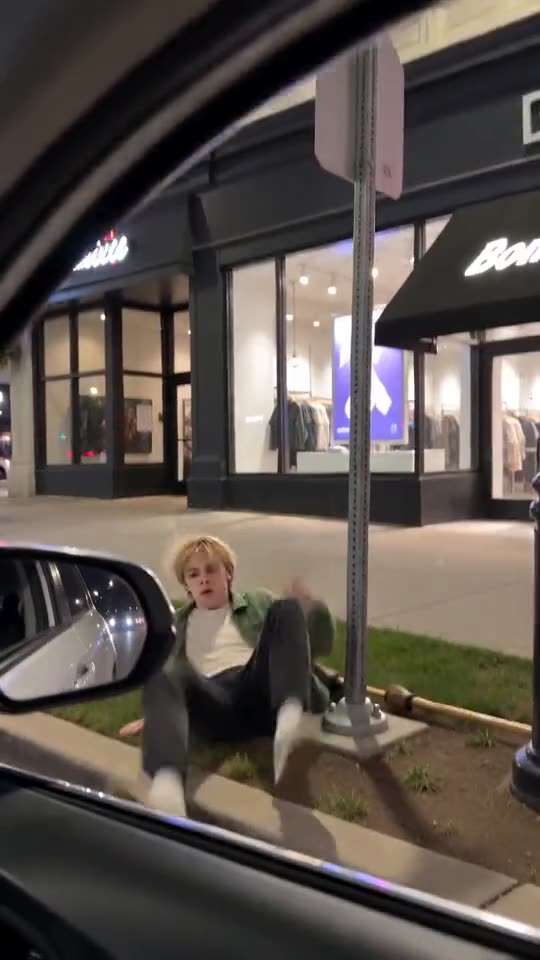
The crash you should see
- The rider looks forward again just in time.
- The rider slams into a roadside sign.
- The rider tumbles onto the grass, with the broom landing beside them.
- The rider sits up dazed but unhurt.
What to try
- Run again. A new run places the sign and the fall differently.
- Try another place. A quiet suburban street gives the clearest view of the sign.
- Choose the fly-away ending if you do not need a crash.
- Still wrong? Email support@mimiczip.com with the video link.
Questions people ask
Why is there no sign in my video?
The sign is part of the preset, but the model decides how it looks and where it stands. A new run can fix it.
Is the crash violent?
No. It is a comic tumble onto the grass, and the rider sits up unhurt.
Can I choose the kind of sign?
No. The sign is part of the preset, and you cannot add text or pick a shape.
Make your own My Ride Is Here video
Upload one photo and try a free 5-second preview. No subscription, no watermark.
Make my video