Crazy Frog AI prompt for Veo: a copyable prompt without names
Updated:
Short answer
Copy the prompt below into Veo and attach your photo as the starting image. It is one flowing paragraph that covers the crouched ride, the police hoverbike, the look back and the final bend. It uses no names or brands, because video tools filter them. Or skip the prompt and use MimicZip.
Copy this prompt
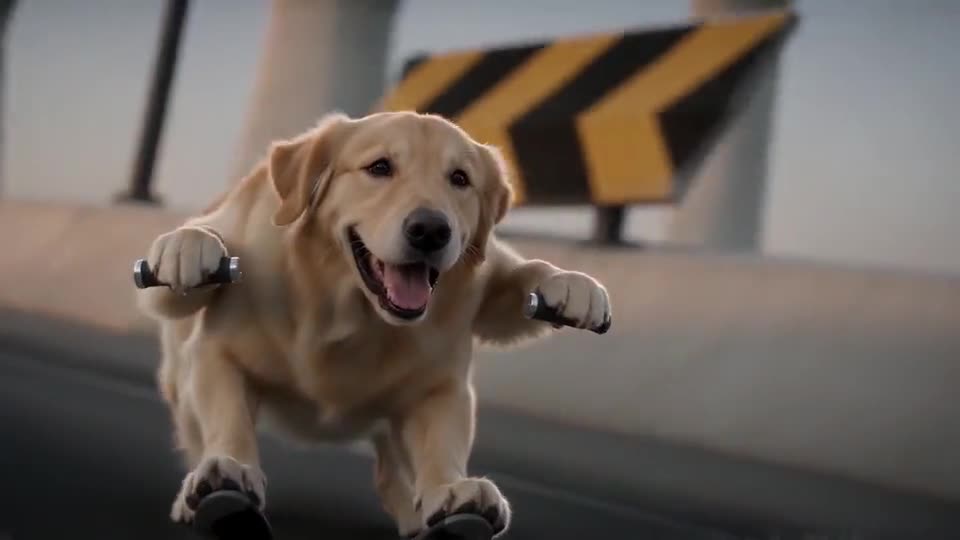
A photorealistic cinematic widescreen action clip. The person or character in the attached photo is the rider; keep their face, hair, skin tone and clothes exactly as in the photo. On a futuristic elevated concrete highway at dusk, with curving ramps, concrete barriers with yellow-and-black chevron warning boards and huge concrete towers in the distance under a warm twilight glow, the rider crouches in a low squat in mid-air about half a metre above the road, knees bent, both fists stretched forward gripping invisible handlebars, grinning and racing along at high speed, leaning into the curve. There is nothing at all underneath the rider: no bike, no board, no seat, no wheels. A low camera races backward just ahead of the rider. Then a hard cut to a stern police officer in a dark blue uniform and peaked cap leaning over the handlebars of a sleek grey-and-white hoverbike with flashing red lights and glowing cyan thrusters, chasing. Hard cut back to the rider, still crouched in mid-air, who looks back over the shoulder, sees the hoverbike closing in and screams in panic with both hands up. Then a low shot from behind as the hoverbike shoots past the camera with a cyan trail, a high aerial sweep over the curving ramps and towers, and a final low wide shot as the rider banks hard around a bend with the hoverbike close behind. No badges, logos or readable text anywhere. Sound: a fast, bouncy electronic dance instrumental with a buzzy synth lead, rushing wind, a whining hover engine and a police siren, no singing, no lyrics. No text, no subtitles, no logos, no watermark.
How to use it
- Attach one clear photo of the rider. Check whether your tool keeps the face steady, and run it a few times.
- Keep names out of the paragraph. Veo can refuse prompts that name real people, songs or brands, so describe what happens on the road.
- Veo clips are often shorter than 15 seconds. Keep the first three beats if your tool cuts the length, and trim the rest of the paragraph.
Questions people ask
Can I add the trend name to make it more accurate?
It is better not to. Tools can filter names, and the clip gets its look from the description anyway. Describing the action works better.
Will the result match the trend exactly?
Not exactly. Veo versions differ, and your photo changes the face, the movement and the timing. Use the prompt as a first draft and adjust it.
Is this page tied to Google?
No. MimicZip is independent and not affiliated with Google or the people who posted the trend.
Make your own Crazy Frog AI chase video
Upload one photo and try a free 5-second preview. No subscription, and the full video has no watermark.
Make my video