Alors on Danse AI Video Generator: Two Photos, One Studio Hit
Add a Player photo and a Hype partner photo: two friends, a couple, two pets or you and your dog. In a bright white studio, one plays a tiny keyboard with a straight face while the other points, beatboxes and cheers. It follows the viral clip second by second, so the trending sound lines up.
- Free 5s preview · 15s HD video from $9.90
- 9:16 or 16:9
- Full video, no watermark
- No subscription
See the studio session first, then make yours
These clips were made with MimicZip from AI-generated photos of fictional people and animals. Your result follows your own two photos, so it will look different.
- Generated
Two friends in the studio
A young man in a grey T-shirt plays a mini keyboard and laptop at a white table while a woman in glasses and a burgundy blouse points at the keys, nods to the beat and pumps a finger in the air. In the last seconds he hits the keys and she freezes, satisfied. The people are fictional and the input photos are AI-generated.
Inputs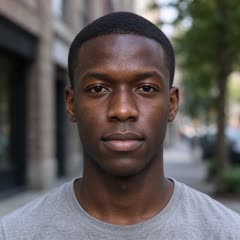

15s · 720p · AI-generated audio · Made 2026-10-21
Generated with MimicZip
AI-generated beatbox, electronic beat and synth riff. No lyrics, and not the original song.
Example people are fictional.
- Generated
A cat and a dog
A grey and white long-haired cat presses the keys of a mini keyboard with its paws while a golden retriever beside it points a paw at the keys, then raises it high as the riff drops. Both stand at a white table in a white studio. Both input photos are AI-generated pet photos.
Inputs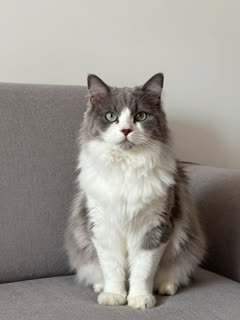
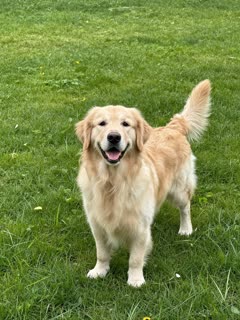
15s · 720p · AI-generated audio · Made 2026-10-21
Generated with MimicZip
AI-generated beatbox, electronic beat and synth riff. No lyrics, and not the original song.
Example people are fictional.
Examples are shown for illustration, not as a promise of identical output. Faces, fur, motion and sound change with your photos.
The meme, explained
What is the Alors on Danse AI trend?
The Alors on Danse AI trend is a two-character TikTok clip set in a white studio: one person or pet plays a tiny keyboard and laptop with a straight face, while the other points, beatboxes and hypes them up. It copies a 2010 French comedy sketch and spread as AI versions in October 2026.
The sketch shows a comedian pretending to teach a singer how to write his 2010 hit, and many viewers took it for real studio footage. A re-upload went viral on TikTok in June 2026. From 3 October 2026, AI versions swapped in new pairs: two parrots by @kennyslowbird (about 1 million views), a fantasy-character pair by @yapayzekaserisi (about 1.4 million) and an Italian comedy duo, @martaegianluca, on 5 October. View counts were read on 21 October 2026 and are not audited.
MimicZip makes your own version from two photos. A fixed template sets the studio, the keyboard, the beatbox intro, the pause and the finger-pumping build-up, so you never write a prompt. The clip follows the viral sound’s first 15 seconds, so the original sound fits when you add it in the app. The site is an independent tool, not affiliated with the sketch’s creators, the song’s artist or any social platform, and the video does not include the original song.
Read more: TikTok: the parrot version by @kennyslowbird · TikTok: an AI character version by @yapayzekaserisi · TikTok: the duo version by @martaegianluca
What happens in an Alors on Danse AI video
A 15-second video follows five beats in this order, timed to the viral clip. Timings are approximate, and the 5-second preview runs through the same beats faster.
01 · 0–3s
Beatbox intro
One static shot of a white studio. The Player stands at a small white table with a laptop and a mini keyboard. The Hype partner leans in, jabs a finger at the keys and mouths a beatbox rhythm.
02 · 3–6s
The beat starts
The Player plays with both hands, head down and completely deadpan. The Hype partner nods along and pokes a finger down on every beat.
03 · 6–8s
“Huh?”
The beat stops. The Player lifts their hands and looks up with a puzzled little “huh?”, and the Hype partner nods.
04 · 8–13s
Finger in the air
The Hype partner pumps a finger upward nonstop, then faster with two fingers, humming a bouncy synth line. The Player waits, hands over the keys.
05 · 13–15s
The riff drops
The Player hits the keys as a loud synth riff blasts, and the Hype partner freezes in a cool, satisfied pose.
Your photos decide who plays and who hypes. The studio, the camera and the order of the beats are fixed, and every result comes out a little different. Pets stand upright at the table and use their front paws.
How to make an Alors on Danse AI video in 3 steps
No filming, no keyboard, no prompts and no editing app.
Add two photos
Upload one clear photo for the Player and one for the Hype partner. Both are required. JPG, PNG or WebP, up to 10 MB each.
Try the free preview
Pick 9:16 or 16:9 and the place, tick the photo-consent box and log in. You get a free 5-second 480p preview.
Make the full video
Spend 1 credit on a 15-second 720p video. You can close the page while it renders and find it in My videos.
Why people use it
Free preview first
See your two photos in motion before you spend anything.
Two roles, one studio
One plays the mini keyboard with a straight face, the other does all the hyping.
Pets welcome
Cats, dogs and birds stand at the table and press the keys with their paws.
No subscription
Buy credits once. They never expire.
Timed to the sound
Beats follow the viral clip, so the trending sound lines up when you post.
Three languages
The whole site works in English, Spanish and Brazilian Portuguese.
Which photos work?
Two photos are required: the Player and the Hype partner. Each photo shows a single subject.
Works well
- A clear, well-lit photo of one person, one pet, one toy or one drawn character in each box
- Subject facing the camera and not covered
- JPG, PNG or WebP, up to 10 MB
- Between 300 and 6000 pixels on each side
Avoid
- Two people or animals in the same photo
- Sunglasses, masks or heavy filters over the face
- Very blurry or very dark pictures
- Celebrities, famous cartoon or game characters, minors, or anyone who has not agreed
Limits: width-to-height ratio between 0.4 and 2.5. Upload only subjects you own or have permission to use.
One-time credit packs
Preview for free, then pay only for the videos you keep. One full 15-second video costs 1 credit.
1 HD video
$9.90
≈ $9.90 / video
One-time payment, no subscription
- Most popular
3 HD videos
$19.90
≈ $6.63 / video
One-time payment, no subscription
5 HD videos
$29.90
≈ $5.98 / video
One-time payment, no subscription
- Secure checkout by Waffo
- Instant credits
- 7-day refund on unused packs
- Failed videos refunded
Alors on Danse AI: frequently asked questions
What is the Alors on Danse AI trend?
A two-character studio clip: one person or pet plays a tiny keyboard with a straight face while the other points, beatboxes and pumps a finger in the air, until the synth riff drops. It recreates a 2010 French comedy sketch and spread as AI versions in October 2026. The trend explainer has more.
How do I make the Alors on Danse AI video?
Upload two photos, one for the Player and one for the Hype partner, pick 9:16 or 16:9 and start. A few minutes later you get a 15-second 720p MP4 in a white studio. The how-to guide lists each step.
Is it free to try?
Yes. New accounts can usually try 1 free 5-second 480p preview, once for life, and one free preview is given per network every 30 days. The full 15-second 720p video needs 1 credit, with packs from $9.90. The free preview is watch-only: it carries a PREVIEW badge and cannot be downloaded.
Will the original sound line up if I add it?
Yes. The video follows the viral clip’s first 15 seconds: beatbox intro, beat, pause, finger pumps, then the riff. In TikTok or Reels, add the trending sound from its start. Most AI versions run 20 to 30 seconds, so you get the first 15. A few edits of the sound drift a second after the intro.
How many photos do I need?
Two, and both are required: one for the Player and one for the Hype partner. Each photo shows a single person, pet, toy or drawn character, as a JPG, PNG or WebP file up to 10 MB.
Can I use my cat, dog or parrot?
Yes. Pets keep their species and stand upright at the table: the Player presses the keys with its paws and the Hype partner points and waves a paw. Two parrots made one of the best-known versions. Run the free preview first. See the pet page.
What song is it, and is it in my video?
The trend uses a sound built from the 2010 dance hit “Alors on danse” by Stromae, with the sketch’s beatbox. Our video does not include the original song. MimicZip generates its own beatbox, beat and synth riff, and you add the trending sound in TikTok or Instagram.
Is there a watermark, and can I post it on TikTok or Reels?
The free preview wears a PREVIEW badge and can’t be saved, while the full video has no watermark. Yes, you can post it: pick 9:16 for TikTok and Reels and add the trending sound in the app. Keep the platform’s AI-generated label on.
Is this connected to the sketch, the singer or TikTok?
No. MimicZip is an independent AI tool with no link to the people in the original sketch, the song’s artist or label, the creators of the AI versions, TikTok or Instagram. It makes new videos from your photos and uses no original footage.
Is Alors on Danse a CapCut template?
Not as a template. MimicZip runs in your browser: add two photos and the finished 15-second Alors on Danse video comes back, with nothing to edit and no app to install. If you like CapCut, you can still drop the result into it afterwards. See the side-by-side with CapCut.
Which settings should I use for Alors on Danse?
No prompt and no settings to learn: the template decides the scene, the camera and the timing, and you only add two photos. People who want to run it in Kling, Veo or Seedance themselves can start from the prompt page.
Can I use one selfie for both people in Alors on Danse?
Alors on Danse has two roles, so it needs two photos. They can both be of you: use two different pictures of the same person and play both parts. The same file added twice is rejected, so pick a second shot from another angle.
What do people use to make the Alors on Danse trend?
There is no single app. People mix CapCut templates, general AI video generators and their own prompts. MimicZip skips that: it is a browser tool dedicated to this trend, where you upload two photos and it makes the full 15-second video for you.
What if a video fails, and how long are my photos kept?
A failed generation returns its credits automatically, and unused packs can be refunded within 7 days; see the refund policy. Photos are stored privately and deleted automatically 14 days after upload. The privacy policy has the details.
Can I change the place?
Yes, from three presets. White studio (the default) is a bright, pure-white photo studio; Living room is a cosy living room; Rooftop at dusk is a city rooftop at dusk. The option does not change the price, and the table, the gestures and the sound stay the same.
Ready for your studio session?
Two photos, one free preview, then your own keyboard-and-hype video.
Make my videoQuestions? Email support@mimiczip.com.
MimicZip is an independent AI tool. Not affiliated with or endorsed by the people in the original sketch, the song’s artist or label, the creators of the AI versions, or any social platform.