Spooky Scary Skeletons AI Video Generator
Become the AI vampire of this October’s trend: you do the skeleton dance in a black suit and a red-lined cape, under a huge orange moon with bats and glowing pumpkins. Upload one photo and get a 11-second video for TikTok and Reels, timed so the trending sound lines up. Preview it free first.
- Free 5s preview · 11s HD video from $9.90
- 9:16 or 16:9
- Full video, no watermark
- No subscription
See the vampire skeleton dance, then make yours
These clips were made with MimicZip from AI-generated photos of a fictional woman and a cat. Your result follows your own photo, so it will look different.
- Generated
Vampire dance under the orange moon
A woman with her hair pulled back, in a black suit and a long red-lined vampire cape, does the skeleton dance on a hilltop in front of a huge orange moon, with bats, bare trees and glowing pumpkins. The moves follow the viral dance second by second. She is fictional and the input photo is AI-generated.
Inputs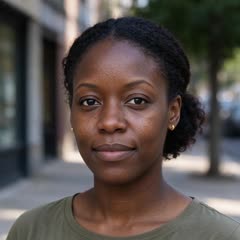
11s · 720p · AI-generated audio · Made 2026-10-21
Generated with MimicZip
AI-generated spooky Halloween beat. No singing and no lyrics.
Example people are fictional.
- Generated
Vampire cat
An orange tabby cat stands on its hind legs in a small red-lined vampire cape and bounces through the skeleton dance under a huge orange moon, with bats and carved pumpkins around it. The cat is fictional and the input photo is AI-generated.
Inputs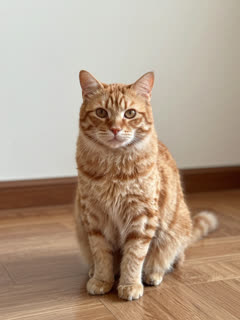
11s · 720p · AI-generated audio · Made 2026-10-21
Generated with MimicZip
AI-generated spooky Halloween beat. No singing and no lyrics.
Example people are fictional.
Examples are shown for illustration, not as a promise of identical output. Faces, motion and sound change with your photo.
The trend, explained
What is the Spooky Scary Skeletons AI trend?
Spooky Scary Skeletons is a Halloween dance trend that has come back to TikTok every October since 2019: kicks, stiff skeleton elbows and hip shakes to a 1990s Halloween song. In October 2026 it gained an AI vampire layer, where a character dances in a red-lined cape under a giant orange moon.
The dance is widely credited to the TikTok account @minecrafter2011. This season’s biggest dance post is a “2026 vs 2019” clip by @_alexandramarasigan on 2 October, listed at about 7.3 million views. The AI vampire edits started in anime fan circles: @teenagerlovepill posted one of the first on 8 October, and @n1me.yoshikage’s version from 10 October reached about 2.8 million views. View counts were read on 21 October 2026 and not audited.
MimicZip makes your own version from one photo. You wear the vampire suit and cape, and you dance on a Halloween hill with bats, bare trees and pumpkins, following the timing of the viral dance so the trending sound lines up. You never write a prompt. The site is an independent tool, not affiliated with the people who posted the trend, TikTok or any music artist or label.
Read more: “2026 vs 2019” dance on TikTok (@_alexandramarasigan) · Early AI vampire edit on TikTok (@teenagerlovepill) · Most-viewed AI vampire edit on TikTok (@n1me.yoshikage)
What happens in a Spooky Scary Skeletons video
A 11-second video follows four beats in this order, timed to the viral dance. The camera stays still and you stay in full view. The free preview runs through the same beats in less time.
01 · 0–3s
Kick-off
You stand in a black suit and a long red-lined cape under a huge orange moon, with bats in the sky and pumpkins glowing at your feet. You hop on one foot, kick a knee up, swing a leg out to the side and land facing the camera.
02 · 3–7s
Skeleton pose
You drop into a bouncy half-squat with both elbows stuck out like a stiff skeleton, pumping your chest on every beat, then shimmy your shoulders and shake your hips.
03 · 7–8.5s
Elbows up again
The skeleton elbows snap back up for another round of pumps, and you whip your head and hair back.
04 · 8.5–11s
Spooky finish
You sway your hips with stomping steps, lift one knee across your body and finish with one arm raised high, grinning into the camera as the cape swings.
Your photo decides who dances. The costume, the scene and the order of the moves are fixed, and every result comes out a little different.
How to make a Spooky Scary Skeletons video in 3 steps
No filming, no green screen, no prompts and no editing app.
Add your photo
Upload one clear photo of yourself, a friend or a pet, with the face visible. JPG, PNG or WebP, up to 10 MB.
Try the free preview
Pick 9:16 or 16:9 and the place, tick the photo-consent box and log in. You get a free 5-second 480p preview.
Make the full video
Spend 1 credit on a 11-second 720p video. You can close the page while it renders and find it in My videos.
Why people use it
Free preview first
See your photo in motion before you spend anything.
The vampire look, ready-made
Suit, red-lined cape, orange moon, bats and pumpkins are built in. No costume, no green screen.
Not only people
A friend, a dog or a cat can put on the cape and do the dance.
No subscription
Buy credits once. They never expire.
Works on your phone
Pick a photo from your camera roll and download a video ready for TikTok, Reels or Shorts.
Three languages
The whole site works in English, Spanish and Brazilian Portuguese.
Ways to play it
Your cat or dog
A sharp, front-facing pet photo turns your pet into a tiny caped vampire doing the dance.
Just you
The classic version: your face, the cape and the full skeleton dance.
A friend
Use a friend’s photo instead, with their OK, and send them the result.
A toy or a drawing
Photograph your own toy or character drawing and it comes to life in the cape.
Which photo works?
One photo is required: the dancer. It shows a single subject, and the face should be easy to see.
Works well
- A clear, well-lit photo of one person or one pet, head and shoulders or upper body
- Subject facing the camera and not covered
- JPG, PNG or WebP, up to 10 MB
- Between 300 and 6000 pixels on each side
Avoid
- Group photos with several people or animals
- Sunglasses, masks or heavy filters over the face
- Very blurry or very dark pictures
- Celebrities, famous anime, cartoon or game characters, minors, anyone who has not agreed, or a screenshot of someone else’s clip
Limits: width-to-height ratio between 0.4 and 2.5. Upload only subjects you own or have permission to use.
One-time credit packs
Preview for free, then pay only for the videos you keep. One full 11-second video costs 1 credit.
1 HD video
$9.90
≈ $9.90 / video
One-time payment, no subscription
- Most popular
3 HD videos
$19.90
≈ $6.63 / video
One-time payment, no subscription
5 HD videos
$29.90
≈ $5.98 / video
One-time payment, no subscription
- Secure checkout by Waffo
- Instant credits
- 7-day refund on unused packs
- Failed videos refunded
Spooky Scary Skeletons AI: frequently asked questions
What is the Spooky Scary Skeletons AI trend?
It is the October 2026 twist on a Halloween dance that returns every year: a character becomes a vampire in a red-lined cape and does the skeleton dance under a giant orange moon with bats and pumpkins. It started in anime edits. The explainer guide has the timeline.
How do I do the AI vampire Spooky Scary Skeletons trend with my photo?
Upload one photo, run the free 5-second preview, then make the full 11-second 720p video for 1 credit. The cape, the moon and the dance are set for you, and there is no prompt to write. The how-to guide covers each step.
Can I add the original sound so the dance is on the beat?
Yes. The moves follow the timing of the viral 2026 dance clip second by second. Download your video, tap Add sound in TikTok or Reels, pick the trending Spooky Scary Skeletons sound and start it from the beginning. Our file has its own spooky beat, not the song, and a silent download is available.
Is there a free Spooky Scary Skeletons AI generator?
Partly. New accounts can usually try 1 free 5-second 480p preview, once for life, and one free preview is given per network every 30 days. The full video needs 1 credit, with packs from $9.90. The full video has no watermark, and there is no subscription. The free preview is watch-only: it carries a PREVIEW badge and cannot be downloaded.
Can I turn my cat or dog into a dancing vampire?
Yes. A pet stands up on its hind legs in a small red-lined cape and copies the dance. Use a sharp, front-facing photo and run the free preview first, because pet results vary. The pet version has photo tips.
Can I use an anime character like the viral edits?
No. Famous anime, cartoon and game characters are copyrighted, so the photo check blocks them. Use yourself, an adult friend who agreed, a pet, or a toy or drawing you made. See the AI vampire guide.
What song is in the trend, and is it in my video?
The trend uses a 1990s Halloween song of the same name, often in a sped-up remix. Our video does not include it. It has an AI-generated spooky beat with no singing, so add the trending sound inside TikTok or Instagram when you post. See the sound guide.
What photo works best?
One clear photo of one person or pet, with the face visible, head and shoulders or upper body. Use JPG, PNG or WebP up to 10 MB. Photos are stored privately and deleted automatically 14 days after upload. The photo guide lists what to avoid.
Can I change the costume or the background?
You can change the place, not the costume. Pick Pumpkin hilltop (the default), Haunted mansion or Foggy forest; the black suit and red-lined cape stay. There is no free-text prompt, and the option does not change the price.
Is this connected to the original dancers or to any artist?
No. MimicZip is an independent AI tool with no link to the people who posted the trend, TikTok, Instagram or any music artist or label. Your video shows your photo, not anyone from the original clips.
Can I make the Spooky Scary Skeletons trend in CapCut instead?
MimicZip is not a CapCut template; it is a separate web tool for this one trend. CapCut templates work on footage you shoot yourself, while ours starts from one photo, so it suits people who do not want to film anything. The CapCut page compares the two.
What prompt or settings do I need for Spooky Scary Skeletons?
None. The scene, the camera and the timing are already built into the template, so you never write a prompt: you add one photo and press the button. If you would rather run Spooky Scary Skeletons yourself in Kling, Veo or Seedance, the prompts page has a ready-made prompt to copy.
Is one selfie enough for the Spooky Scary Skeletons trend?
Yes, one photo is all it takes. Pick a clear, front-facing picture of whoever is starring (a selfie works if it is not a mirror shot) and you are done; there is no second photo to add.
What app are people using for the Spooky Scary Skeletons trend?
Most people follow a CapCut template or run a general AI video model such as Kling, Veo or Seedance with their own prompt. MimicZip is another route: a web tool made for just this trend, so you open it in a browser, add one photo and get the 11-second video, with no app to install.
What if a video fails or I want a refund?
A failed generation returns its credits automatically. Packs you have not used can be refunded within 7 days; see the refund policy.
Ready to dance like a skeleton?
One photo, one free preview, then your own vampire skeleton dance.
Make my videoYour photo. Your cape. Your dance.
Free 5-second preview, then 11-second HD from $9.90.
Start with my photoQuestions? Email support@mimiczip.com.
MimicZip is an independent AI tool. Not affiliated with or endorsed by the people who posted the trend, TikTok, Instagram or any music artist or label.