Crazy Frog AI video: a bike or handlebars show up, how do I fix it?
Updated:
Short answer
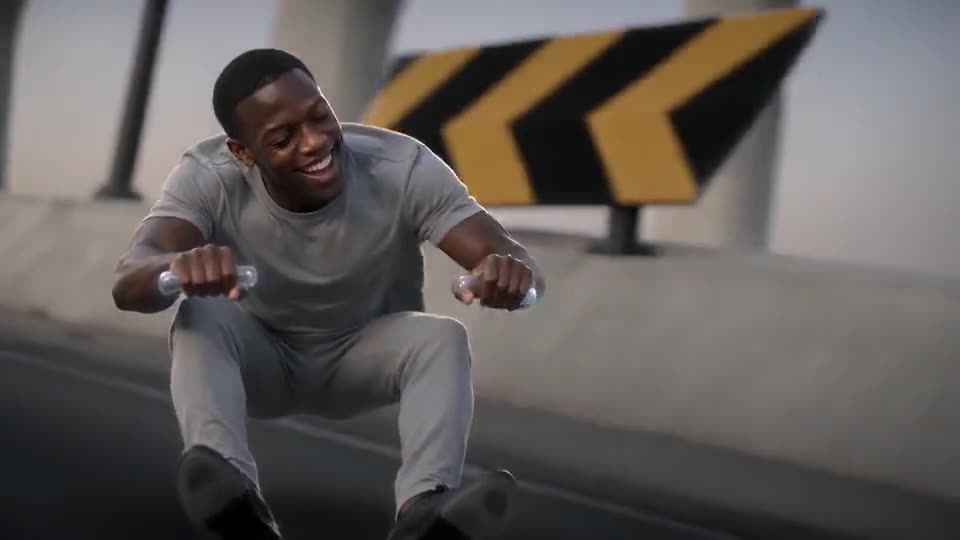
The pose is meant to have nothing under the rider, though small handlebar grips may show in the fists. A video model can still add a seat, a wheel or a whole motorbike. Use an upper-body photo with no vehicle in it, run the free 5-second preview, and run again if needed.
What you should see
- The rider crouches in mid-air with fists out, as if holding invisible handlebars.
- Nothing carries the rider: no seat, no board, no wheels.
- Two small handlebar grips may show in the fists. That is normal.
What to try
- Use a photo without a bike, a scooter or a chair in it, so the model does not copy the vehicle.
- Pick a photo with your hands out of frame, because visible hands give the model more to blend with a handlebar.
- Run again. Each run is a new result, and one run is often closer than another. The free redo page explains what a second run costs.
Questions people ask
Can I choose a real motorbike instead?
No. The ride is always the invisible-bike pose, and the site has no setting for another vehicle.
Is a visible bike a failed video?
No. Failed videos are the ones that do not finish, and those are refunded on their own. An odd bike in a finished video is a normal result.
Why does the rider seem to float on a board?
The model can add odd shapes by mistake. Nothing is meant to carry the rider, so run the preview again.
Make your own Crazy Frog AI chase video
Upload one photo and try a free 5-second preview. No subscription, and the full video has no watermark.
Make my video