Driver Put Phone Away AI Video Generator
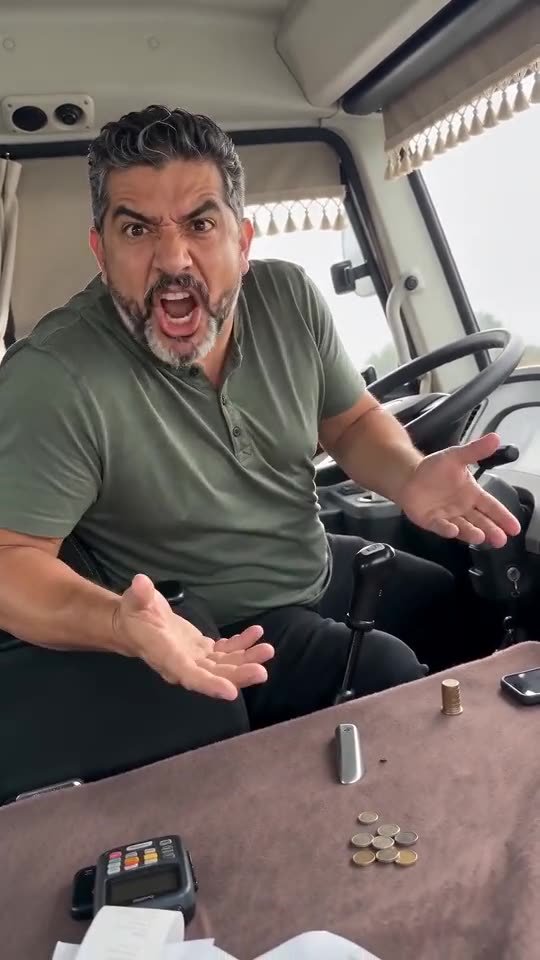
Turn one photo into the Driver Put Phone Away meme: a passenger secretly films you in a minibus cab, you glance back, turn round, throw both hands open and shout angrily at the camera to put the phone away, then turn back to the road. Preview it free first. It is an AI prank, not news.
Free 5s preview · 14s HD video from $9.90 · 9:16 or 16:9 · Full video, no watermark · No subscription
 Made with MimicZip
Example frame. Your video uses your own photo.
See who got told off, then make yours
These clips were made with MimicZip from AI-generated photos, one photo each. Your video uses your photo and the cab, outfit and light you pick.
- Made with MimicZip
The driver turns round
A grey-bearded man in a green shirt sits in the minibus driver's seat, turns round, throws both hands open and shouts at the camera, then turns back. Made from one photo.
Cab: Original curtains · Outfit: My own clothes · Time of day: Daytime
Inputs14s · 720p · AI-generated audio · Made 2026-10-25
Generated with MimicZip
AI-generated shouting and engine noise. Not the original audio.
Example people are fictional.
- Made with MimicZip
A corgi tells you off
A corgi sits in the driver's seat, turns to the camera, raises both paws and barks angrily, then faces the road again. Made from one photo.
Cab: Original curtains · Outfit: My own clothes · Time of day: Daytime
Inputs
14s · 720p · AI-generated audio · Made 2026-10-25
Generated with MimicZip
AI-generated shouting and engine noise. Not the original audio.
Example people are fictional.
Unlike sites that use videos downloaded from TikTok as their examples, every example here was made on MimicZip from a single photo — what you see is what our generator actually produced.
Examples are shown for illustration, not as a promise of identical output. Faces, motion and sound change with your photo.
The trend, explained
What is the Driver Put Phone Away meme?
Driver Put Phone Away is a short video meme set in the cab of a small passenger minibus. A passenger films the driver from the next seat; the driver glances back, turns round, throws both hands open and shouts at the camera to put the phone away, then turns back to the road.
The shouting is in Russian, and the phrase «убери телефон» («put the phone away») became the name of the trend. Copies and AI remakes in the same cab were already getting hundreds of thousands of views on TikTok from 17 October 2026. We could not confirm who posted it first, so we do not credit anyone as the original creator.
MimicZip makes the same scene from your own photo. It is an AI prank, not news, and it shows no real driver. Our video is not timed to any single post, because the clip we copy the moves from is a cut from a compilation; you can add the Russian sound in TikTok.
An early remake in the same cab (@ponh117) · Another early copy (@xevqu) · An AI remake (@shlawg52)
Where this trend comes from
- @ponh117 · TikTok · Oct 17, 2026 · 519K views — Early remake in the same minibus cab, with absurd props
- @xevqu · TikTok · Oct 17, 2026 · 440K views — Early remake of the shouting driver clip
- @shlawg52 · TikTok · Oct 19, 2026 · 376K views — AI remake in the same cab
- @ivan4k.xd · TikTok · Oct 20, 2026 · 386K views — AI remake in the same cab
- @new_bro_ser · TikTok · Oct 21, 2026 · 134K views — 97-second compilation; our reference is a 14s cut of the original driver, not a confirmed first post
Links open the original posts. MimicZip is not affiliated with these creators.
What happens in a Driver Put Phone Away video
A 14-second video follows four beats in this order. Your photo decides who sits behind the wheel; the cab, outfit and light come from the options you pick.
01 · 0–3s
The glance
You sit sideways in the driver's seat and glance back at the phone filming you.
02 · 3–6s
The shouting
You turn right round, mouth wide open, and throw both hands open, palms up.
03 · 6–9s
The scolding
You keep telling the camera off, shaking your head and waving your hands.
04 · 9–14s
Back to the road
You turn to the front again, shoulders drop and you stare ahead, still annoyed.
The shouting has no clear words, in any language. You add the Russian sound in TikTok if you want it.
How to add the sound in TikTok
Pick the song inside TikTok when you post, then turn the video's own sound down.Show the full how-to
Our video has AI-made shouting with no clear words. The viral clips use Russian shouting, and we could not confirm which post came first, so this video is not timed to any one of them. Add the sound you like in TikTok, or download a silent version from My videos.
- In TikTok, search «убери телефон» or «put the phone away», open a post you like and tap its sound, then tap Use this sound.
- Tap Upload and pick the video you downloaded from us.
- Open Volume and turn the video's own sound down to 0, or download the silent version from My videos.
- Use the scissors (trim) to line the loudest shout up with the moment the driver throws up both hands (about 3 seconds in), then post.

Need to move where the sound starts? This short video shows how to trim it.

Video: How To Trim Sound On TikTok 2026 (Very Easy) by Software Solutions on YouTube
How to make a Driver Put Phone Away video in 3 steps
No minibus, no actor, no editing, no prompt to write.
Add a photo
Upload one clear photo of yourself, a friend who agreed, or your pet, face visible.
Preview it free
Pick 9:16 or 16:9 and the cab, outfit and light, tick the photo-consent box and run the free 5-second preview.
Make it and add the sound
Spend 1 credit on the 14-second video, download it, then add the sound in TikTok if you want the Russian shouting.
Which photo works?
One photo is required: whoever sits behind the wheel. It shows a single adult, pet, toy or drawing, and the face should be easy to see. No celebrities.
- A clear, well-lit photo of one person or pet, face and shoulders visible
- Looking toward the camera, eyes open, no sunglasses
- JPG, PNG or WebP, up to 10 MB
- Between 300 and 6000 pixels on each side
- Babies, children or anyone under 18
- Group photos with several people or animals
- Sunglasses, masks or heavy filters over the face
- Celebrities, famous cartoon or game characters, anyone who has not agreed, or a screenshot of someone else’s clip
Ways to play it
Your pet
A dog or cat in the driver's seat, barking at the phone like an angry bus driver.
Birthday or big news
Put your boss, your quiet friend or yourself behind the wheel. Ask them first.
A friend
Tag a friend who is always on their phone. Ask them first.
A toy or drawing
A plush toy or a character you drew gets behind the wheel.
Why people use it
Free preview first
See yourself yelling from the driver's seat before you spend anything.
Follows the viral clip
The glance, the open hands and the turn back follow the viral clip, so the Russian sound you add fits roughly.
Safe, it is all AI
No real driver, no real minibus, no news footage. The scene only exists in the video.
Pick the cab
The original curtains, a football scarf, icons and beads, or LED lights. Same price.
No subscription
Buy credits once. They never expire.
Works on your phone
Pick a photo from your camera roll and download a video ready for TikTok, Reels or Shorts.
One-time credit packs
Preview for free, then pay only for the videos you keep. One full 14-second video costs 1 credit.
1 HD video
$9.90
≈ $9.90 / video
One-time payment, no subscription
- Most popular
3 HD videos
$19.90
≈ $6.63 / video
One-time payment, no subscription
5 HD videos
$29.90
≈ $5.98 / video
One-time payment, no subscription
- Secure checkout by Waffo
- Instant credits
- 7-day refund on unused packs
- Failed videos refunded
Driver Put Phone Away AI: frequently asked questions
What is the Driver Put Phone Away meme?
A video meme set in a minibus cab: a passenger films the driver, who turns round, throws both hands open and shouts at the camera to put the phone away. It spread on TikTok from mid-October 2026.
How do I make an Driver Put Phone Away video?
Upload one photo, pick the cab, outfit and light, run the free 5-second preview, then spend 1 credit on the 14-second video. Add the sound in TikTok if you want it.
Can I try it for free?
Yes. New accounts can usually try one free 5-second preview. It is watch-only, carries a PREVIEW badge and cannot be downloaded. The full video costs 1 credit.
Can I add the original sound?
Yes. The original sound is Russian shouting, and you add it in TikTok: search «убери телефон», pick a sound and tap Use this sound. Our video follows the viral clip but is not timed to any single post, because we could not confirm the first one. A silent version is available too.
What is the sound, and is it in the video?
The trend uses Russian shouting that includes strong language. Our video does not include it: it has AI-made shouting with no clear words and engine noise, and you add the trending sound in TikTok if you want it. The sound guide explains.
Will it line up with a particular TikTok post?
Roughly. The video follows the viral clip's moves, but we do not time it to one post, because the clip we follow is a cut from a compilation and the first post is unconfirmed. Trim the sound in TikTok to taste.
How many photos do I need?
One. A single photo of whoever sits behind the wheel.
Does it work with pets?
Yes. A dog or cat sits in the driver's seat like a person, turns to the camera, raises both front paws and barks angrily. See the pet page.
More questions (6)
Does the video have a watermark?
The full video has no watermark. Only the free preview carries a PREVIEW badge.
Can I change the clothes or the place?
You can pick the cab (original curtains, football scarf, icons and beads, or LED lights), your outfit and the time of day. The minibus, the fixed camera and the shouting stay, because they are the joke.
Do I have to write a prompt?
No. The cab, the timing and the camera are built in. You only pick the photo, the shape and the options.
Is this connected to whoever posted the original clips?
No. MimicZip is independent and has no link to anyone who posted the clips, TikTok or CapCut. We do not name an original creator because the first post is unconfirmed.
What if a video fails, and how long are my photos kept?
A failed video returns its credit automatically. Photos are stored privately and deleted 14 days after upload, or sooner if you delete your account.
Is this a real driver or real news?
No. It is an AI prank made from a photo you are allowed to use. It shows no real driver and no real incident. Do not film or post strangers without their consent.
Updated:
Your face. Your minibus.
Free 5-second preview, then 14-second HD from $9.90.
Questions? Email support@mimiczip.com.
MimicZip is an independent AI tool. Not affiliated with or endorsed by anyone who posted the original clips, TikTok or CapCut.