Singing Pet AI Video Generator
Turn one photo of your dog or cat into the bathroom opera trend: fresh out of the bath, wrapped in a white towel, holding a hair dryer like a microphone and belting a dramatic high note. It follows the timing of the viral 10-second clips, so the trending sound lines up. Preview it free first.
- Free 5s preview · 10s HD video from $9.90
- 9:16 or 16:9
- Full video, no watermark
- No subscription
See the bathroom opera, then make yours
These clips were made with MimicZip from AI-generated pet photos, one photo each. Your video uses your photo and the bathroom you pick.
- Made with MimicZip
A golden retriever hits the high note
A golden retriever in a white towel holds a hair dryer by its head, throws its head back and sings, then brings the dryer to its mouth like a mic. Made from one photo.
Bathroom: Mirror and vanity
Inputs
10s · 720p · AI-generated audio · Made 2026-10-23
Generated with MimicZip
AI-generated audio, no words. Not the trending sound.
Example people are fictional.
- Made with MimicZip
An orange cat goes full opera
An orange tabby cat in a white towel belts with its mouth wide open, then pulls the hair dryer in like a microphone for the big finish. Made from one photo.
Bathroom: Mirror and vanity
Inputs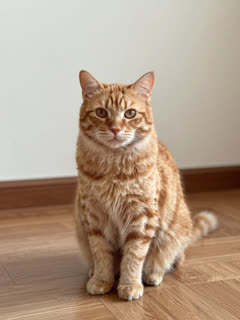
10s · 720p · AI-generated audio · Made 2026-10-23
Generated with MimicZip
AI-generated audio, no words. Not the trending sound.
Example people are fictional.
Unlike sites that use videos downloaded from TikTok as their examples, every example here was made on MimicZip from a single photo — what you see is what our generator actually produced.
Examples are shown for illustration, not as a promise of identical output. Faces, motion and sound change with your photo.
The trend, explained
What is the Singing Pet trend?
Singing Pet is an AI video trend from October 2026: a dog or cat stands in the bathroom after a bath, a white towel around its waist, holds a hair dryer like a microphone and belts an opera high note with a very serious face.
The first towel-and-hair-dryer clip we found was a Rottweiler posted by @tinaverrico on 14 October 2026, made with a CapCut template. Within days boxers, pit bulls, doodles and a tuxedo cat followed, all 10 seconds long and almost all on the same trending sound.
The idea is older: a chihuahua “shower concert” clip from December 2025 reached about 4.2 million views. The 2026 version added the towel and the hair dryer, which is what people now copy.
Read more: The first towel-and-hair-dryer version (@tinaverrico) · The boxer version our timing follows (@boandtytheboxerboys) · A tuxedo cat version (@millyjudges)
Where this trend comes from
- @tinaverrico · TikTok · Oct 14, 2026 · 69.7K views — First towel-and-hair-dryer version (AI)
- @kblackwell1975 · TikTok · Oct 16, 2026 · 64.3K views — Pit bull follow-up (AI)
- @boandtytheboxerboys · TikTok · Oct 16, 2026 · 80.5K views — Boxer version, the motion we follow
- @millyjudges · TikTok · Oct 19, 2026 · 6.8K views — Tuxedo cat version (AI)
- @itspocketriot · TikTok · Dec 29, 2025 · 4.2M views — Earlier shower-concert chihuahua, same idea
Links open the original posts. MimicZip is not affiliated with these creators.
What happens in a Singing Pet video
A 10-second video follows four beats in this order. Your photo decides which pet sings; the bathroom comes from the option you pick.
01 · 0–2s
The high note
Your pet stands in its towel, hair dryer up by its head, other paw raised, head back and mouth wide open.
02 · 2–5s
Pure drama
Big head sways, eyes squeezed shut, then a look up at the ceiling while it keeps belting.
03 · 5–8s
Mic check
The hair dryer comes to the mouth like a microphone, a lean toward the camera, then one dead-serious look into the lens.
04 · 8–10s
The finale
Head thrown all the way back on the last long note, paw trembling with emotion.
The camera stays still the whole time, like a phone propped up on the bathroom counter.
How to add the original sound in TikTok
Our videos come with an AI-made original soundtrack. To use the trending sound instead, add it inside TikTok when you post. You can also download a silent version from My videos and put the original sound on that.
- Open the original video of this trend in TikTok, tap the sound name at the bottom, then tap Use this sound.
- Tap Upload and pick the video you downloaded from us.
- Open Volume and turn the video's own sound down to 0, or download the silent version from My videos.
- To line up the beat, use the scissors (trim) to start the sound from 0 seconds, then post.

Need to move where the sound starts? This short video shows how to trim it.

Video: How To Trim Sound On TikTok 2026 (Very Easy) by Software Solutions on YouTube
How to make a Singing Pet video in 3 steps
No bath, no costume, no filming, no prompt to write.
Add a pet photo
Upload one clear photo of your dog, cat or other pet with its face visible. An adult or a toy works too.
Preview it free
Pick 9:16 or 16:9 and a bathroom, tick the photo-consent box and run the free 5-second preview.
Make it and add the sound
Spend 1 credit on the 10-second video, download it, then add the trending sound in TikTok or Reels.
Why people use it
Free preview first
See your pet in the towel before you spend anything.
Timed to the trend
The high notes, the mic moment and the finale land where they do in the viral 10-second clips, so the trending sound lines up.
Made for pets
Dogs and cats work best, and other pets can join in. One photo is enough.
Pick the bathroom
Mirror and vanity like the boxer clip, white tiles and a tub, or a retro pink bathroom. Same price.
No subscription
Buy credits once. They never expire.
Works on your phone
Pick a photo from your camera roll and download a video ready for TikTok, Reels or Shorts.
Ways to play it
Cats and other pets
Cats, rabbits and parrots can sing too. A sharp, front-facing photo is what matters.
Your dog
The classic: a dog in a towel with a hair dryer. Big dogs and small dogs both work.
You
Put yourself in the towel and hit the note. Adults only.
A toy or drawing
A plush toy or a character you drew comes to life and sings.
Which photo works?
One photo is required: the singer. It shows a single pet, adult, toy or drawing, and the face should be easy to see.
Works well
- A clear, well-lit photo of one pet, face and chest visible
- Pet looking toward the camera, eyes open
- JPG, PNG or WebP, up to 10 MB
- Between 300 and 6000 pixels on each side
Avoid
- Babies, children or anyone under 18
- Group photos with several people or animals
- Sunglasses, masks or heavy filters over the face
- Celebrities, famous cartoon or game characters, anyone who has not agreed, or a screenshot of someone else’s clip
Limits: width-to-height ratio between 0.4 and 2.5. Upload only subjects you own or have permission to use.
One-time credit packs
Preview for free, then pay only for the videos you keep. One full 10-second video costs 1 credit.
1 HD video
$9.90
≈ $9.90 / video
One-time payment, no subscription
- Most popular
3 HD videos
$19.90
≈ $6.63 / video
One-time payment, no subscription
5 HD videos
$29.90
≈ $5.98 / video
One-time payment, no subscription
- Secure checkout by Waffo
- Instant credits
- 7-day refund on unused packs
- Failed videos refunded
Singing Pet AI: frequently asked questions
What is the Singing Pet trend?
It is an AI video trend from October 2026: a pet wrapped in a bath towel holds a hair dryer like a microphone and sings an opera high note in the bathroom. The clips are 10 seconds long and use one trending sound.
How do I make a Singing Pet video with my pet?
Upload one photo of your pet, pick a bathroom, run the free 5-second preview, then spend 1 credit on the 10-second video. You do not write a prompt or edit anything.
Can I try it for free?
Yes. New accounts can usually try one free 5-second preview. It is watch-only, carries a PREVIEW badge and cannot be downloaded. The full video costs 1 credit.
Can I add the trending sound so it lines up?
Yes. The video follows the timing of the viral clips, so in TikTok tap Add sound, search for the trend's sound (shown as “original sound – reggie”) and start it from 0 seconds. Download the silent version if you only want that sound.
Is the trending sound in my video?
No. Your video has a new AI-made orchestral track with no words, not the TikTok sound. You add the trending sound yourself when you post.
How many photos do I need?
One. A single photo of the pet that sings.
Does it work with cats?
Yes. Cats work as well as dogs, and so do rabbits, parrots and other pets with a clear face. See the cat and pet page.
Does the video have a watermark?
The full video has no watermark. Only the free preview carries a PREVIEW badge.
Can I change the bathroom?
Yes. Pick mirror and vanity, white tiles with a bathtub, or a retro pink bathroom. The price is the same. The towel and the hair dryer stay, because they are the joke.
Is there a CapCut template for Singing Pet?
The trend started with a CapCut template. MimicZip is a separate web tool: you upload a photo and get a new video, no app needed.
Do I have to write a prompt?
No. The scene, the timing and the camera are built in. You only pick the photo, the shape and the bathroom.
Which app do people use to make Singing Pet videos?
Most early clips came from a CapCut template. You can also make one here in a browser from one photo, then post it on TikTok, Reels or Shorts.
Is this connected to the people who posted the trend?
No. MimicZip is independent and has no link to the creators, TikTok or CapCut.
What if a video fails, and how long are my photos kept?
A failed video returns its credit automatically. Photos are stored privately and deleted after 14 days.
Is it safe to copy this with my real pet?
Please do not. The hair dryer near a bath is only an AI gag. Never put a pet in a tub next to an electrical appliance.
Ready for the bathroom opera?
One photo, one free preview, then your pet's big high note.
Make my videoQuestions? Email support@mimiczip.com.
MimicZip is an independent AI tool. Not affiliated with or endorsed by the people who posted the original clips, TikTok or CapCut.