Babydoll Dance AI Video Generator: Your Photos on the Country Lane
Add one to four photos: you, your friends or your pets. They do the Babydoll two-step side by side on a tree-lined country lane, then point at the camera and jump. It is the first 15 seconds of the 34-second dance, timed to the viral clip second by second, so the trending sound lines up from 0 seconds.
Free 5s preview · 15s HD video from $9.90 · 9:16 or 16:9 · Full video, no watermark · No subscription
 Made with MimicZip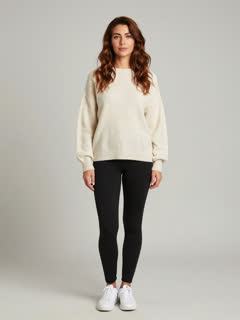
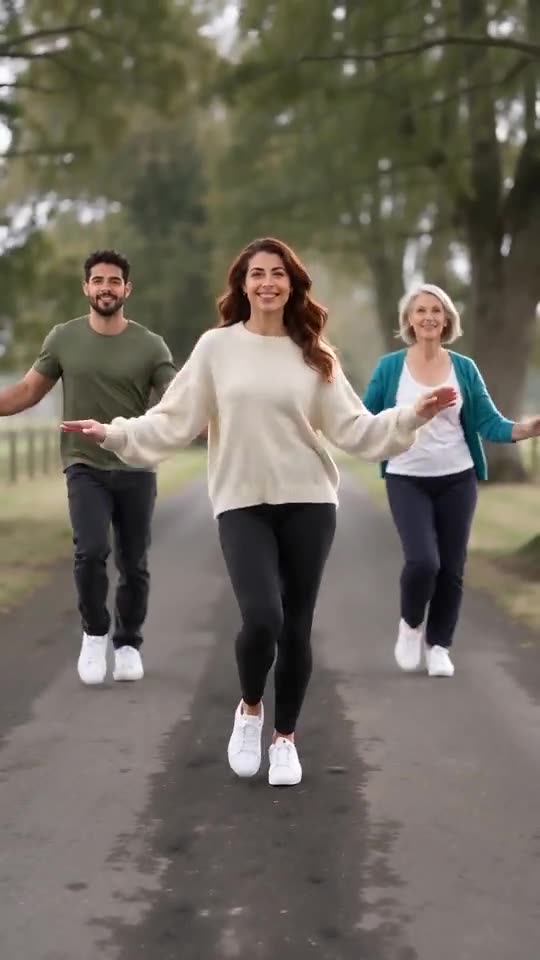
Example frame. Your video uses your photos.
See the lane dancers first, then make yours
These clips were made with MimicZip from AI-generated photos of fictional people and pets. Your result follows your own photos, so it will look different.
- Made with MimicZip
Three friends on the lane
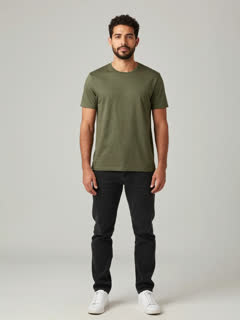
A man in an olive T-shirt (left), a woman in a cream sweater (middle, the lead) and a woman in a teal cardigan (right) dance the two-step side by side. All three are fictional and the input photos are AI-generated.
Place: Country lane · Outfit: My own look
Inputs15s · 720p · AI-generated audio · Made 2026-10-27
Generated with MimicZip
AI-generated upbeat two-step beat, no words. Not the original recording.
Example people are fictional.
- Made with MimicZip
A beagle and a cat dance
A tricolour beagle and a calico cat trot and bounce side by side on a country lane, then stand up on their hind legs at the end. Both are fictional and the input photos are AI-generated.
Place: Country lane · Outfit: My own look
Inputs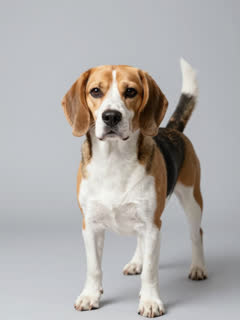
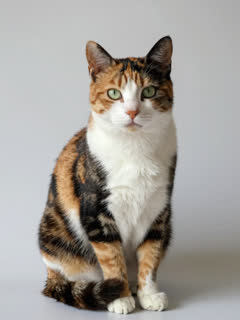
15s · 720p · AI-generated audio · Made 2026-10-27
Generated with MimicZip
AI-generated upbeat two-step beat, no words. Not the original recording.
Example people are fictional.
Unlike sites that use videos downloaded from TikTok as their examples, every example here was made on MimicZip from the photos shown — what you see is what our generator actually produced.
Examples are shown for illustration, not as a promise of identical output. Faces, fur, motion and sound change with your photos.
The trend, explained
What is the Babydoll Dance AI trend?
The Babydoll Dance is a light two-step that friends film outdoors, side by side, on a quiet lane: bouncy side steps, a few arm swings, a point at the camera and a jump. The sound is tagged Babydoll on TikTok.
@jamiemillmusic posted a Babydoll two-step clip on 16 August 2026 that reached about 7.2 million views by our notes. On 14 October 2026 @gracebettyharmer posted three friends dancing it on a country lane, a 34-second clip that reached about 302,000 views. AI versions followed within days, with friends on a lane and pets in a living room. We read these counts on 27 October 2026 and did not audit them.
MimicZip makes your own version from one to four photos of adults or pets. It follows the first 15 seconds of the 34-second @gracebettyharmer clip second by second; the second half of the dance is not in our video. The lane and the dancers are generated: no real footage is used. The site is independent, not affiliated with the creators, the people who posted other versions, TikTok or CapCut.
Read more: The clip we follow: three friends on a country lane by @gracebettyharmer
Where this trend comes from
Use this sound — your video is timed to it, from 0s
@gracebettyharmer · TikTok · Oct 14, 2026 · 302K views — The clip we follow; sound starts at 0s. Three friends dance on a country lane; the 34-second dance, our video uses its first 15 seconds
Links open the original posts. MimicZip is not affiliated with these creators.
What happens in a Babydoll Dance AI video
A 15-second video follows four beats in this order, on one fixed camera. It covers the first 15 seconds of the 34-second dance. Timings are approximate, and the 5-second preview runs through the same beats faster.
01 · 0–4s
Two-step in
The dancers walk-bounce toward the camera in a line, stepping side to side with loose, swinging arms. With three or four, the lead stands in the middle, a step ahead.
02 · 4–8s
Arms out
Arms stretch out to the sides as they hop and sidestep together, loose and playful, the lead smiling at the lens.
03 · 8–11s
Bigger moves
Wide-legged steps, hip swings and a quick turn, all still side by side and in sync.
04 · 11–15s
Point and jump
Everyone faces the camera and points at it on the beat, then throws their hands up and jumps.
Your photos decide who dances where. The lane, the camera and the order of the moves are fixed, and every result comes out a little different. The 34-second original has more after this; our video stops at 15 seconds.
How to add the original sound in TikTok
Open the clip marked above, tap Use this sound, upload your video and keep the sound at 0s.Show the full how-to
Our videos come with an AI-made original soundtrack. To use the trending sound instead, add it inside TikTok when you post. You can also download a silent version from My videos and put the original sound on that.
- Open this clip in TikTok: our video follows it. Tap the sound name at the bottom, then tap Use this sound.
- Tap Upload and pick the video you downloaded from us.
- Open Volume and turn the video's own sound down to 0, or download the silent version from My videos.
- To line up the beat, use the scissors (trim) to start the sound from 0 seconds, then post.

Need to move where the sound starts? This short video shows how to trim it.

Video: How To Trim Sound On TikTok 2026 (Very Easy) by Software Solutions on YouTube
How to make a Babydoll Dance AI video in 3 steps
No filming, no prompts and no editing app.
Add one to four photos
Upload one clear photo of the lead dancer, who stands in the middle, then add up to three more people or pets. A full-body photo works best. JPG, PNG or WebP, up to 10 MB each.
Try the free preview
Pick 9:16 or 16:9, a place and an outfit, tick the photo-consent box and log in. You get a free 5-second 480p preview.
Make the full video
Spend 1 credit on a 15-second 720p video. You can close the page while it renders and find it in My videos.
Which photos work?
One photo is enough; the first box is the lead dancer. You can add up to three more, and each photo shows a single adult or a single pet, ideally full body.
Works well
- A clear, well-lit photo of one adult or one pet in each box, full body or at least down to the knees
- Subject facing the camera and not covered
- JPG, PNG or WebP, up to 10 MB
- Between 300 and 6000 pixels on each side
Avoid
- Toys, drawings or cartoon characters: this template takes adults and pets only
- Babies or anyone under 18
- Two subjects in the same photo, sunglasses, masks or heavy filters over the face
- Celebrities, famous characters, anyone who has not agreed, or a screenshot of someone else’s clip
Limits: width-to-height ratio between 0.4 and 2.5. Upload only subjects you own or have permission to use.
Ways to play it
Three friends
Three adults, one photo each (with their OK), the lead in the middle.
Two pets
Your cat and dog, or any two pets, dancing upright like little people.
You and your pet
You on one side, your pet at your side.
Just you
One photo, one lead dancer in the middle of the lane.
Why people use it
Free preview first
See your photos do the two-step before you spend anything.
One to four dancers
Dance alone, as a pair, or as a trio or quartet, with the lead in the middle.
People or pets
Adults, cats, dogs and other pets can dance upright, even in a mix.
No subscription
Buy credits once. They never expire.
Timed to the sound
The moves follow the viral clip, so the trending sound lines up when you post.
Pick the place and outfit
Country lane (the default), seaside promenade, city street or living room; your own look, black hoodies or bright sweatshirts.
One-time credit packs
Preview for free, then pay only for the videos you keep. One full 15-second video costs 1 credit.
1 HD video
$9.90
≈ $9.90 / video
One-time payment, no subscription
- Most popular
3 HD videos
$19.90
≈ $6.63 / video
One-time payment, no subscription
5 HD videos
$29.90
≈ $5.98 / video
One-time payment, no subscription
- Secure checkout by Waffo
- Instant credits
- 7-day refund on unused packs
- Failed videos refunded
Babydoll Dance AI: frequently asked questions
What is the Babydoll Dance AI trend?
Friends dance a light two-step side by side on a quiet lane, then point at the camera and jump. It went viral in October 2026 on TikTok, with AI versions using your own photos. The explainer guide has the timeline.
How do I make the Babydoll Dance video with my photos?
Upload one to four photos, pick 9:16 or 16:9, then start. A few minutes later you get a 15-second 720p MP4 on a country lane. The how-to guide lists each step.
Is it free to try?
Yes. New accounts can usually try 1 free 5-second 480p preview, once for life, and at most one free preview per network every 30 days. The full 15-second 720p video needs 1 credit, with packs from $9.90. The free preview is watch-only: it carries a PREVIEW badge and cannot be downloaded.
How long is the video?
15 seconds. The original clip we follow runs 34 seconds, and ours covers its first 15 seconds; the longer second half is not included. Tap “Want the full-length version?” in the generator to tell us you want it. The 5-second preview squeezes the same moves.
Will the original sound line up if I add it?
Yes. Our video follows the @gracebettyharmer clip second by second for its first 15 seconds. Open that clip in TikTok, tap its sound, use it on your video and keep it starting at 0 seconds. We could not confirm who made the sound, so we name no artist.
How many photos do I need?
One is enough, and you can add up to four. The first photo is the lead dancer in the middle; the second stands on their left, the third on their right and the fourth at the far right. Each photo shows a single adult or a single pet, as a JPG, PNG or WebP file up to 10 MB.
Can I use my cat, dog or another pet?
Yes. Pets bounce along with the routine, can stand up on their hind legs like little people and keep their own fur and markings; in our example the pets mostly trot side by side and stand up at the end. You can use pets only, people only or a mix. Pet results vary, so check the free preview first.
What sound is used, and is it in my video?
The trend clips use a Babydoll-tagged track. Our video does not include it: MimicZip generates its own upbeat instrumental two-step beat with no words, and you add the trending sound in TikTok.
More questions (8)
Is there a watermark, and can I post it on TikTok or Reels?
The free preview wears a PREVIEW badge and can’t be saved, while the full video has no watermark. Yes, you can post it: pick 9:16 for TikTok and Reels and add the trending sound in the app. Keep the platform’s AI-generated label on.
Can I do it alone?
Yes. With one photo you get one lead dancer in the middle of the lane doing the whole routine. Adding friends or pets makes it a group, and each extra photo adds one more dancer beside the lead.
Can I change the place or the outfit?
Yes, from presets. Places: a country lane (the default, like the original), a seaside promenade, a city street or a living room. Outfits: the looks from your photos (the default), matching black hoodies or bright sweatshirts. The camera and the moves stay the same, and the options do not change the price.
Is the lane real, and are the people in the clip?
No. Everything in our video is generated by AI, the lane included. No real footage is used, and everyone in your video is whoever is in your photos, never the dancers from the viral clip.
Is there a CapCut template for the Babydoll Dance?
Phone-app templates and AI template sites offer friends and pets versions, and template apps such as CapCut often carry trends like this one. A template works inside its own app, while MimicZip needs photos on the web and gives a finished 15-second video with a free preview. The comparison explains when each one fits.
Do I have to write a prompt?
No. This is a fixed template, so there is no prompt box: you add photos and pick the place, the outfit and the video shape. Prefer your own tool? Copy the ready-made prompt from the Kling prompt page.
Is this connected to the creators or the people who posted the trend?
No. MimicZip is an independent AI tool with no link to the creators of the original clips, the accounts that posted other versions, TikTok or CapCut. It makes new videos from your photos.
What if a video fails, and how long are my photos kept?
A failed generation returns its credit automatically, and unused packs can be refunded within 7 days; see the refund policy. Photos are stored privately and deleted automatically 14 days after upload.
Updated:
Your photos. Your lane. Your two-step.
Free 5-second preview, then 15-second HD from $9.90.
Questions? Email support@mimiczip.com.
MimicZip is an independent AI tool. Not affiliated with or endorsed by the creators of the original clips, the people who posted other versions, TikTok or CapCut. Videos are AI-generated: no real footage is used.