Lil T Jones Dance AI Video Generator (Pet Version)
Also called: Lil T Jones, Lil T Jones Trend, Lil T Jones Dance Filter, Lil T Jones Pet Dance, Lil T Jones AI
Turn one photo of your pet into the Lil T Jones dance: a fixed camera in a living room while your cat or dog stands up, giggles behind a paw, presses the paws together, salutes, bounces and kicks, turns halfway round and waves both paws, second by second like the viral routine. This is the pet version: photos of people are not accepted. Every pack includes bonus previews, so you can check your photo first.
10s HD video from $8.99 · no subscription · Pets only · 9:16 or 16:9 · No subscription
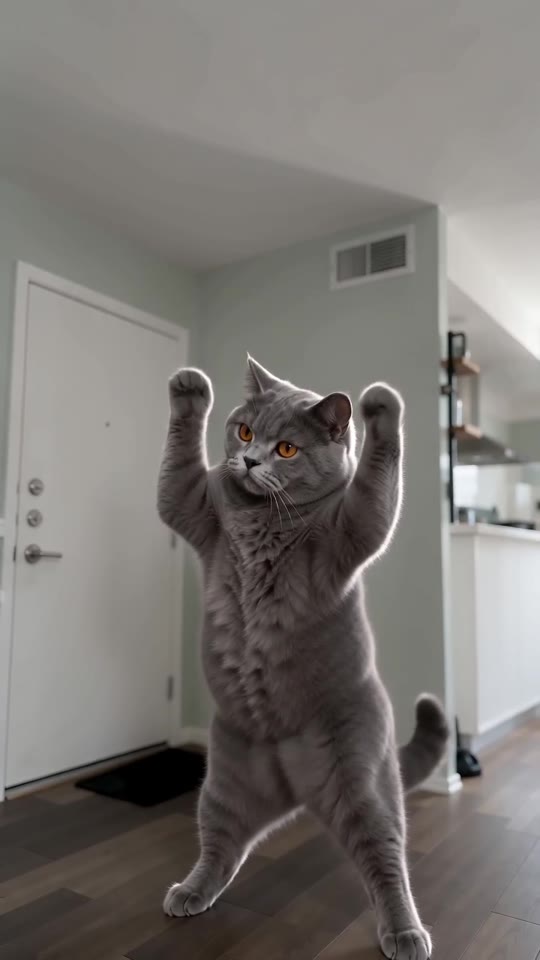 Made with MimicZip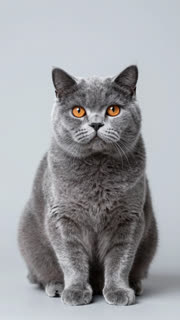
Example frame. Your video uses your own photo.
Dancer
Required. One pet facing the camera, with the whole body in view from the ears to the paws: your cat, your dog or another pet. Pets only: no people, toys or drawings
For the best result
- A clear, well-lit photo of one pet, facing the camera
- The whole body in the frame, from the ears to the paws
- JPG, PNG or WebP, up to 10 MB
More photo tips
Before you upload
- One pet in the photo, facing the camera (pets only, no people)
- Whole body in view, from the ears to the paws
- Good light, no heavy filters
- No two pets in one photo
The video is held first and comes back to your balance if it fails
- This video
- 1 video
- Your balance
- —
- Buy videos
Full video: 10s at 720p, downloadable. Uses 1 video from your balance. Unused videos never expire.
Any problem with your video? Email support@mimiczip.com first — a real person will sort it out for you.
See the giggle, the salute and the kicks
This clip was made with MimicZip from an AI-generated photo of a fictional British Shorthair cat. Your result follows your own photo, so it will look different.
- Made with MimicZip
A British Shorthair cat does the whole routine
A blue-grey cat stands up in a living room, covers its mouth with a paw as if giggling, presses its paws together, salutes, bounces, kicks, turns halfway round and waves both paws beside its head. It is a fictional cat and the input photo is AI-generated.
Place: Living room · Outfit: Just its fur · Colour tone: Natural colours
Inputs10s · 720p · AI-generated audio · Made 2026-10-31
Generated with MimicZip
AI-generated music, which can include made-up vocals. Not the original recording.
Example people are fictional.
Unlike sites that use videos downloaded from TikTok as their examples, every example here was made on MimicZip from a single photo — what you see is what our generator actually produced.
Examples are shown for illustration, not as a promise of identical output. Faces, motion and sound change with your photo.
The trend, explained
What is the Lil T Jones dance?
The Lil T Jones dance is a short living-room routine on a fixed camera: a shy giggle behind a hand, the palms pressed together, a salute at the side of the head, bouncing knees with a kick to each side, a half turn, arm waves and, in the original, a bend and a deep squat at the end. The sound is a clip of “Lil TJones” by BeatKing, posted on TikTok as “original sound - primitive_villaa”.
@frecklefacejb posted the original choreography on 7 October 2026, at about 1.2 million views. @sydcolson remade it on 17 October (about 241,000 views), and @brad_sherry’s living-room version on 28 October (about 511,000) is the one many AI templates copy. None of the three posts is labelled as AI-generated, so the AI versions seem to live mostly in template apps. Counts were read on 31 October 2026 and not audited.
MimicZip makes the pet version: from one photo of a cat, a dog or another pet it follows seconds 3 to 13 of the original, from the shy giggle to the arm waves. The last squat is not included. The song is not in the video: add it in TikTok. MimicZip is an independent template tool, and your video is generated from your own photo, not made, endorsed or licensed by BeatKing, the owners of “Lil TJones” or the accounts that posted the trend.
Read more: The original routine we follow (@frecklefacejb) · The living-room version (@brad_sherry)
Where this trend comes from
The clip we follow
@frecklefacejb · TikTok · Oct 7, 2026 · 1.2M views — The clip we follow: the original choreography, danced alone in a living room. Our video matches seconds 3 to 13 of the 22-second post- @sydcolson · TikTok · Oct 17, 2026 · 240.9K views — A remake of the same routine
- @brad_sherry · TikTok · Oct 28, 2026 · 511.1K views — The living-room version that many AI templates copy
Links open the original posts. MimicZip is not affiliated with these creators.
What happens in a Lil T Jones Dance video
A 10-second video is one continuous take on a fixed camera, full body. Timings are approximate, and the 5-second preview runs through the same moves faster.
01 · 0–1.5s
Shy giggle
Your pet stands up and covers its mouth with a front paw, shoulders bouncing, as if giggling.
02 · 1.75–3s
Prayer and salute
The paws press together in front of the chest, then one paw sweeps up high and comes down in a cheeky salute at the side of the head.
03 · 3–5s
Bounce and kick
Knees bouncing on the beat, then one foot kicks out to the side, then the other.
04 · 5–7.2s
Hands on hips, half turn
The paws go on the hips, then a half turn shows the back to the camera before it turns round again.
05 · 7.5–10s
Arm waves
Both paws swing beside the head, the hips sway and the body leans forward with plenty of energy.
Your photo decides who dances. The camera, the framing and the order of the moves are fixed, and every result comes out a little different.
How to add the original sound to your Lil T Jones Dance AI video in TikTok
Pick the song inside TikTok when you post, then turn the video's own sound down.Show the full how-to
Our video comes with new AI-made music. To use the trending sound, add it inside TikTok when you post. Our video follows seconds 3 to 13 of the @frecklefacejb post, so the sound should start about 3 seconds in.
- Open the @frecklefacejb post in TikTok, tap the sound name at the bottom (“original sound - primitive_villaa”) and tap Use this sound.
- Upload the video you downloaded from us, or the silent version from My videos.
- Turn the video's own sound down to 0.
- Use the scissors (trim) to start the sound about 3 seconds in, where the paw goes over the mouth, nudge it until the beat feels right, then post.

Need to move where the sound starts? This short video shows how to trim it.

Video: How To Trim Sound On TikTok 2026 (Very Easy) by Software Solutions on YouTube
How to make a Lil T Jones Dance video in 3 steps
No filming, no choreography and no editing app.
Add your pet’s photo
Upload one clear photo of your cat, dog or other pet, standing or sitting and facing the camera, with the whole body in view. JPG, PNG or WebP, up to 10 MB.
Choose your options
Pick 9:16 or 16:9, the place (a plain living room by default), a tiny outfit and the colour tone, tick the photo-consent box and log in. Every pack includes bonus 5-second previews.
Make the full video
Spend 1 credit on a 10-second 720p video. Download it, then add the sound and your caption in TikTok.
Which photo works?
One photo is required: the dancer. It shows a single pet, facing the camera, with the whole body in view from the ears to the paws.
Works well
- A clear, well-lit photo of one pet, facing the camera
- The whole body in the frame, from the ears to the paws
- JPG, PNG or WebP, up to 10 MB
- Between 300 and 6000 pixels on each side
Avoid
- Photos of people, babies or children: this version takes pets only
- Toys or drawings
- Two pets in one photo, or a photo cut off at the chest
- A screenshot of someone else’s clip
Limits: width-to-height ratio between 0.4 and 2.5. Upload only photos you have permission to use.
Ways to play it
Your cat
A cat on two legs that giggles behind a paw and salutes.
Your dog
A dog that kicks, turns and waves both paws like it means it.
A tiny outfit
Dress your pet in a pastel hoodie, a white tee, a cream sweater, a denim jacket or pyjamas.
A different room
Move the dance to a bedroom, a kitchen, a garden, a hallway or a photo studio.
Why people use it
Bonus previews in every pack
See your pet stand up before you spend a credit.
Follows the original routine
Giggle, prayer, salute, kicks, turn and arm waves: the same order as the viral dance.
Cats, dogs and more
Any pet with a clear body and face works. This version is for pets only.
Six places and six tiny outfits
A living room, a bedroom, a kitchen, a garden, a hallway or a photo studio, with a hoodie, a tee, a sweater, a denim jacket or pyjamas. Same price.
No subscription
Buy credits once. They never expire.
Works on your phone
Pick a photo from your camera roll and download a video ready for TikTok, Reels or Shorts.
One-time credit packs
Pay only for the videos you make. One full 10-second video costs 1 credit.
1 HD video
$8.99
≈ $8.99 / video
+ 1 extra preview
One-time payment, no subscription
- Most popular
3 HD videos
$16.99
≈ $5.66 / video
+ 3 extra previews
One-time payment, no subscription
5 HD videos
$25.99
≈ $5.20 / video
+ 5 extra previews
One-time payment, no subscription
- Secure checkout by Waffo
- Instant credits
- 7-day refund on unused packs
- Failed videos refunded
Lil T Jones Dance AI: frequently asked questions
What is the Lil T Jones dance AI trend?
A short fixed-camera living-room routine: a shy giggle, a prayer, a salute, bouncy kicks, a half turn and arm waves. AI versions put someone else in the lead; here that is your pet. The explainer guide has the timeline.
How do I make the Lil T Jones dance with my pet's photo?
Upload one full-body photo of your pet, pick the place, the tiny outfit and the colour tone, check your photo with a 5-second bonus preview, then make the full 10-second 720p video for 1 credit. There is no prompt to write. The how-to guide covers each step.
Can I try it for free?
Not at the moment. MimicZip has no free tier or free preview; one full 10-second 720p video costs 1 credit, and packs start at $8.99. Every pack includes bonus watch-only previews so you can check your photos before spending a credit. There is no subscription, and the full video has no watermark.
Which song does the Lil T Jones dance use?
A clip of “Lil TJones” by BeatKing, posted on TikTok as “original sound - primitive_villaa”. We do not include it. The sound guide says how to add it.
Can I add the original sound and will it line up?
Yes. Our video follows seconds 3 to 13 of the @frecklefacejb post, so add the primitive_villaa sound in TikTok and start it about 3 seconds in, where the paw goes over the mouth. If the beat is slightly off, nudge it in the TikTok editor.
Is the sound in my video?
No. Our video comes with new AI-made music, never the original recording. You add the trending sound inside TikTok, where it is licensed. A silent download is available.
Is this connected to BeatKing or the people who posted it?
No. MimicZip is an independent template tool. Your video is generated from your own photo and is not made, endorsed or licensed by BeatKing, the owners of the song or the accounts that posted the trend.
Can I use a photo of a person?
No. This is the pet version, so it takes photos of cats, dogs and other pets only. Photos of people, babies and children, toys and drawings are not accepted.
More questions (6)
How many photos do I need?
One. The template has a single role, the dancer, so add one sharp photo of a single pet, facing the camera, with the whole body in view.
Does the video have a watermark?
The full 10-second 720p video has no watermark. Only a preview carries a PREVIEW badge, and the preview cannot be downloaded.
Can I change the place or add a tiny outfit?
Yes. Places: a plain living room (the default), a bedroom, a kitchen, a garden, a hallway or a photo studio. Outfits: just its fur (the default), a pastel hoodie, a white tee, a cream sweater, a denim jacket or pyjamas. Colour tone: natural by default, or warm, cool, pastel, vivid or retro film. The moves and the timing stay the same.
Is there a CapCut template for Lil T Jones?
AI templates for the dance have circulated since late October. A template works inside its own app, while MimicZip needs one photo of a pet on the web and gives a finished 10-second video. The comparison explains when each one fits.
What if a video fails, and how long are my photos kept?
A failed generation returns its credit automatically, and unused packs can be refunded within 7 days; see the refund policy. Photos are stored privately and deleted automatically 14 days after upload.
Was the Lil T Jones example really made on MimicZip?
Yes, it went through the MimicZip generator, starting from the input photo on its card. That starting photo is AI-made and does not show a real pet. We never use another creator's video as an example.
Updated:
Ready to see your pet dance?
One photo, a bonus preview with every pack, then your own Lil T Jones Dance video.
Make my videoYour pet. Your routine.
10-second HD video from $8.99. No subscription, no watermark.
Questions? Email support@mimiczip.com.
MimicZip is an independent AI tool. Lil T Jones is an internet meme name, and its sound is a clip of “Lil TJones” by BeatKing: MimicZip is not affiliated with or endorsed by BeatKing, the accounts that posted the trend or TikTok. Videos are AI-generated.