Pet Seal Filter AI Video Generator
Also called: Seal Filter, Dog Seal Filter, Cat Seal Filter, Trying the Seal Filter, Dog Turns Into a Seal, Seal Transformation
Turn one photo of your dog or cat into the Pet Seal Filter video. Your pet sits still for a moment, a line of light sweeps across the picture and it becomes a round, chubby seal that keeps its own face and colours. No filming, no editing, no prompt.
6s HD video from $8.99 · no subscription · Dog or cat to seal · Full video, no watermark · No subscription
 Made with MimicZip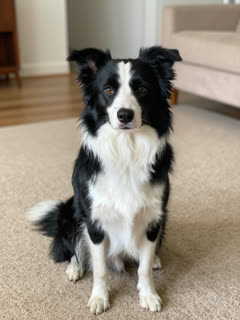
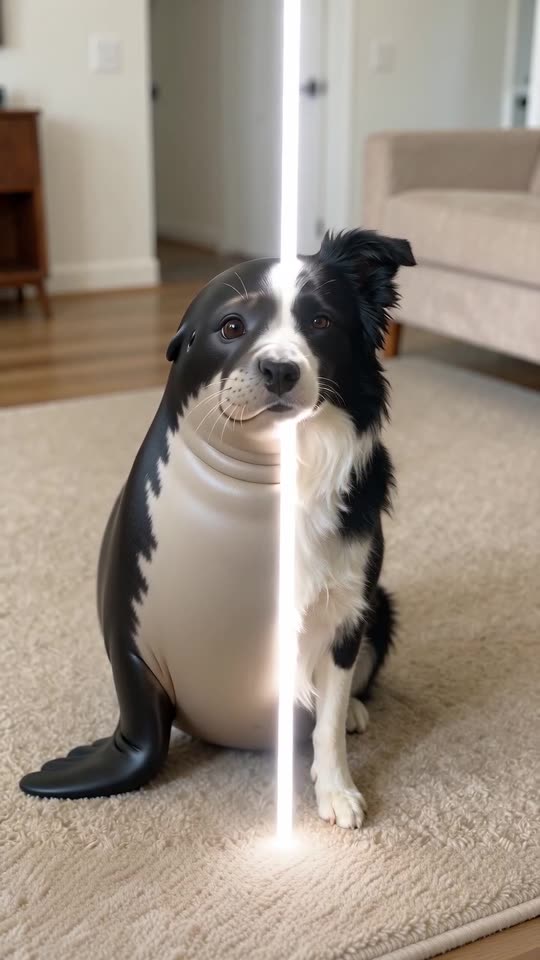
Example frame, halfway through the sweep. Your video uses your own pet's photo.
The pet
Required. One dog or cat facing the camera, sitting or standing, with the whole body in view. Your own pet, or one you may use. No people and no children
For the best result
- A clear, well-lit photo of one dog or cat, facing the camera
- The whole animal in view, from the head to the paws
- JPG, PNG or WebP, up to 10 MB
More photo tips
Before you upload
- One dog or cat in the photo, facing the camera (no people, no children)
- Whole body in view, from the ears to the paws
- Good light and a tidy background
- No second animal, and nobody holding the pet
The video is held first and comes back to your balance if it fails
- This video
- 1 video
- Your balance
- —
- Buy videos
Full video: 6s at 720p, downloadable. Uses 1 video from your balance. Unused videos never expire.
Any problem with your video? Email support@mimiczip.com first — a real person will sort it out for you.
See the sweep, then make yours
This clip was made with MimicZip from an AI-generated photo of a fictional border collie: the dog sits still, a white line crosses the room and a plump seal in the dog's black and white colours is sitting there.
- Made with MimicZip
A border collie becomes a seal
A black-and-white border collie sits on a beige carpet. A bright line of light sweeps across, and behind it the dog is a round grey seal with the dog's markings, blinking at the camera.
Turns into: Seal · Place: My photo's place · Line colour: White
Inputs6s · 720p · AI-generated audio · Made 2026-10-31
Generated with MimicZip
AI-generated ambient sound with a soft whoosh during the sweep, no music and no voice. Not the original recording.
Example people are fictional.
Unlike sites that use videos downloaded from TikTok as their examples, every example here was made on MimicZip from a single photo — what you see is what our generator actually produced.
Examples are shown for illustration, not as a promise of identical output. Faces, motion and sound change with your photo.
The trend, explained
What is the Pet Seal Filter trend?
The Pet Seal Filter is a short transformation clip: a photo of a dog or cat sits still for about two seconds, a line of light sweeps across the picture, and the pet turns into a round, chubby seal that keeps its own face and fur colour. Owners post it with a caption such as “trying the seal filter”, and it is also called the Dog Seal Filter.
The look began as a CapCut template, a ready-made editing layout in the CapCut app. A black puppy post by @zeustlabrottie on 11 June 2026 (about 262,000 views) started a first wave, and a bulldog post by @staciepeters3 on 6 July 2026 (about 1.8 million views) was its biggest. A second wave began on 18 October 2026, when @sablespins posted a black Labrador at about 399,600 views, marked by TikTok as AI-generated. View counts were not audited.
MimicZip makes your own version from one photo of your pet, as a video of 6 seconds that follows the same beats: still pet, sweep, seal. The pet keeps its coat colours and markings on the seal's body, and the room, the light and the sweep are generated.
The clip we follow (@sablespins, 18 October 2026) · The biggest first-wave post (@staciepeters3, 6 July 2026) · The post that started the first wave (@zeustlabrottie, 11 June 2026)
Where this trend comes from
Use this sound — your video is timed to it, from 0s
@sablespins · TikTok · Oct 18, 2026 · 399.6K views — The clip we follow: a black Labrador, still for two seconds, a line sweeps across, a round seal sits there. Our video follows its first 6 seconds- @staciepeters3 · TikTok · Jul 6, 2026 · 1.8M views — The biggest post of the first wave: a bulldog turns into a seal
- @zeustlabrottie · TikTok · Jun 11, 2026 · 262.4K views — The post that started the first wave: a black puppy on a white chair
- @d.0.gz · TikTok · Sep 2, 2026 · 823 views — Where the newer template version and its sound first appeared
Links open the original posts. MimicZip is not affiliated with these creators.
What happens in the Pet Seal Filter video
The 6-second video is one fixed shot at eye level, in four beats that follow the original posts. Timings are approximate.
01 · 0–2s
Still pet
Your pet sits in the middle of the picture, looking at the camera, calm and attentive, exactly as in your photo.
02 · 2–4s
The sweep
A thin bright line of light starts to cross the picture from the left. Behind it the pet is changing.
03 · 4–5s
Half and half
On one side of the line there is still your pet, on the other side a smooth, plump seal with your pet's colours.
04 · 5–6s
The seal
The line leaves the picture and the seal looks into the lens, blinks slowly and twitches its whiskers.
Your photo decides which pet changes and what colours the seal wears. The camera and the order of the beats stay the same; the options only change what it turns into, where it sits and the colour of the line.
How to add the original sound in TikTok
Open the clip marked above, tap Use this sound, upload your video and keep the sound at 0s.Show the full how-to
Our videos come with an AI-made original soundtrack. To use the trending sound instead, add it inside TikTok when you post: that also puts your video on the sound's page, where people following the trend look. You can also download a silent version from My videos and put the original sound on that.
- Open this clip in TikTok: our video follows it. Tap the sound name at the bottom, then tap Use this sound.
- Tap Upload and pick the video you downloaded from us.
- Open Volume and turn the video's own sound down to 0, or download the silent version from My videos.
- To line up the beat, use the scissors (trim) to start the sound from 0 seconds, then post.

Need to move where the sound starts? This short video shows how to trim it.

Video: How To Trim Sound On TikTok 2026 (Very Easy) by Software Solutions on YouTube
How to make a Pet Seal Filter video in 3 steps
No filming, no app to learn and no prompts.
Add your pet's photo
Upload one clear photo of your dog or cat sitting or standing, facing the camera, with the whole body in view. JPG, PNG or WebP, up to 10 MB.
Pick what it turns into
Choose a seal, a penguin, a sea otter, a piglet or a hamster, then a place and a line colour, and 9:16 or 16:9. The defaults are a seal, your own room and a white line.
Make the full video
Spend 1 credit on the 6-second 720p video. Download it and post it with the sound you like.
Which photo works?
One photo is required: your pet. It shows one dog or cat, sitting or standing and facing the camera, with the whole body in view and nobody else in the picture.
Works well
- A clear, well-lit photo of one dog or cat, facing the camera
- The whole animal in view, from the head to the paws
- JPG, PNG or WebP, up to 10 MB
- Between 300 and 6000 pixels on each side
Avoid
- Photos of people or children: this template is for pets only
- Two animals in one photo, or a pet cut off by the edge of the picture
- Toys, drawings or cartoons
- Very dark or blurry photos, or a frame taken from the original posts
Limits: width-to-height ratio between 0.4 and 2.5. Upload only photos of pets you may use.
What your pet can turn into
Seal
The default: a smooth, round seal sitting upright on its flippers.
Penguin
A plump penguin standing upright with small flippers.
Sea otter
A round sea otter with its paws held together on its belly.
Piglet
A chubby little pig with short legs and a curly tail.
Hamster
A ball-shaped hamster with tiny paws and tiny ears.
Why people use it
Keeps your pet's colours
The seal wears the coat colours and markings from your photo, not a generic grey.
The sweep, as it should be
Still pet, a line of light, a seal: the three beats of the original filter.
Five things to turn into
A seal by default, or a penguin, a sea otter, a piglet or a ball of a hamster.
Five places, five line colours
Your own room by default, or a beach, an icy shore, a poolside or a sofa; a white line, or cyan, pink, gold or green.
Bonus previews in every pack
Check your pet and the change before you spend a credit.
No subscription
Buy credits once. They never expire.
One-time credit packs
Pay only for the videos you make. One full 6-second video costs 1 credit.
1 HD video
$8.99
≈ $8.99 / video
+ 1 extra preview
One-time payment, no subscription
- Most popular
3 HD videos
$16.99
≈ $5.66 / video
+ 3 extra previews
One-time payment, no subscription
5 HD videos
$25.99
≈ $5.20 / video
+ 5 extra previews
One-time payment, no subscription
- Secure checkout by Waffo
- Instant credits
- 7-day refund on unused packs
- Failed videos refunded
Questions people ask
What is the Pet Seal Filter trend?
A short clip where a pet photo sits still, a line of light sweeps across and the pet turns into a round, chubby seal that keeps its own face and colours. It began as a CapCut template in June 2026.
How do I make the Pet Seal Filter video with my pet?
Upload one photo of your dog or cat, pick what it turns into, a place and a line colour, choose 9:16 or 16:9 and make the video. You write nothing; the sweep is already scripted.
Can I try it for free?
Not at the moment. MimicZip has no free tier or free preview; one full 6-second 720p video costs 1 credit, and packs start at $8.99. Every pack includes bonus watch-only previews. There is no subscription, and the full video has no watermark.
Which sound goes with the Pet Seal Filter?
The posts use a sound from the template account, such as “original sound - D.O.G” in the second wave. Our video has only quiet ambience and a soft whoosh, so download the silent version and add the sound in TikTok.
Is this connected to CapCut or the accounts that posted it?
The look also spread as a CapCut template. MimicZip is an independent template tool: your video is generated from your own photo and is not made, endorsed or licensed by CapCut, TikTok or the accounts that posted the trend.
Can I use a photo of a person?
No. This template takes pets only: a dog or a cat. Photos of people, children, toys and drawings are not accepted.
Will the seal look like my pet?
The seal keeps your pet's coat colours, markings and eye colour, and a hint of its face. A seal has a seal's face, so it will not look like a dog drawn on a seal. A bonus preview shows you the result before you spend a credit.
Does the line move at the same speed as in the original?
Not exactly. The sweep is drawn by AI, so its speed can change from run to run, and the change may finish a little ahead of or behind the line.
More questions (5)
Can I change what it turns into?
Yes. There are five choices, five places and five line colours, and none of them changes the price. The default combination is the one we tested.
Does the video have a watermark?
No. The full video has no watermark and no text. Previews carry a PREVIEW badge and cannot be downloaded.
How popular is the Pet Seal Filter trend?
It is a template that returned in waves: about 1.8 million views on the biggest post in July 2026, and about 399,600 on the October clip we follow. We call it a recurring trend, not a new one.
What if a video fails, and how long are my photos kept?
A failed render returns its credit by itself. Photos are stored privately and deleted after 14 days.
Was the Pet Seal Filter example really made on MimicZip?
Yes. It was generated here from a single AI-made photo of a fictional border collie, with the default seal, the dog's own room and a white line.
Updated:
Ready to turn your pet into a seal?
One photo, a bonus preview with every pack, then your own Pet Seal Filter video.
Make my videoYour pet. One sweep. One seal.
6-second HD video from $8.99. No subscription, no watermark.
Questions? Email support@mimiczip.com.
MimicZip is an independent AI tool. Pet Seal Filter is an internet meme name: MimicZip is not affiliated with or endorsed by CapCut, TikTok or the accounts that posted the trend, and the pet in our videos is yours, not the animals from the original posts.