How do I make an I'm So In Love With You AI dance video?
Updated:
Short answer
Upload one photo of yourself, an adult friend or your pet, pick a stairwell or another place and an outfit, and MimicZip builds the two-pose clip. Check a 5-second bonus preview, then spend 1 credit on the 8-second 720p video and add the sound from 0 seconds. No prompt to write.
From one photo to both poses
- Open the template page. There is a single box, for the singer. Use a sharp photo of one adult or one pet from the waist up or full body, with the face easy to see and the hands out of the way, as JPG, PNG or WebP up to 10 MB. Toys, drawings and children are not accepted.
- Choose the place: stairwell (the default and the closest to the clip), bright kitchen, bedroom, school hallway, living room or rooftop at dusk. Choose the outfit: your own clothes, a navy sweatshirt, a bright hoodie, a white tee, a cream cardigan or a denim jacket. Choose the colour tone: natural, warm, cool, pastel, vivid or retro film. None changes the price.
- Pick 9:16 for TikTok, Reels and Shorts, or 16:9 for YouTube and desktop screens.
- Consent, login, pack. Tick the photo-consent box and sign in with Google. Previews come inside a pack, so take one if you have no credits.
- Check the preview. It is watch-only, 5 seconds at 480p, with a PREVIEW badge. Look at the face and at both poses; for a pet, the standing pose on its hind legs can look a bit stiff, and a blurred fist or paw for a moment is normal, not a failed render.
- Render: 1 credit gives the 8-second 720p MP4 with no watermark, saved in My videos.
- Add the sound in TikTok and start it at 0 seconds.
The two poses already built in
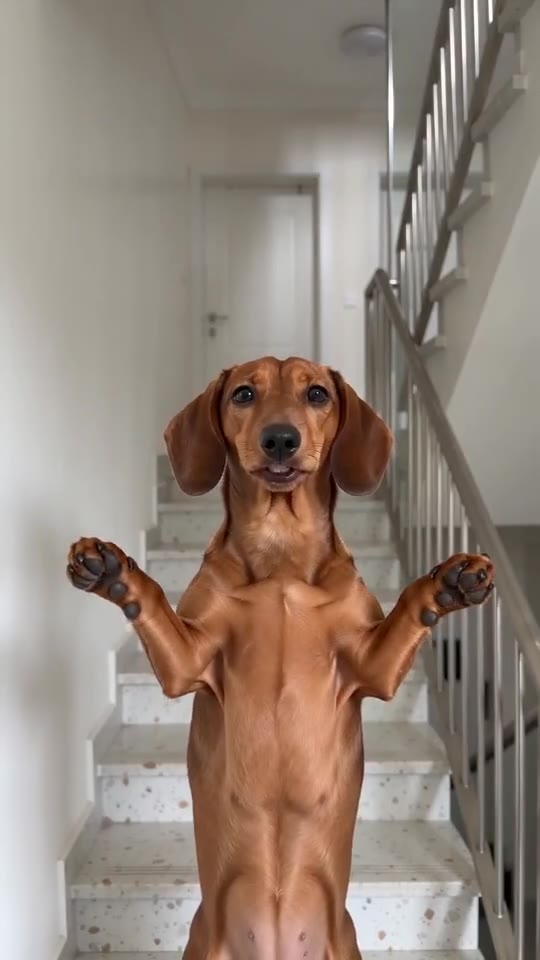
A fixed camera and the order of the poses are set. From 0 to 4 seconds you face the lens with both arms out at shoulder height, elbows bent, fists clenched and chest out, swaying slowly as you sing along. At about 4 seconds both fists drop to your hips, the elbows point out and the shoulders shrug in time until 7 seconds, then your head tips all the way back and holds until the end at 8 seconds.
A pet stands on its hind legs and uses its front paws like arms. The stairwell is generated, nothing is lip-synced to real lyrics and no anime character or window appears; faces and moves shift a little each run.
After rendering, and the sound
Download the MP4 or copy a share link from My videos. The sound is “it's like i'm not even here” by mthu, released on 10 April 2026, and our video follows the @adamlostagain clip second by second, so use that clip’s sound from 0 seconds. The sound guide says which one to add before posting.
MimicZip is independent and has no link to Dragon Ball, its makers, the artist or the people who posted the trend.
Questions people ask
Do I need to write a prompt?
No. The stairwell, the camera and the order of the two poses are fixed. You provide one photo and choose the place, the outfit and the format.
Do I need to film myself or climb a staircase?
No. The stairwell is generated, so there is nothing to film and no staircase to climb. One photo is all you need.
Can I close the page while it renders?
Yes. Rendering carries on at our end, and the finished video is saved under your account in My videos.
Which format should I pick?
Choose 9:16 for TikTok, Reels and Shorts, or 16:9 for YouTube and desktop. A bonus preview works in either shape.
Make your own I'm So In Love With You video
Upload one photo and make a 8-second HD video from $8.99. No subscription, and the full video has no watermark.
Make my video