Cat Middle Finger AI: price, photos, free options and FAQ
Updated:
Short answer
No subscription. Cat Middle Finger is sold in packs: $8.99 for 1 video, $16.99 for 3 and $25.99 for 5. One video is 1 credit and makes one 8-second 720p walk-up from one photo, with no watermark. Credits never expire, and every pack includes watch-only previews.
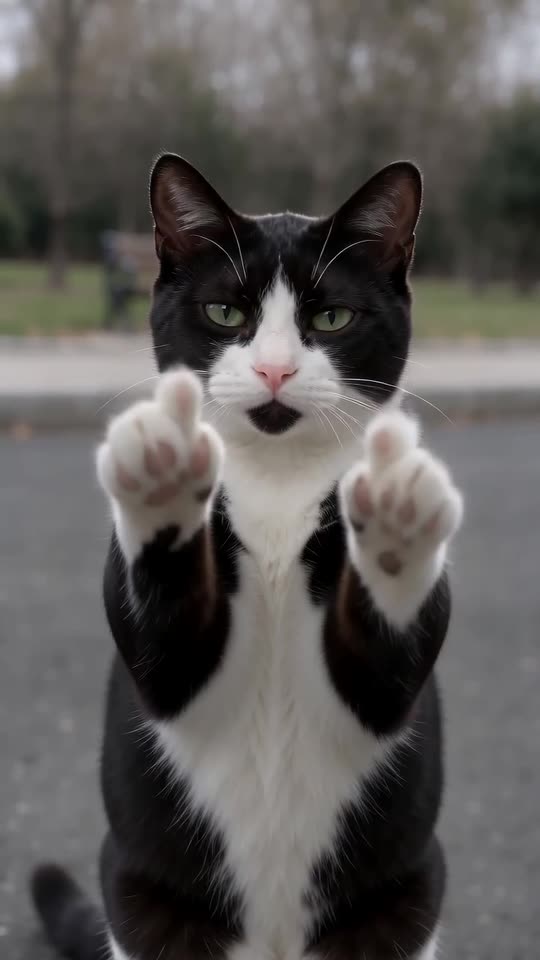
What one credit buys
- One walk-up: an 8-second 720p clip with soft ambient sound, no watermark.
- One pet: a single cat or dog. The place, accessory and light are included in the price.
- What it works out to: roughly $8.99, $5.66 or $5.20 a clip, depending on the pack.
Making several pets
With 3 or 5 in a pack you can make the walk-up for each pet in the house, or try one pet in several places. The credits that are left work on every other template on MimicZip.
How the packs work
Each pack also carries watch-only previews, 1, 3 and 5 from the smallest pack to the largest. They are a bonus, not a free tier. You pay once and nothing recurs; an unopened pack can be refunded for 7 days (see the refund policy).
Is there a free Cat Middle Finger AI video generator?
No. Cat Middle Finger has no free version and no free preview on MimicZip. One finished 8-second 720p walk-up from one pet photo costs 1 credit, and packs start at $8.99. Every pack includes watch-only previews for testing your photo. No subscription.
Free routes to this clip
Watching the trend on TikTok is free, and a phone template can drop a video of your own in, though we have not checked what its free plan includes. Doing it for real is not an option: no cat walks upright toward a phone and raises both paws on cue.
What a template cannot do is walk your own pet, with its fur and face, along a road you choose. That is what MimicZip generates from one photo.
What one run takes
- One photo: a single cat or dog, facing the camera.
- Choices included: five places, five accessories, five lights, and 9:16 or 16:9.
- Cost: 1 credit buys 8 seconds at 720p, no watermark. $8.99 gets 1 video, $16.99 gets 3 and $25.99 gets 5.
- Previews: 1 with $8.99, 3 with $16.99 and 5 with $25.99, each 5 seconds at 480p, watch-only.
Why it is a paid tool
Each clip comes from a paid AI video model that also follows a motion guide. A failed run returns its credit by itself, and an unused pack can be refunded within 7 days.
Which pet photo works for a Cat Middle Finger AI video?
Use one sharp, well-lit photo of a single cat or dog facing the camera, with the face and front paws visible. Photos of people, two animals, toys or drawings are not accepted. JPG, PNG or WebP, up to 10 MB, 300 to 6000 pixels per side.
Photos that work
- One cat or dog, standing, sitting or lying, looking toward the camera.
- The whole face in view, eyes visible, nothing covering the nose.
- Front paws in view; a full-body shot is ideal, because the paws are the punchline.
- Even light and a plain background, so the fur pattern is easy to read.
Photos to avoid
- People in the picture, including a hand holding the pet: this template is for pets only.
- Two animals together, or a pet half hidden behind furniture.
- Toys, plush animals and drawings.
- Dark, blurry or heavily filtered photos, and frames taken from other people’s videos.
Questions people ask
How long do credits last?
For as long as your account exists.
Is there a monthly fee?
No. A pack is one payment with no recurring charge.
Do I pay when the render fails?
No. The credit returns to your balance on its own.
Do I need a credit card for the free preview?
There is no free preview, so no card is asked for at login or when you add a photo. You pay once, at checkout, when you choose a pack.
Why does it say my free preview is used up?
Free previews are no longer offered on any account, so an old message like that does not apply. Buy a pack and use its bonus previews.
Does the preview show the whole walk?
It shows the opening at 480p, watch-only; only the full video is 720p and downloadable.
Can I use a photo of my dog?
Yes. A dog stands on its hind legs and raises both paws in the same way.
What about a long-haired pet?
It works, but the paws can hide in the fur; a photo where the paws show helps the toes look clear.
Does the pet need to look at the camera?
Looking at the camera helps the face stay faithful. A three-quarter view usually works too.
Make your own Cat Middle Finger video
Upload one photo and make an 8-second HD video from $8.99. No subscription, and the full video has no watermark.
Make my video