How do I make an iPhone Kupi Dance AI video?
Updated:
Short answer
Upload one photo of yourself or an adult friend, pick a room and an outfit, and MimicZip builds the hotel clip with the unfolding phone. Check a 5-second bonus preview, then spend 1 credit on the 15-second 720p video and add the sound in TikTok from 0 seconds. No prompt to write.
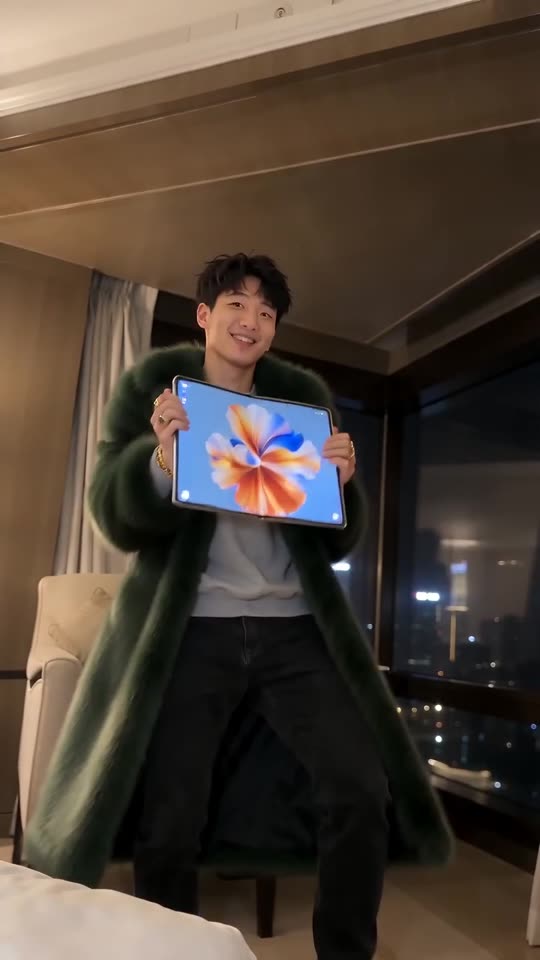
One photo, one giant folding phone
- Open the template page. There is one box, for the dancer. Use a sharp, ideally full-body photo of one adult with the face easy to see and, if possible, empty hands, so the model does not confuse your photo’s objects with the phone. Pets, children and group photos are not accepted. JPG, PNG or WebP, up to 10 MB.
- Pick the room: night hotel (the default and the closest match to the clip), sunny apartment, neon bedroom, rooftop terrace at night, night penthouse or art-deco suite. Pick the outfit: faux-fur coat, black suit, tracksuit, evening wear, satin robe or sequin jacket. Pick the phone colour: dark, silver, gold, white, rose pink or deep blue. None changes the price.
- Choose 9:16 for TikTok, Reels and Shorts, or 16:9 for YouTube and desktop.
- Consent and sign-in. Tick the photo-consent box and log in with Google. Previews arrive inside a pack, so take one if your account has no credits.
- Watch the preview. It is watch-only, 5 seconds at 480p, with a PREVIEW badge. The toss only plays out in full in the real clip, so use the preview to check the face and the outfit, not the catch.
- Render: 1 credit gives the 15-second 720p MP4 with no watermark, saved in My videos.
- Add the sound in TikTok and start it at 0 seconds.
What is already filmed for you
The hotel room, the phone and a fixed camera at chest height are built in, and the beats run in order: you flip the dark folding phone open and show the small screen (0 to 2 seconds), unfold it into a tablet-sized screen and wiggle it at the lens (2 to 6), back away hugging it and dancing (6 to 10), then toss it up, catch it, spin and strut out of frame (10 to 15). You need no folding phone of your own and write no prompt.
The phone is generic: it shows no logo and its screen carries only an abstract wallpaper. A device spinning through the air can bend for a moment during the toss, which is normal and not a failed render.
The sound and the post
Download the MP4 or copy a share link from My videos. The trend’s sound is “Bare Minimum” by Sabi and MIA BOYKA, nicknamed “iPhone kupi”; our video follows the @thecocovex clip, so use that clip’s sound from 0 seconds. The sound guide says what to add before posting.
MimicZip is independent and has no link to Apple, Win William, Sabi, MIA BOYKA or the people who posted the trend.
Questions people ask
Do I need to write a prompt?
No. The room, the camera and the order of the beats are fixed. You provide one photo and choose the room, the outfit and the format.
Do I need a folding phone?
No. The folding phone is generated and has no logo; all you need is one photo of an adult.
Can I close the page while it renders?
Yes. Rendering carries on at our end, and the finished video is saved under your account in My videos.
Which format should I pick?
Choose 9:16 for TikTok, Reels and Shorts, or 16:9 for YouTube and desktop. A bonus preview works in either shape.
Make your own iPhone Kupi Dance video
Upload one photo and make a 15-second HD video from $8.99. No subscription, and the full video has no watermark.
Make my video