iPhone Kupi Dance AI: price, photos, free options and FAQ
Updated:
Short answer
No subscription. The iPhone Kupi Dance is sold in packs: $8.99 for 1 video, $16.99 for 3 and $25.99 for 5. One video is 1 credit and gives one 15-second 720p clip from one adult photo, with no watermark. Credits never expire, and every pack includes watch-only previews.
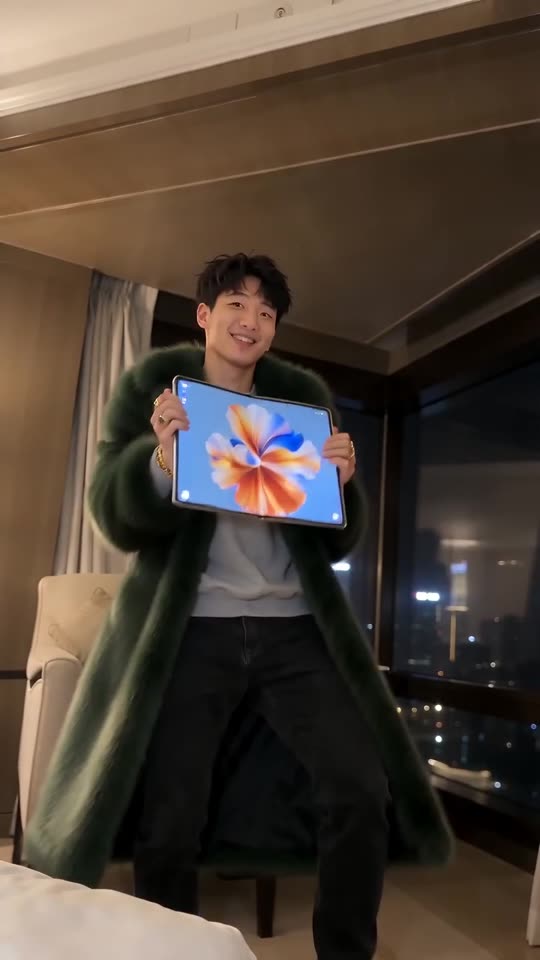
What 1 credit covers for this dance
- The whole sequence: the reveal, the big screen, the dance and the toss and exit, 15 seconds at 720p.
- One photo, one credit: only one adult is in the video, so the price is the same whichever room or outfit you pick.
- Per clip: about $8.99, $5.66 or $5.20, depending on the pack.
Spending a pack
A pack of 3 or 5 can cover six rooms and six outfits across several clips: the faux-fur coat in the night hotel, then the black suit on the rooftop, then evening wear in the neon bedroom. A friend or relative who agreed can have their own run. Credits work on every template on MimicZip.
Previews, refunds and costs
Previews arrive with the pack: 1 with $8.99, 3 with $16.99 and 5 with $25.99; none are free. A failed render returns its credit automatically. An unused pack can be refunded within 7 days; see the refund policy. Credits that produced a clip are not refundable. There are no download fees, no watermark and no renewal.
Is there a free iPhone Kupi Dance AI video generator?
There is no free version or free preview of the iPhone Kupi Dance on MimicZip. One finished 15-second 720p hotel-room clip from one adult photo costs 1 credit, and packs start at $8.99. Every pack includes watch-only previews for testing your photo. No subscription.
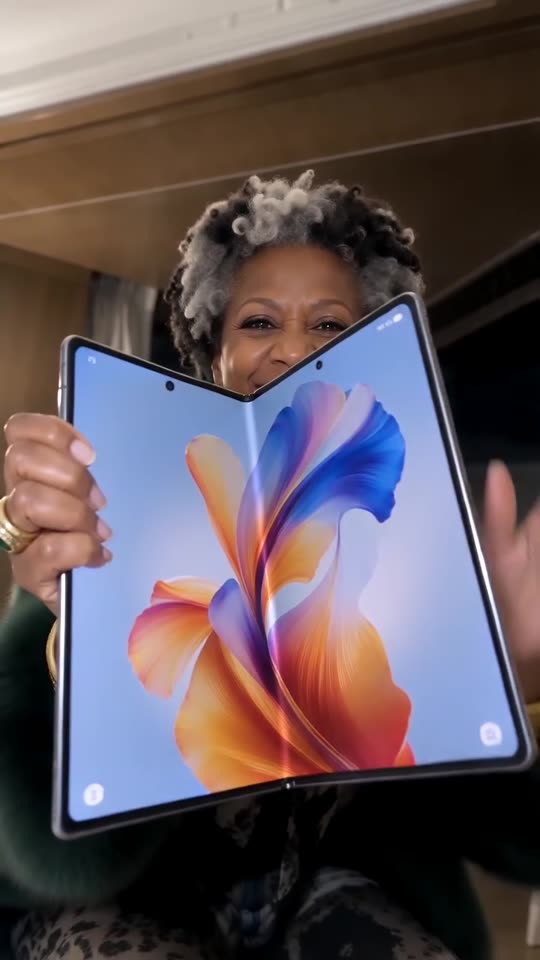
What the free route to iPhone Kupi looks like
CapCut how-tos for this trend started on 26 October, and template apps such as CapCut often carry trends like this one; they run on their own scene and plan, and we have not checked what is free there today. Filming it yourself costs nothing but needs a hotel room and a folding phone.
The shot that gives it away is the device. In the 15-second clip the dark folding phone is flipped open at 0 to 2 seconds, unfolded into a tablet-sized screen at 2 to 6, hugged to the chest during the dance, then tossed in the air and caught at 10 to 15 seconds. Generating that toss for your own face, with a phone that shows no logo and an abstract wallpaper, is the paid part here.
What you prepare for one run
- One photo of one adult: ideally full body, face easy to see, empty hands. Pets and anyone under 18 are not accepted.
- Free options: 9:16 or 16:9, one of six rooms (night hotel, sunny apartment, neon bedroom, rooftop terrace at night and more), one of six outfits (faux-fur coat, black suit, tracksuit, evening wear and more) and the phone colour.
- Cost: 1 credit for 15 seconds at 720p, no watermark. $8.99 buys 1 video, $16.99 buys 3 and $25.99 buys 5.
- Previews: 1 bundled with $8.99, 3 with $16.99 and 5 with $25.99. They last 5 seconds at 480p, carry a PREVIEW badge and cannot be downloaded.
Paid, independent, refundable
Each render runs on a paid AI video model. A failed run returns its credit by itself, credits never expire, nothing renews, and an unused pack can be refunded within 7 days. MimicZip is an independent tool with no link to Apple, Win William, Sabi, MIA BOYKA, TikTok or CapCut.
What photo works for an iPhone Kupi Dance AI video?
Use one sharp, well-lit photo of a single adult, ideally full body with the face clearly visible, because you start close to the lens and then dance in a wider shot. Avoid group photos, sunglasses, heavy filters, pets and children. JPG, PNG or WebP up to 10 MB.
Photos that work
- One adult: you, or a friend who agreed.
- Full body if you can: standing, facing the camera.
- Face clear and uncovered: it fills the frame in the first seconds.
- Plain background: helps the model find you.
Photos to avoid
- Pets, toys or drawings: this template takes adults only.
- Babies, children or anyone under 18.
- Group photos, celebrities or screenshots of someone else’s clip.
- Sunglasses, masks or strong beauty filters.
Can I change the room or the outfit in an iPhone Kupi Dance AI video?
Yes, from presets. Places: the night hotel room (the default), a sunny apartment, a neon bedroom, a rooftop terrace at night, a night penthouse or an art-deco suite. Outfits: the dramatic faux-fur coat (the default), a black suit, a tracksuit, evening wear, a satin robe or a sequin jacket. You can also pick the phone colour. The unfold, the dance and the timing stay the same, and every option costs the same.
Places
- Night hotel room (default): warm wood walls and a city view, like the viral clip.
- Sunny apartment: white walls and big bright windows.
- Neon bedroom: pink and blue neon light.
- Rooftop at night: string lights and the city behind you.
- Night penthouse: a high-rise living room with a cream sofa and glittering city lights.
- Art-deco suite: deep green walls, gold trim and a velvet armchair.
Outfits
- Faux-fur coat (default): long, dark green and dramatic, worn open over your clothes.
- Black suit: sharp suit and white shirt.
- Tracksuit: a bold plain colour, no logos.
- Evening wear: a sequin gown or a velvet tuxedo.
- Satin robe: a long champagne dressing gown worn open over your clothes.
- Sequin jacket: a bold silver jacket with chunky gold rings.
Good to know
Only the default place and outfit were tested on the examples. The others use the same scene and moves, so check a bonus preview first.
The phone colour is a third choice: dark (the default), silver, gold, white, rose pink or deep blue.
Questions people ask
Do credits expire?
No. Credits stay on your account until you use them.
Will I be charged again automatically?
No. Every pack is a single payment, and nothing renews on its own.
Can I get a refund?
Yes, for a pack you have not used, within 7 days. Credits that already made a video stay spent.
What does a failed video cost?
Nothing. When a render fails, its credit goes back to your balance automatically.
Do I need a credit card for the free preview?
No card is asked for at login or when you add your photo, because there is no free preview to unlock. You pay once, at checkout, when you choose a pack.
Why does it say my free preview is used up?
Free previews are no longer offered on any account, so an old used-up message does not apply. Buy a pack and use its bonus previews to test the photo.
Is the preview long enough for the whole clip?
No. The 5-second preview runs the beats faster, which is enough to judge the face but not the full unfold, dance and toss in 15 seconds.
Can I use a selfie?
Yes, but the body is then invented. A full-body photo works best for the dance.
Does the background matter?
Not much. The room is generated, so any clear photo works.
What size should the photo be?
Between 300 and 6000 pixels on each side, up to 10 MB.
Do the options cost more?
No. The price is the same for every option.
Can I keep my own clothes?
Not as a preset: pick the outfit closest to your style.
Can I type my own room?
No. The options are presets, which keeps results on trend and free of brands.
Make your own iPhone Kupi Dance video
Upload one photo and make a 15-second HD video from $8.99. No subscription, and the full video has no watermark.
Make my video