Shoulder Carry Video Generator: Carry, Turn and Land in One Shot
Also called: Shoulder Carry Trend, I'm the One Shoulder Carry, Shoulder Carry AI, Fireman Carry Trend
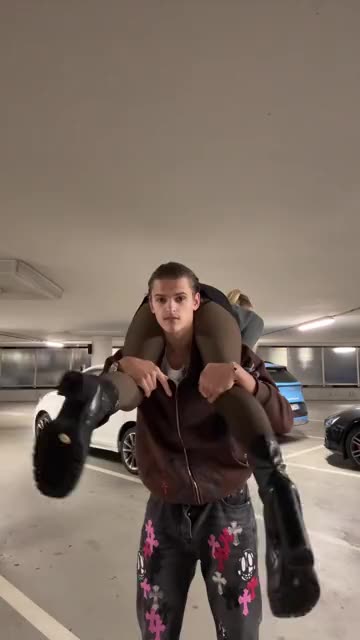
Add one photo of each of the two, the carrier and the carried. You get a 9-second video: a fixed camera shows one of you carrying the other across both shoulders; the carrier turns around on the spot, then sets the carried one down gently on their feet in front, facing the camera. The carried one can be a small pet. It recreates the look of the trend people post.
No free preview right now: the full 9s HD video starts at $8.99. · Vertical 9:16 · Full video, no watermark · No subscription
TikTok
@777emilyyyy
Original trend on TikTok
This is the original trend on TikTok. Your video uses your own photo.
Carrier
Required. One adult looking at the camera with the face clearly visible: you or an adult friend (with their OK). A head-to-knees or whole-body photo works best. No pets, no one under 18
Carried
Required. One adult or a small pet looking at the camera with the face clearly visible: an adult friend (with their OK), or your cat or small dog. A head-to-knees or whole-body photo works best. No one under 18
For the best result
- One subject, alone, looking at the camera
- Head to knees or whole body, in good light
- The face clearly visible, with no sunglasses
More photo tips
Before you upload
- One adult for the carrier, one adult or small pet for the carried one (no one under 18)
- Head to knees or whole body, faces clearly visible
- Good light, no heavy filters or sunglasses
- Both photos are required
The video is held first and comes back to your balance if it fails
- This video
- 1 video
- Your balance
- —
- Buy videos
Full video: 9s at 720p, downloadable. Uses 1 video from your balance. Unused videos never expire.
Any problem with your video? Email support@mimiczip.com first — a real person will sort it out for you.
The trend, explained
What is the Shoulder Carry trend?
Quick answer
Shoulder Carry, also called the Shoulder Carry Trend, I’m the One Shoulder Carry, Shoulder Carry AI or the Fireman Carry Trend, is a short fixed-camera clip, often filmed in an underground car park: one person stands facing the camera with another lying across both shoulders, turns around on the spot, and the carried person ends up facing the camera. Upload 2 photos for an HD (720p) video of 9 seconds from $8.99, paid once with no subscription. Add the original sound in TikTok when you post.
By MimicZip Team · Updated
Shoulder Carry, also called the Shoulder Carry Trend, I’m the One Shoulder Carry, Shoulder Carry AI or the Fireman Carry Trend, is a short fixed-camera clip, often filmed in an underground car park: one person stands facing the camera with another lying across both shoulders, turns around on the spot, and the carried person ends up facing the camera. The post we follow is @777emilyyyy’s video of 24 October 2026, with about 582,000 views and no AI label on TikTok.
The earliest post we found is @pedromoves_’s real-person video of 24 September 2026 (about 119,000 views). From 21 October, posts with photo-swap tutorials helped the carry spread, and the clip we follow reached about 582,000 views. We recreate its 9 seconds, in the scene you pick.
MimicZip makes your own version from one photo of each of the two, the carrier and the carried, in a 9-second video. The car park, the cars behind and the light are generated. Only the pair you upload is yours. MimicZip is an independent template tool: your video is generated from your own photo and is not made, endorsed or licensed by @777emilyyyy or anyone in the original posts. It is a light, playful AI scene: nobody falls and nobody is hurt.
Where this trend comes from
Use this sound — your video is timed to it, from 0s
@777emilyyyy · TikTok · Oct 24, 2026 · 581.5K views — The clip we follow: a fixed shot in an underground car park, one person carries another across the shoulders, turns around, and the carried person ends up facing the camera (9 seconds, no AI label)- @pedromoves_ · TikTok · Sep 24, 2026 · 119.4K views — The earliest post we found of the carry, a real-person video, older than the version we follow
Links open the original posts. MimicZip is not affiliated with these creators.
What happens in a Shoulder Carry video
A 9-second video in four beats: the carry, the turn, the landing and the pose. Timings are approximate, and the 5-second preview shows the same scene at lower quality.
01 · 0–2s
The carry
The carrier stands facing the camera with the carried one lying across both shoulders.
02 · 2–4s
The turn
The carrier turns around slowly on the spot, and the carried one swings gently with the turn.
03 · 4–7s
The landing
The carrier bends the knees and lowers the carried one onto their feet in front, facing the camera.
04 · 7–9s
The pose
The carried one strikes a proud pose in front while the carrier smiles behind.
Your photos decide who carries and who is carried. The car park, the camera and the order of the beats are fixed, and every result comes out a little different. A pet can only be the carried one, and the carry is slow and steady.
How to add the original sound in TikTok
Open the clip marked above, tap Use this sound, upload your video and keep the sound at 0s.Show the full how-to
Our videos come with an AI-made original soundtrack. To use the trending sound instead, add it inside TikTok when you post: that also puts your video on the sound's page, where people following the trend look. You can also download a silent version from My videos and put the original sound on that.
- Open this clip in TikTok: our video follows it. Tap the sound name at the bottom, then tap Use this sound.
- Tap Upload and pick the video you downloaded from us.
- Open Volume and turn the video's own sound down to 0, or download the silent version from My videos.
- To line up the beat, use the scissors (trim) to start the sound from 0 seconds, then post.
Need to move where the sound starts? This short video shows how to trim it.

Video: How To Trim Sound On TikTok 2026 (Very Easy) by Software Solutions on YouTube
How to make a Shoulder Carry video in 3 steps
No filming, no prompts and no editing app.
Add your photos
Upload two clear photos: the carrier (an adult facing the camera) and the carried one (an adult or a small pet facing the camera), head to knees or whole body. JPG, PNG or WebP, up to 10 MB each.
Choose your options
Pick the scene, the outfit and the light, tick the photo-consent box and log in. Every pack includes bonus 5-second previews, so you can check your photo before spending a credit.
Make the full video
Spend 1 credit on a 9-second 720p video. Download it and add your sound in TikTok.
Which photo works?
Two photos are required: the carrier, a single adult, and the carried one, a single adult or a small pet. Each looks at the camera, head to knees or whole body.
Works well
- One subject, alone, looking at the camera
- Head to knees or whole body, in good light
- The face clearly visible, with no sunglasses
- JPG, PNG or WebP, up to 10 MB, 300 to 6000 pixels per side
Avoid
- Anyone under 18, celebrities or famous characters
- Photos with no clear main subject: scenery, text, a screenshot or a crowd
- Several people in the same photo, or heavy filters
- Sunglasses, masks or anything hiding the face
Limits: width-to-height ratio between 0.4 and 2.5. Upload only subjects you own or have permission to use.
Ways to play it
You carry a friend
Two adult friends who agreed: one photo each, one carries, the other lands in front.
You carry your pet
A cat or a small dog across your shoulders, then cradled in your arms in front of the camera.
A different place
Swap the car park for a lawn, a bedroom, a street or a beach.
Why people use it
Bonus previews in every pack
See your pair before you spend a credit.
A car-park carry, generated
The car park, the light and the moves are made for you, with nothing to film and nobody to lift.
Two adults, or an adult and a pet
Two adults who agreed to appear, or an adult and a small pet. No celebrities, no children.
No subscription
Buy credits once. They never expire.
Pick the scene, the outfit and the light
five scenes (Underground car park by default), five outfits (Clothes from the photos by default) and five kinds of light (Cool even light by default).
One continuous take, nothing to edit
One continuous take, nothing to edit. You add the sound in TikTok.
One-time credit packs
Pay only for the videos you make. One full 9-second video costs 1 credit.
1 HD video
$8.99
≈ $8.99 / video
+ 1 extra preview
One-time payment, no subscription
- Most popular
3 HD videos
$16.99
≈ $5.66 / video
+ 3 extra previews
One-time payment, no subscription
5 HD videos
$25.99
≈ $5.20 / video
+ 5 extra previews
One-time payment, no subscription
- Secure checkout by Waffo
- Instant credits
- 7-day refund on unused packs
- Failed videos refunded
Shoulder Carry: frequently asked questions
What is the Shoulder Carry trend?
It is a short clip on TikTok: one person carries another across both shoulders, turns around on the spot, and the carried one ends up facing the camera. It is often filmed in a car park and has been around since late September 2026. The explainer guide has the background.
How do I make the Shoulder Carry video from my photo?
Upload one photo of each of the two, the carrier and the carried, choose the options and start. A few minutes later you get a 9-second 720p MP4. The how-to guide lists each step.
Is it free to try?
Not at the moment. MimicZip has no free tier or free preview; one full 9-second 720p video costs 1 credit, and packs start at $8.99. Every pack includes bonus watch-only previews so you can check your photo before spending a credit. There is no subscription, and the full video has no watermark.
Which sound goes with it?
Many posts use the song “I’m the One” as their “original sound”. We do not include it: our video has its own AI-made instrumental track. Pick a sound in TikTok when you post, or download the silent version first. The sound guide shows how.
Can I use a pet instead of a person?
Yes, as the carried one: a cat or a small dog can lie across the shoulders and be cradled in the arms. The carrier must be an adult. Toys, drawn characters and children are not supported.
Is the original AI-made?
TikTok shows no AI label on the post we follow, a real-person video. Our version is AI-generated from your own photos, so keep the platform’s AI label on when you post.
How popular is this trend?
The post we follow, of 24 October 2026, had about 582,000 views when we checked. The earliest post we found, of 24 September, had about 119,000.
How many photos do I need?
Two. The carrier’s photo and the carried one’s photo are both required. Each shows a single adult (or, for the carried one, a small pet), as a JPG, PNG or WebP file up to 10 MB.
More questions (8)
Who is the carrier and who is carried?
The first photo is the carrier, who stands and carries; the second is the carried one, who lies across the shoulders and lands in front. Swap the two photos to swap the roles.
Is this connected to the TikTok author?
MimicZip is an independent template tool: your video is generated from your own photo and is not made, endorsed or licensed by @777emilyyyy, @pedromoves_, “I’m the One” or anyone in the original posts.
Is there a watermark, and can I post it on TikTok or Reels?
A bonus preview wears a PREVIEW badge and can’t be saved, while the full video has no watermark. Yes, you can post it: pick 9:16 for TikTok and Reels and add the sound you like in the app. Keep the platform’s AI-generated label on.
Can I change the scene, the outfit and the light?
Yes, from presets: five scenes (Underground car park by default), five outfits (Clothes from the photos by default) and five kinds of light (Cool even light by default). The scene, the camera and the timing stay the same, and the options do not change the price.
Do I have to write a prompt?
No. This is a fixed template, so there is no prompt box: you add your photos and pick the options and the video shape. Prefer your own tool? Copy the ready-made prompt from the Kling prompt page.
What if a video fails, and how long is my photo kept?
A failed generation returns its credit automatically, and unused packs can be refunded within 7 days; see the refund policy. Photos are stored privately and deleted automatically 14 days after upload.
Can I copy the carry at home?
The video is a slow AI scene in which nobody falls. If you try a real carry, only lift someone who is happy to be lifted, keep the floor soft, and never lift a pet onto your shoulders.
Who appears in the video?
Only the carrier and the carried one from your two photos. The car park and everything behind them are generated, and nobody from the original posts appears.
Updated:
Ready to carry them?
One photo of each of the two, the carrier and the carried, a bonus preview with every pack, then your own Shoulder Carry video.
Make my videoTwo photos. One carry.
9-second HD video from $8.99. No subscription, no watermark.
Questions? Email support@mimiczip.com.
MimicZip is an independent AI tool. “Shoulder Carry” is the name of an internet trend: MimicZip is not affiliated with or endorsed by the author of the original post, the app the trend spread on or anyone in it. Videos are AI-generated scenes; nobody falls and nobody is hurt.