How do I make a Pet Seal Filter AI video from my pet's photo?
Updated:
Short answer
Upload one photo of your dog or cat, facing the camera with the whole body in view, pick what it turns into, a place and a line colour, and MimicZip builds the sweep. Check a 5-second bonus preview, then spend 1 credit on the 6-second 720p video.
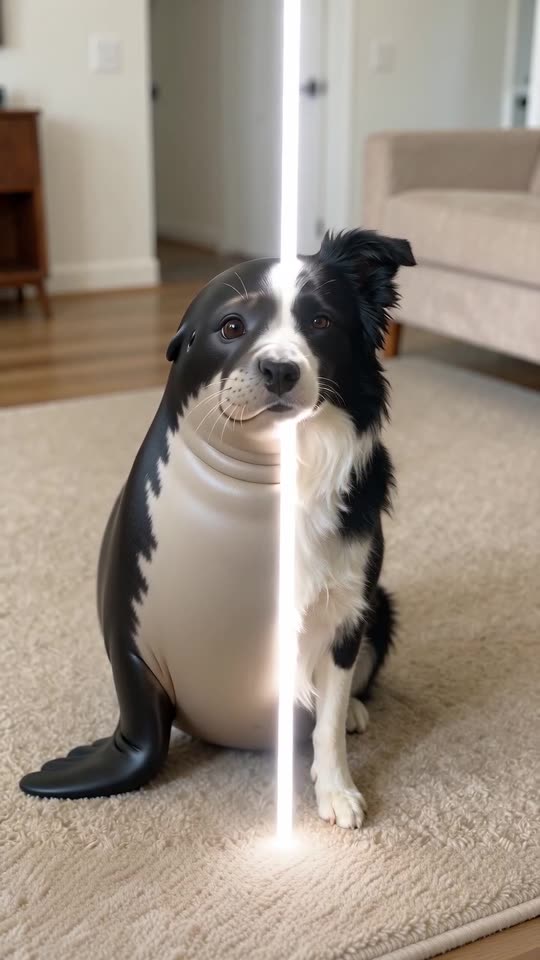
From a photo to the seal
- Open the template page. There is one box, for your pet. Use a sharp photo of one dog or cat, sitting or standing and facing the camera, as JPG, PNG or WebP up to 10 MB.
- Pick what it turns into: a seal by default, or a penguin, a sea otter, a piglet or a hamster.
- Pick the place and the line colour. The default keeps your own room and a white line; a beach, an icy shore, a poolside or a sofa, and cyan, pink, gold or green lines are the other choices.
- Pick 9:16 for TikTok, Reels and Shorts, or 16:9 for YouTube and desktop screens.
- Consent, login, pack. Tick the photo-consent box and sign in with Google. Previews come inside a pack.
- Check the preview for your pet's colours, then render: 1 credit gives the 6-second 720p MP4, saved in My videos.
What the photo decides
The room, the pet and its colours come straight from your photo, because the first seconds show your pet as it is. Choose a photo where the whole animal is in view, since the seal body is built from the pet's real size and coat.
After rendering
Download the MP4 or copy a share link from My videos. The clip has only quiet ambience and a soft whoosh; the sound guide says how to add the template sound in TikTok.
Questions people ask
Do I need to write a prompt?
No. The sweep is already written. You add a photo and pick options.
Can I use a photo taken in my living room?
Yes. The default keeps the place from your photo, so a photo with a tidy background gives the cleanest result.
Can I close the page while it renders?
Yes. Rendering carries on at our end, and the finished video is saved in My videos.
Make your own Pet Seal Filter video
Upload one photo and make a 6-second HD video from $8.99. No subscription, and the full video has no watermark.
Make my video