Pet Seal Filter AI: CapCut vs AI, other tools and prompts
Updated:
Short answer
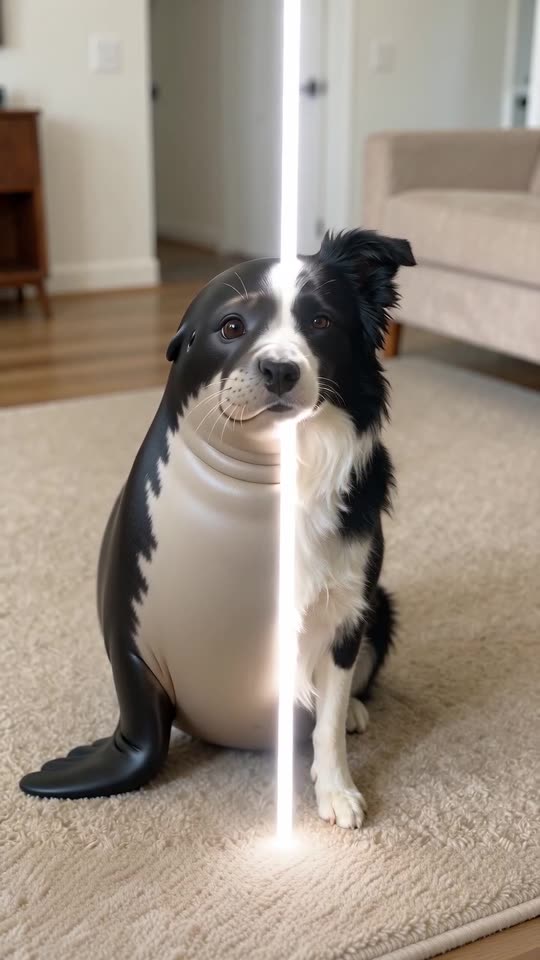
The original Pet Seal Filter is a CapCut template: you add a photo and the app applies its seal effect. MimicZip generates a new 6-second video from one photo of your pet, with a choice of what it turns into. You can still trim it or add text in CapCut afterwards.
Two ways to get a clip
- In the template: you open the template in CapCut, add a photo and let the effect run; the seal belongs to the template.
- On MimicZip: one photo of your pet, a transformation, a place and a line colour; the sweep and the seal are generated.
- Who can be in it: pets only here, a dog or a cat.
- What comes back: a 6-second 720p clip with no text, logo or branding.
- Cost: CapCut has free and paid features, so check its current plans. Here 1 credit is one video with no watermark.
Which one to use
Use the template if you want the original sound and the exact original look inside the app. Use MimicZip if you want a seal in your pet’s own colours or a penguin, an otter, a piglet or a hamster; you can still add the sound in CapCut afterwards.
Pet Seal Filter AI vs a general AI video tool: which is easier?
A general AI video tool can turn a pet into a seal, but you write the sweep, keep the colours on the new body and pay per try. MimicZip has the change written, takes the colours from one photo and costs 1 credit for the 6-second clip, with watch-only previews to check first.
What is different
- The effect: a general tool needs a prompt for the still start, the moving line and the seal that appears behind it; here it is written.
- Your pet: in a general tool, keeping the markings through a change of body takes several tries; here they come from the photo.
- The format: one fixed shot at eye level, 6 seconds, with a soft whoosh.
- The cost: a general tool charges for every try; here a failed run returns its credit and previews are watch-only extras.
Which one to use
A general tool gives freedom to invent a new transformation, and you can copy our written scene from the prompt page. MimicZip suits you when you want the known seal sweep from one photo without prompting.
Pet Seal Filter prompt for Seedance: a copyable seal-sweep prompt
Copy the prompt below into Seedance and attach one photo of your dog or cat as the reference image. It covers the still start, the sweeping line and the seal that keeps the pet’s colours, in one fixed shot. It names no account or brand; expect a few tries.
Copy this prompt
Image-to-video, 9:16, 6 seconds.
Reference image 1 is the pet: at the start it is exactly the pet in the image, with its face, coat colours and markings.
One fixed phone shot at eye level, no cuts, no zoom; the pet sits in the middle of the frame facing the lens; the room stays unchanged.
0 to 2 s: the pet sits perfectly still, calm and attentive.
2 to 4 s: a thin bright white vertical line of light sweeps across the picture from the left edge to the right edge. Behind the line the pet is a round, chubby seal; ahead of it the pet is still the pet.
4 to 6 s: the line has left; the whole animal is a plump seal in the same pose, wearing the pet's exact face colours, eye colour and coat markings. It blinks slowly and its whiskers twitch.
Audio: quiet room sound and one short soft whoosh. No music, no voice, no text, no logos.
How to use it
- Attach one clear photo of the whole pet as image 1.
- If the seal loses the colours, add: the seal wears the exact coat colours and markings of reference image 1.
- Tools change often, so check the length and aspect ratio your plan supports.
Questions people ask
Is Pet Seal Filter AI made by CapCut or TikTok?
No. MimicZip is an independent tool, not linked to CapCut, TikTok or the accounts that posted the trend.
Can I use both?
Yes. Download the MP4 and open it in CapCut to trim it, add a caption or a sound.
Is the CapCut template free?
We have not checked what its free plan includes today, so check the app.
Can I use the same prompt in another tool?
Yes. The prompt page shows a copyable version, though results differ by tool.
Which is cheaper?
It depends on how many tries your tool needs. Here a run is a fixed 1 credit.
Does MimicZip use its own model?
No. It uses a paid third-party AI video model behind a fixed scene.
Why does the prompt say “wearing the pet's exact face colours”?
Without it the model may paint a plain grey seal. This page is independent and not affiliated with the accounts that posted the trend.
Is this what MimicZip runs?
MimicZip runs a longer written version of the same sweep, with other animals, places and line colours as presets.
Will it match the original clip?
No. It is the same kind of scene, not a copy.
Make your own Pet Seal Filter video
Upload one photo and make a 6-second HD video from $8.99. No subscription, and the full video has no watermark.
Make my video