How do I make a Prank Mask AI video from my selfie?
Updated:
Short answer
Upload one chest-up photo of yourself or an adult friend, facing the camera, keep the background or pick a living room, a kitchen or a bathroom, and MimicZip builds the reveal. Check a 5-second bonus preview, then spend 1 credit on the 5-second 720p video. No prompt to write.
From a selfie to the reveal
- Open the template page. There is a single box, for your face. Use a sharp photo of one adult, chest up, facing the camera with both shoulders in view and nothing covering the face, as JPG, PNG or WebP up to 10 MB.
- Pick the place: your own background (the default), a living room, a kitchen, a bathroom, a bedroom or a home office. Pick the outfit: your own, a white tee, a grey hoodie, a navy sweater, a denim shirt or a red sweater. Pick the colour tone: natural, warm, cool, pastel, vivid or retro film. None changes the price.
- Pick 9:16 for TikTok, Reels and Shorts, or 16:9 for YouTube and desktop screens.
- Consent, login, pack. Tick the photo-consent box and sign in with Google. Previews come inside a pack.
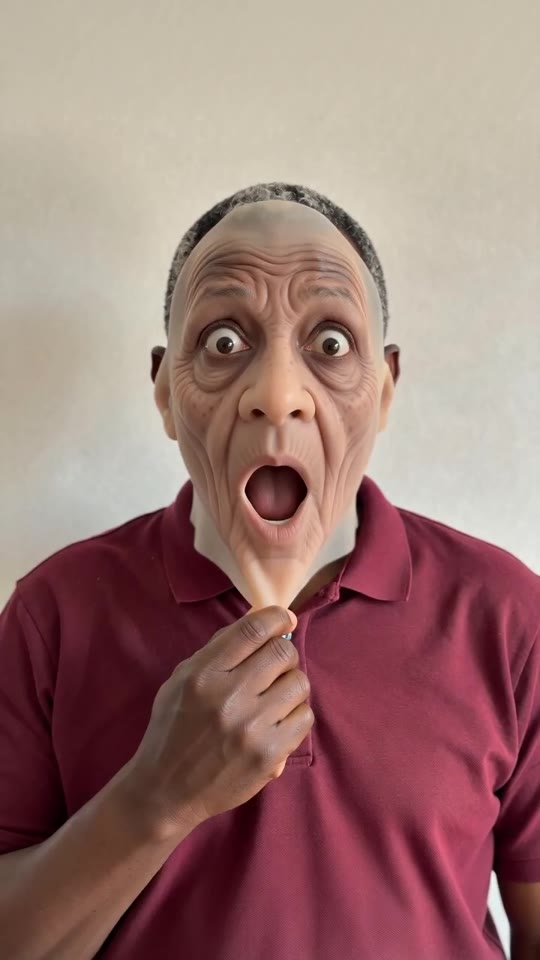
- Check the preview. It is watch-only, 5 seconds at 480p, with a PREVIEW badge. Check that the face that comes back is yours and that the mask lifts upward from the chin; a hand blurring for a moment is normal.
- Render: 1 credit gives the 5-second 720p MP4 with no watermark, saved in My videos.
- Add a sound you like in TikTok when you post; our video follows no trend song.
The four beats already built in
The camera is fixed chest up. From 0 to 1 second you pinch your cheek, then your face turns elderly with wide eyes and an open mouth until 2 seconds. From 2 to 3.5 seconds both hands peel a thin rubber mask upward from the chin, and from 3.5 seconds your own face is back, hands on your cheeks, smiling until 5 seconds.
The old face and the mask are generated, and nothing is lip-synced; faces and moves shift a little each run.
After rendering
Download the MP4 or copy a share link from My videos. The posts we follow use their creator’s own voice-over, so there is no sound to match; the sound guide says how to add one.
Questions people ask
Do I need to write a prompt?
No. The camera, the framing and the order of the four beats are fixed. You provide one photo and choose the place, the outfit and the format.
Do I need a rubber mask or a filter?
No. The mask, the old face and the room are generated. You only need the photo.
Can I close the page while it renders?
Yes. Rendering carries on at our end, and the finished video is saved under your account in My videos.
Make your own Prank Mask video
Upload one photo and make a 5-second HD video from $8.99. No subscription, and the full video has no watermark.
Make my video