Prank Mask AI: CapCut vs AI, other tools and prompts
Updated:
Short answer
The Prank Mask template in CapCut puts your photo into its own six-second effect inside the app. MimicZip generates a new 5-second reveal on the web from one photo of an adult, with its own AI soundtrack and bonus previews in every pack.
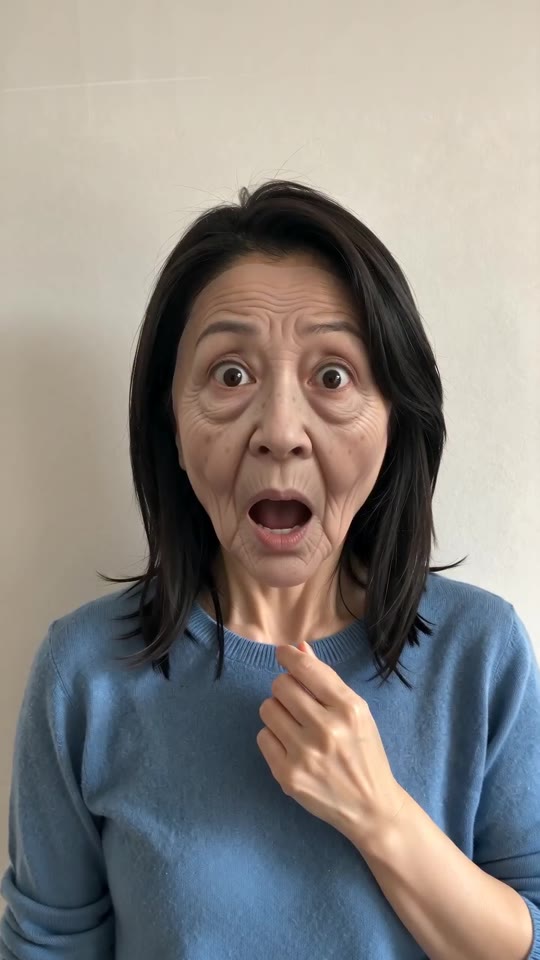
One photo, two routes
- Where it runs: the template sits inside CapCut and applies its fixed effect to your photo. MimicZip runs on the web and generates the old face, the mask and the room fresh, with a living room, a kitchen or a bathroom as alternatives.
- The reveal: the key beat is the mask coming off upward from the chin at about 2 to 3.5 seconds, after the old-face shock. Ours follows the adult peel-off in the @shyo890 post, stretched to 5 seconds.
- Who can be in it: adults only here. A template may accept anything you upload, so check its rules; we do not accept pets, toys or children.
- What comes back: a 5-second 720p clip with no text, logo or template branding.
- Cost: CapCut has free and paid features, so check its current plans. Here 1 credit is one full video with no watermark, and each pack includes watch-only previews.
Which one to use
The template suits you if you want to stay in the app and trim the clip there. MimicZip suits you if you want a finished reveal from one selfie with a bonus preview first. You can also generate here and finish the clip in CapCut.
Prank Mask AI vs general AI video tools: which one should I use?
General AI video tools give full control, but a prompt about a mask peeled off a face can drift into skin-tearing or horror, lose your face or skip the reveal. MimicZip does one job: one adult photo becomes a clean four-beat Prank Mask clip, with a bonus preview and no prompt.
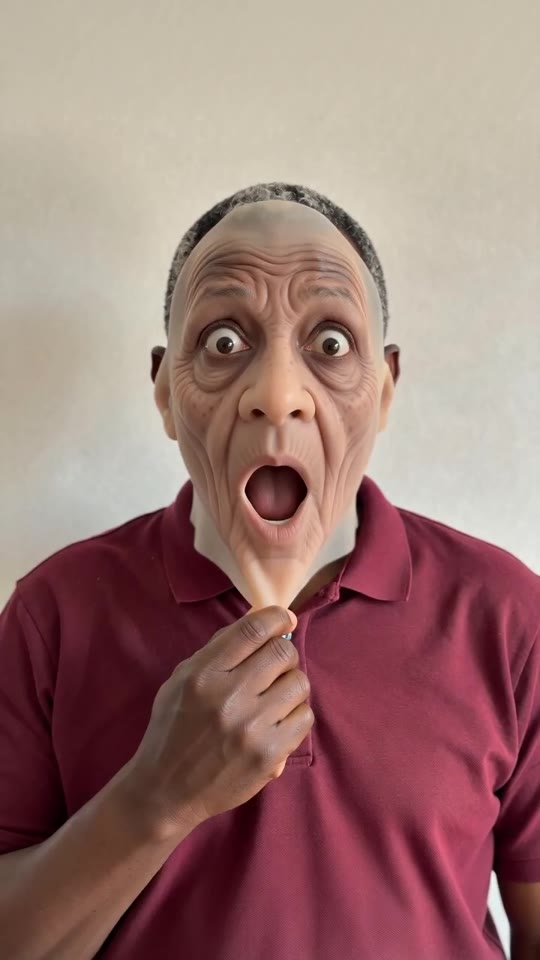
Where a prompt goes wrong
- What you type: a general tool wants a prompt and settings. MimicZip has no prompt box; you add one photo and choose the place, the outfit and the shape.
- The mask: words like peel, skin and face often steer a model to peeling real skin. Here the mask is fixed as a thin rubber one that comes off clean.
- Identity: the same face must age and then return. In a free prompt the face after the peel is often a different person.
- The beats: pinch, old face, peel-off and reveal in five seconds is a timing a text prompt tends to blur together.
- Cost: check each general tool’s plans. MimicZip sells one-time packs from $8.99 with bonus previews and no subscription.
When a general tool is better
Use a general tool for your own story or full camera control. Use MimicZip when you want this one reveal from your photo, fast. If you would rather write the prompt, see the guides for Kling, Veo and Seedance.
Prank Mask prompt for Kling: a copyable peel-off prompt
Copy the prompt below into Kling and attach one photo of an adult. It covers the pinch, the old face, the peel-off from the chin and the reveal in a fixed chest-up shot, and asks for a clean mask and an instrumental with no voices. It names no song, account or app. Expect a few tries, or use MimicZip.
Copy this prompt
Image-to-video, 9:16, about 5 seconds.
Reference image 1 is the only character in the video, an adult. Keep their own face, hair and body shape whenever the real face is shown.
Scene: keep the place from the photo. Camera: one fixed vertical shot, chest up, no cuts, no movement.
0 to 1 second: a small smirk; one hand pinches and tugs the skin of the cheek and chin.
1 to 2 seconds: the face suddenly looks like a deeply wrinkled old person's, eyes wide, mouth open in comic shock. Funny, not scary.
2 to 3.5 seconds: both hands take hold of a thin, floppy rubber face mask at the chin and peel it slowly upward off the face. Clean, no tearing, no blood.
3.5 to 5 seconds: under the mask is the person's own face from the photo. Both hands go to the cheeks in happy surprise, then a warm smile into the lens.
Audio: a light, playful comedy instrumental with a small boing and a rubbery peel sound. No voices, no lyrics.
Photorealistic, no second person, no text, no subtitles, no logos, no watermark.
How to use it
- Attach one photo of an adult as image 1, chest up and facing the camera.
- Add a sound you like in TikTok afterwards; there is no trend song to match.
- If the face after the peel is not yours, add: the face under the mask is exactly the face of reference image 1.
- Tools change often, so check the length and aspect ratio your tool supports.
Prank Mask prompt for Veo: a copyable peel-off prompt
Copy the prompt below into Veo and attach one photo of an adult. It covers the pinch, the old face, the peel-off from the chin and the reveal in a fixed chest-up shot, and asks for a clean mask and an instrumental with no voices. It names no song, account or app. Expect a few tries, or use MimicZip.
Copy this prompt
Image-to-video, 9:16, about 5 seconds.
Reference image 1 is the only character in the video, an adult. Keep their own face, hair and body shape whenever the real face is shown.
Scene: keep the place from the photo. Camera: one fixed vertical shot, chest up, no cuts, no movement.
0 to 1 second: a small smirk; one hand pinches and tugs the skin of the cheek and chin.
1 to 2 seconds: the face suddenly looks like a deeply wrinkled old person's, eyes wide, mouth open in comic shock. Funny, not scary.
2 to 3.5 seconds: both hands take hold of a thin, floppy rubber face mask at the chin and peel it slowly upward off the face. Clean, no tearing, no blood.
3.5 to 5 seconds: under the mask is the person's own face from the photo. Both hands go to the cheeks in happy surprise, then a warm smile into the lens.
Audio: a light, playful comedy instrumental with a small boing and a rubbery peel sound. No voices, no lyrics.
Photorealistic, no second person, no text, no subtitles, no logos, no watermark.
Tips for Veo
- Keep the clip near 5 to 8 seconds and let the peel take the middle of it.
- Say the camera stays still and the person stays chest up, or the framing may drift.
- State the mask as thin, floppy rubber and say no blood and no torn skin.
- Leave names and sound titles out and describe an instrumental.
Prank Mask prompt for Seedance: a copyable peel-off prompt
Copy the prompt below into Seedance and attach one photo of an adult. It covers the pinch, the old face, the peel-off from the chin and the reveal in a fixed chest-up shot, and asks for a clean mask and an instrumental with no voices. It names no song, account or app. Expect a few tries, or use MimicZip.
Copy this prompt
Image-to-video, 9:16, about 5 seconds.
Reference image 1 is the only character in the video, an adult. Keep their own face, hair and body shape whenever the real face is shown.
Scene: keep the place from the photo. Camera: one fixed vertical shot, chest up, no cuts, no movement.
0 to 1 second: a small smirk; one hand pinches and tugs the skin of the cheek and chin.
1 to 2 seconds: the face suddenly looks like a deeply wrinkled old person's, eyes wide, mouth open in comic shock. Funny, not scary.
2 to 3.5 seconds: both hands take hold of a thin, floppy rubber face mask at the chin and peel it slowly upward off the face. Clean, no tearing, no blood.
3.5 to 5 seconds: under the mask is the person's own face from the photo. Both hands go to the cheeks in happy surprise, then a warm smile into the lens.
Audio: a light, playful comedy instrumental with a small boing and a rubbery peel sound. No voices, no lyrics.
Photorealistic, no second person, no text, no subtitles, no logos, no watermark.
Tips for Seedance
- Attach your photo as the reference image and, if the tool allows, a short clip for the timing; blur it so it guides the motion only.
- Write the beats by seconds, as above, and ask for a still camera.
- MimicZip runs on a Seedance model with a fixed scene, so a Seedance prompt is the closest to what you get here.
- Keep the clean-mask line and the audio line.
Questions people ask
Is Prank Mask AI made by CapCut or TikTok?
No. MimicZip is an independent tool, not linked to CapCut, TikTok or the account that posted the trend.
Can I use both?
Yes. Download the MP4, open it in CapCut and trim it, add text or add a sound.
Which one is cheaper?
It depends on what you have. If you already use CapCut, its template costs little. With only a photo, MimicZip starts at $8.99 and includes bonus previews with every pack.
Does Prank Mask AI use a general AI model?
Yes. A general video model draws the frames through an API, but the framing, the mask and the beats are fixed by our template. The Terms of Service say which model.
Can I write my own prompt on this site?
No. The scene is locked and there is no prompt box, which keeps the mask clean and the reveal on trend.
Why not just use a general tool?
You can. Choose a general tool if you want to direct each shot yourself. This site is for people who want the reveal finished from one photo, with bonus previews in every pack.
Why does the prompt say the mask comes off clean?
Prompts about peeling a face can make a model draw torn skin. Saying thin rubber, clean, no blood steers it away. This page is independent and not affiliated with the account that posted the trend.
Will the result match the trend exactly?
Not exactly. Faces, motion and timing change with the tool, the model version and your photo. Treat the prompt as a starting point. Not exactly. Veo may skip the pinch or change the face after the reveal, so run it a few times and keep the best take. Closer than most, but still not exact. The timing and faces change with the version, so treat the prompt as a starting point.
Do I have to write a prompt on this site?
No. MimicZip uses a fixed scene, so you only add a photo, pick an option and press the make button.
Make your own Prank Mask video
Upload one photo and make a 5-second HD video from $8.99. No subscription, and the full video has no watermark.
Make my video