Prank Mask AI: price, photos, free options and FAQ
Updated:
Short answer
No subscription. Prank Mask is sold in packs: $8.99 for 1 video, $16.99 for 3 and $25.99 for 5. One video is 1 credit and makes a 5-second 720p reveal from one photo of an adult, with no watermark. Credits never expire, and every pack includes watch-only previews.
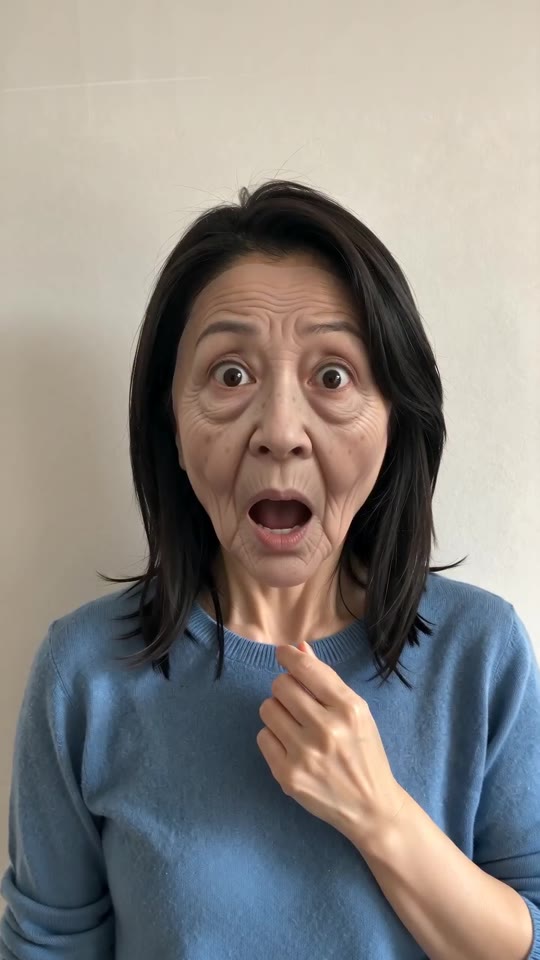
What one credit buys
- One reveal: the pinch, the old face, the peel-off from the chin and your own face back, 5 seconds at 720p, no watermark.
- One adult: a single face per clip. The place and the outfit you pick are included in the price.
- What it works out to: roughly $8.99, $5.66 or $5.20 a clip, depending on the pack you choose.
Pranking more than one person
With 3 or 5 in a pack you can send the old-face prank to a few friends: you in the kitchen, your sister in the living room and a friend at the bathroom mirror. Whatever credits are left work on every other template on MimicZip.
How the packs work
Each pack also carries watch-only previews, 1, 3 and 5 from the smallest pack to the largest, so you can test a photo. They are a bonus and not a free tier. You pay once and nothing recurs; a render that errors out puts its credit back, and an unopened pack can be refunded for 7 days (see the refund policy).
Is there a free Prank Mask AI video generator?
No. Prank Mask has no free version and no free preview on MimicZip. One finished 5-second 720p reveal from one photo of an adult costs 1 credit, and packs start at $8.99. Every pack includes watch-only previews for testing your photo. No subscription.
Free routes to the peel-off
A free route is a CapCut template named Prank Mask, which had about 69,900 uses on 29 October 2026; we have not checked what its free plan includes today. Any pinch-and-reveal clip you film yourself is free too, but the old face needs an effect and a real rubber mask is a prop to buy.
What the template and a prop rarely give you is a clean, wrinkled old face in your own photo’s lighting and a mask that comes off from the chin up without a cut. That is what MimicZip makes from one selfie.
What one Prank Mask run takes
- One photo: a single adult, chest up, facing the camera, with the face uncovered. Pets, toys, drawings and children are not accepted.
- Included choices: 9:16 or 16:9, one of six places (your own background, living room, kitchen, bathroom, bedroom, home office), one of six outfits (your own, white tee, grey hoodie, navy sweater, denim shirt, red sweater) and a colour tone.
- Cost: 1 credit buys 5 seconds at 720p, with no watermark. $8.99 gets 1 video, $16.99 gets 3 and $25.99 gets 5.
- Previews: 1 with $8.99, 3 with $16.99 and 5 with $25.99. Each lasts 5 seconds at 480p, has a PREVIEW badge and cannot be downloaded.
Why it is a paid tool
Each clip comes from a paid AI video model. A failed run returns its credit automatically, credits never expire, nothing renews and an unused pack can be refunded within 7 days. MimicZip is independent and has no link to the account that posted the trend, TikTok or CapCut.
What photo works for a Prank Mask AI video?
Use one sharp, well-lit photo of a single adult, chest up, facing the camera, with the face uncovered and both shoulders in view, because the face and both hands stay in the frame the whole clip. Avoid group photos, sunglasses, hats pulled low, heavy filters, pets and children. JPG, PNG or WebP up to 10 MB.
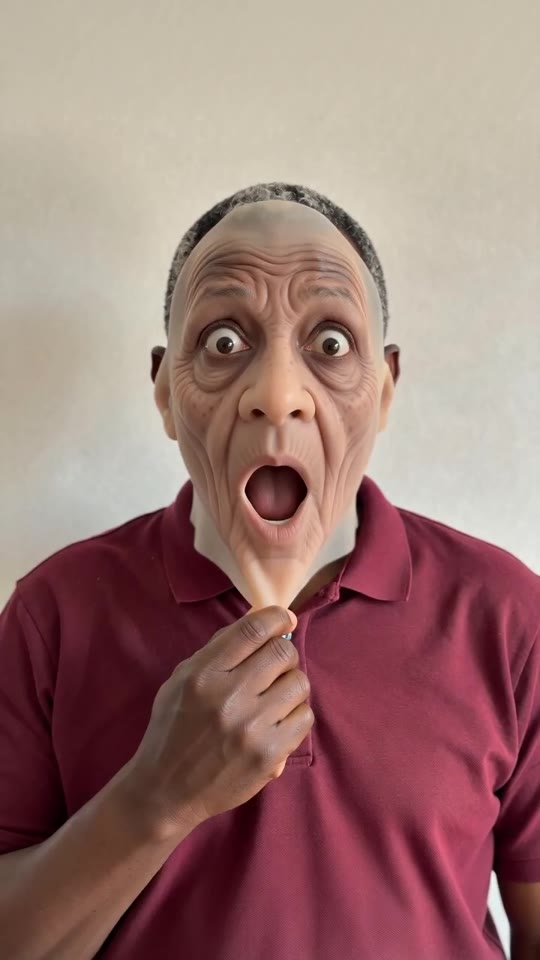
Photos that work
- One adult: you, or a friend who agreed.
- Chest up, facing the camera: both shoulders in view, so there is room for the hands.
- Face uncovered: the same face has to come back after the mask, so it must be clear.
- Plain background: helps the model keep one person in the shot.
Photos to avoid
- Pets, toys or drawings: this template takes adults only.
- Babies, children or anyone under 18.
- Group photos, celebrities or screenshots of someone else's clip.
- Sunglasses, masks, hats pulled low or strong beauty filters.
Can I change the place or the outfit in a Prank Mask AI video?
Yes, from presets. Places: the one in your photo (the default), a living room, a kitchen, a bathroom, a bedroom or a home office. Outfits: what is in your photo (the default), a plain white tee, a grey hoodie, a navy sweater, a denim shirt or a red sweater. You can also pick a colour tone. The pinch, the old face, the peel-off and the timing stay the same, and every option costs the same.
Places
- Your photo's own place (default): the background, furniture and light stay as they are.
- Living room: a tidy room with a beige sofa, a small plant and window light.
- Kitchen: white cabinets and a pale wooden table in morning light.
- Bathroom: plain white tiles and a mirror in bright, even light.
- Bedroom: a tidy room with a white bed, light grey walls and window light.
- Home office: a wooden desk, a small lamp and a bookshelf, softly out of focus.
Outfits
- Your own (default): exactly what you wear in your photo.
- White tee: plain, with no print.
- Grey hoodie: plain, with no print.
- Navy sweater, denim shirt or red sweater: plain, with no print.
Good to know
Only the defaults were tested on the examples. The other places and outfits use the same four beats, so check a bonus preview first.
The colour tone is a third choice: natural (the default), warm golden, cool blue, soft pastel, vivid or retro film.
Questions people ask
How long do credits last?
For as long as your account exists. They do not run out on a date.
Is there a monthly fee?
No. A pack is one payment and there is no recurring charge.
What if I want my money back?
An unused pack can be refunded within 7 days. Credits that already made a clip stay spent.
Do I pay when the render fails?
No. The credit comes back to your balance on its own.
Do I need a credit card for the free preview?
No card is requested at login or when you add your photo, since there is no free preview. You pay once, at checkout, when you choose a pack.
Why does it say my free preview is used up?
Free previews are no longer offered on any account, so an old used-up message does not apply. Buy a pack and use its bonus previews to test the photo.
Does the preview show the whole reveal?
Yes. The 5-second preview covers the pinch, the old face, the peel-off and your face coming back at 480p; only the full video is 720p and downloadable.
Can I use a selfie?
Yes, a chest-up selfie is the ideal photo. Hold the phone at face height so the head is not tilted back.
Why does a second person in the photo matter?
A background figure can be pulled into the clip as a second face. One person per photo keeps the reveal to one face.
What size should the photo be?
Between 300 and 6000 pixels on each side, up to 10 MB.
Do the options cost more?
No. The price is the same for every option.
Can I keep my own clothes?
Yes. Your own clothes are the default outfit.
Can I type my own room?
No. The options are presets, which keeps results clean and free of brands.
Make your own Prank Mask video
Upload one photo and make a 5-second HD video from $8.99. No subscription, and the full video has no watermark.
Make my video